- Home
- :
- All Communities
- :
- Products
- :
- ArcGIS Pro
- :
- ArcGIS Pro Ideas
- :
- Copy/paste mobile geodatabase view as table (Catal...
- Subscribe to RSS Feed
- Mark as New
- Mark as Read
- Bookmark
- Follow this Idea
- Printer Friendly Page
Copy/paste mobile geodatabase view as table (Catalog)

- Mark as New
- Bookmark
- Subscribe
- Mute
- Subscribe to RSS Feed
- Permalink
ArcGIS Pro 3.0.3:
It would be helpful if we could copy/paste mobile geodatabase views as tables -- in the same GDB, from within Catalog.
Currently, it doesn't work that way. We get an error that the object already exists. I assume Pro is trying to paste the view as another view with the same name, not as a table.
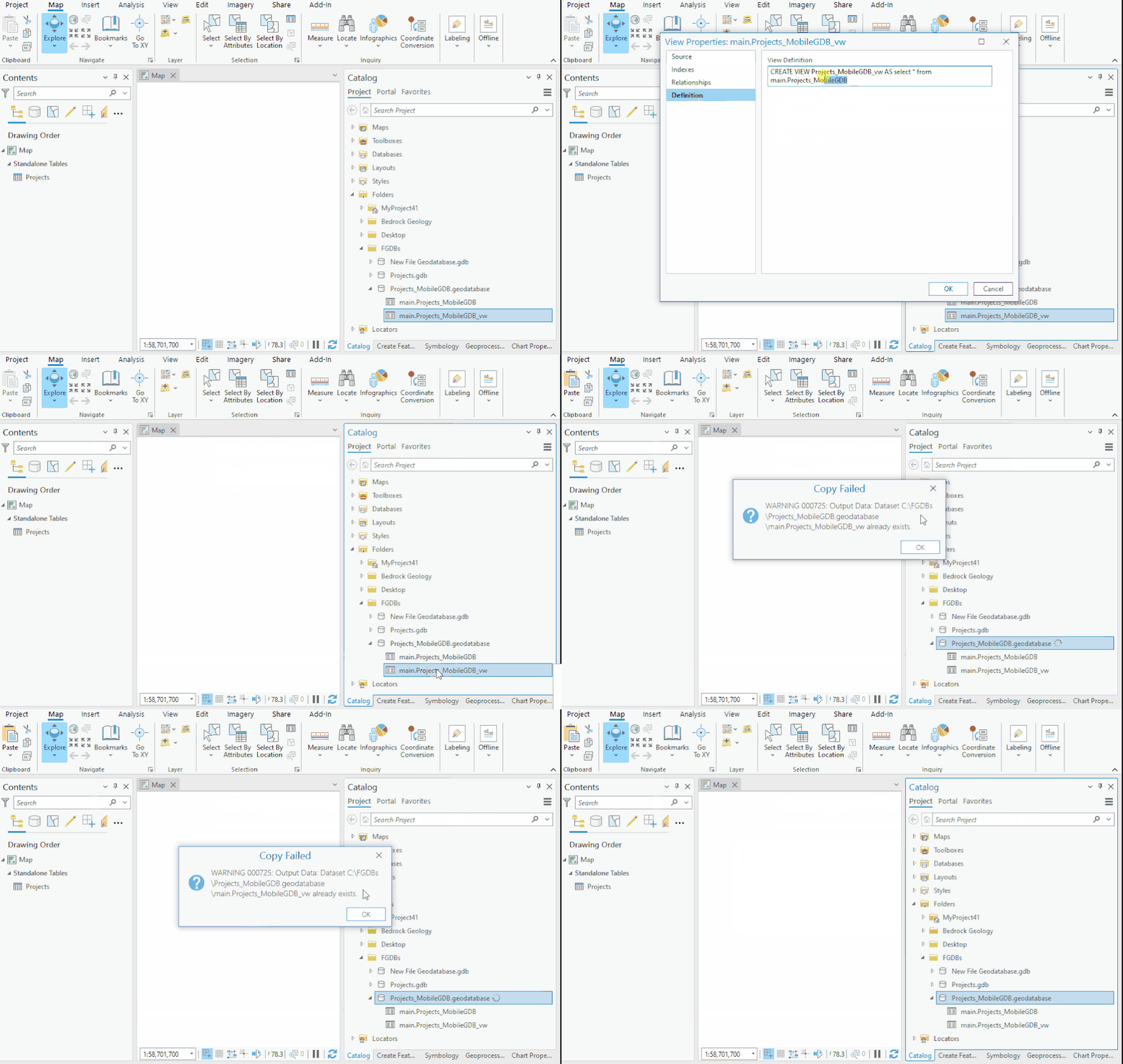
Whereas, with other geodatabase types like file and enterprise geodatabases, copy/pasting a view within the same GDB produces an exported table.
Could Pro be changed so that copy/pasting a view in the same GDB produces a table?
I'm aware there are other ways to export views to tables. But the copy/paste method in Catalog is preferred, for consistency and convenience sake.
And to be honest, exporting using other tools doesn't seem to work for mobile geodatabases anyway. Only file geodatabases get listed when browsing to the view>>table output location.
Thanks.


@Bud is the ask here to have a new view created with the same name + "_1" or are you looking for a genuine table to be created when you copy paste?
If the former, I'd say this is a bug. If the later, then you would need to use an export tool to create a table with the associated data. We would not overload copy/paste with functionality to export.
are you looking for a genuine table to be created when you copy paste?
Yes.
We would not overload copy/paste with functionality to export.
Esri is already overloading copy/paste with functionality to automatically paste views as tables for all other geodatabase types. I'm asking for consistency when it comes to mobile geodatabases.
Ah I see where the confusion is here. Thanks for clarifying, @Bud. I've tried a few different combinations here and I can reproduce this in other, non-mobile geodatabase configurations as well.
I am, however, able to successfully copy the view as expected after registering it with the mobile geodatabase. Will you give that a try and let me know if that is also what you're seeing?
Sorry, normally I can test in Pro, but won't be able to in the near term.
Thanks for the ping @Bud. I was waiting to see if you were able to get back on the behavior question before I closed this idea.
In your original idea you mentioned,
"with other geodatabase types like file and enterprise geodatabases, copy/pasting a view within the same GDB produces an exported table." and you requested that the same behavior be brought to mobile GDBs.
The behavior between mobile GDBs and enterprise GDBs is consistent. In order for this feature to work as you have requested, the view must be registered with the geodatabase. In fileGDB, this doesn't need to be considered since there is no concept of an unregistered view in that workspace. In Enterprise and mobile GDBs, users must register views for this functionality to work as you've outlined. After registering the view in the mobile geodatabase, the copy functionality works as you have requested. Testing across multiple enterprise GDBs also confirms that this behavior is the same when working in enterprise. Copying an unregistered view in enterprise also results in an error.
To make use of this geodatabase functionality, the view must be registered with the geodatabase.
You must be a registered user to add a comment. If you've already registered, sign in. Otherwise, register and sign in.