- Home
- :
- All Communities
- :
- Products
- :
- ArcGIS Pro
- :
- ArcGIS Pro Ideas
- :
- Attribute Table — Insert symbol into text value us...
- Subscribe to RSS Feed
- Mark as New
- Mark as Read
- Bookmark
- Follow this Idea
- Printer Friendly Page

- Mark as New
- Bookmark
- Subscribe
- Mute
- Subscribe to RSS Feed
- Permalink
ArcGIS Pro 3.4.2
When editing a cell value in the attribute table, it would be great if there were a picklist in the attribute table that would insert common symbols into the cell text. For example, the degrees symbol.
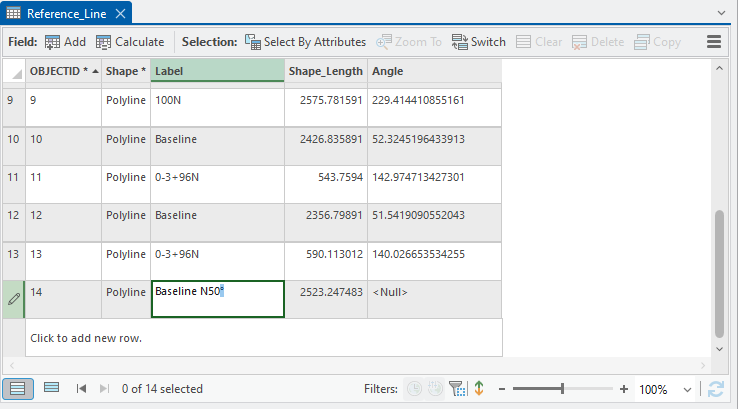
I'm aware that there are Windows keyboard shortcuts for symbols: Type the Degree Symbol like a GIS Pro. I think it would be more reasonable to get users to click a button compared to memorizing numeric keyboard shortcuts.


This would be great in the text editor as well! I make geology maps and would love to be able to have a symbol pulldown like in CAD that has the degree symbol among other things.

Yeah, I usually just copy from word, but why go that extra step?
@michellefillingim I couldn't get this window to insert the degrees symbol into the attribute table. How about you?
@Bud I can't get that particular tool to place a symbol in a table, but I could get it to work when making a label expression. I can copy and paste a symbol from ms word into a table so try that.
You must be a registered user to add a comment. If you've already registered, sign in. Otherwise, register and sign in.