- Home
- :
- All Communities
- :
- Products
- :
- ArcGIS Pro
- :
- ArcGIS Pro Ideas
- :
- Attribute Table — Copy values from highlighted fie...
- Subscribe to RSS Feed
- Mark as New
- Mark as Read
- Bookmark
- Follow this Idea
- Printer Friendly Page
Attribute Table — Copy values from highlighted fields only

- Mark as New
- Bookmark
- Subscribe
- Mute
- Subscribe to RSS Feed
- Permalink
ArcGIS Pro 3.4.3; file geodatabase
In the attribute table, I've selected a few rows and used the Show Selected Records option. Then I used CTRL+click to highlight a couple of fields.
I want to copy the values from the highlighted fields to the clipboard. I don't want to copy the entire selected table.
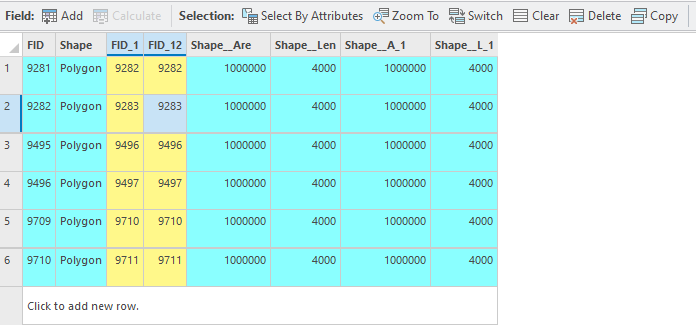
As far as I can tell, there isn't an easy way to copy specific fields, or just a single field, to the clipboard. Could that functionality be added?
I don't want to hide all unwanted fields, copy the whole table, then unhide all the fields. And I don't want to copy the entire selected table, paste into Excel, and delete the unwanted fields.


@Bud while it doesn't give you the column header, you can quickly select the cells you want to copy, Ctrl +C and then paste:

When you say you want to copy to clipboard, what do you need to do with the copied cells afterwards?
@KoryKramer Let me know if you need a separate idea for "Include column header when copying selected cells".
"When you say you want to copy to clipboard, what do you need to do with the copied cells afterwards?"
Answer: Paste into Excel, Word, or Outlook.
You must be a registered user to add a comment. If you've already registered, sign in. Otherwise, register and sign in.