ArcGIS Pro 3.7 was released on May 14, 2026. For information on the latest updates, refer to the ArcGIS Pro 3.7 Release Notes.
Our goal is to build the best GIS software available. This ArcGIS Pro Roadmap* gives you a sneak peek of what we're focusing on for the near-, mid- and long-term of ArcGIS Pro development. It gives our current estimate of when each capability will be released. New capabilities will be made available for beta testing through the Early Access Community prior to a release and we'll revise the roadmap to ensure it reflects the latest information.
What would you like to see next in ArcGIS Pro? Share your ideas in the ArcGIS Pro Idea Exchange.
If you're interested in contributing to the development of ArcGIS Pro, gaining early access to beta versions, and engaging with the team to provide meaningful insights for improvement, sign up to participate in the ArcGIS Pro Early Access Community.
Additionally, if you're interested in shaping the direction of ArcGIS Pro's AI-powered assistant, it is now in beta. Join the ArcGIS Pro assistant Early Access Community.
* Capabilities on this roadmap are tentative and subject to change, delay, or cancellation. The continued development or release of a capability is at the sole discretion of Esri.
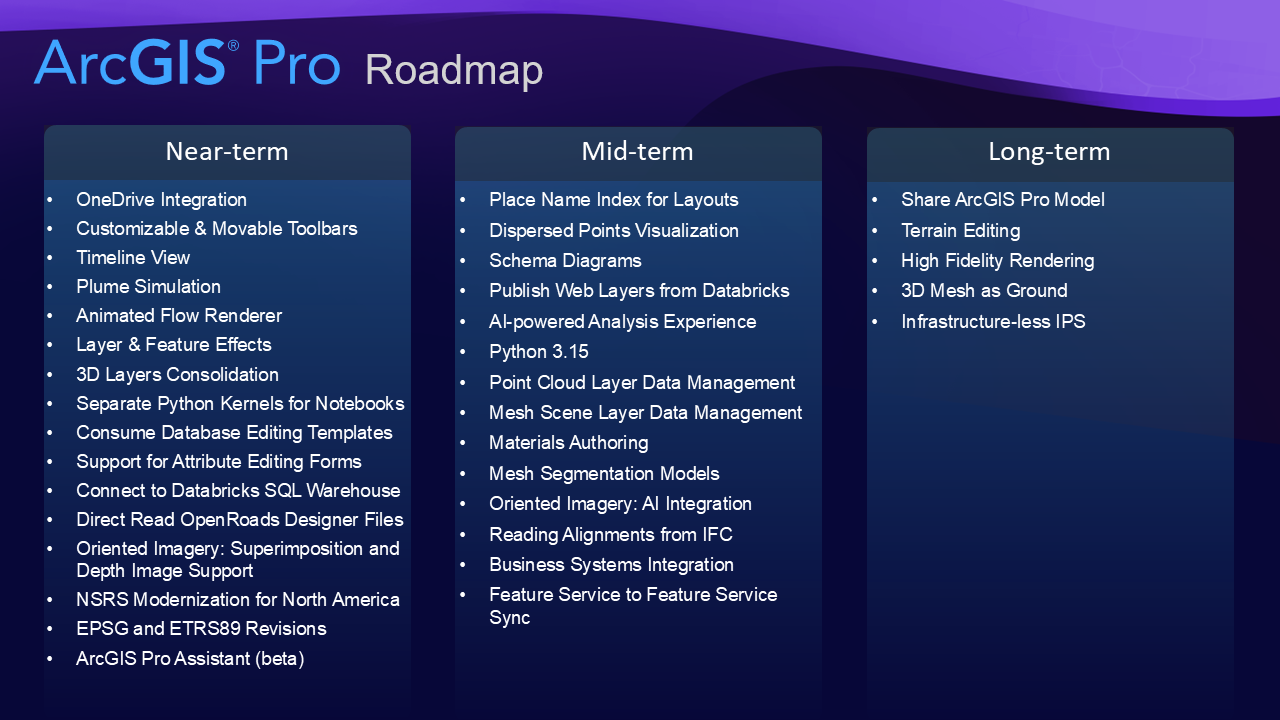
Near-Term (next release or two)
OneDrive Integration - Enable OneDrive integration and connect to a Microsoft work or school account linked to Microsoft OneDrive on your computer to prevent simultaneous editing of certain files in ArcGIS Pro. This integration is not a solution for collaborative workflows on the same ArcGIS Pro project - use portal projects to collaborate with others on the same project at the same time. OneDrive integration is designed to maintain the integrity of project files (.aprx) and other key file types such as file geodatabase, style files, toolboxes and server connection files. It will require users working on the same files to have the OneDrive experience enabled and will be controllable by administrators through application settings.
Customizable & Movable Toolbars – Create custom toolbars of commands that you use most and move them around to keep them close to your work to boost productivity. The first phase of this project was delivered in ArcGIS Pro 3.7 with customizable toolbars in views.
Timeline View - Visualize your data along a temporal axis. Timelines complement the spatial view of your data on the map by showing where in time your data falls. By plotting your data along a timeline, you can understand the temporal order of your data and discern temporal trends that emerge.
Plume Simulation - Use air-quality dispersion simulation to predict pollutant concentrations for current or future scenarios in varying weather conditions, and use the results for health analytics and comparison to air quality standards.
Animated Flow Renderer - Symbolize data with direction and speed - like wind, water, and migrations - using an animated flow renderer that can be shared in web maps and web scenes.
Layer & Feature Effects - Apply visual effects such as blur and drop shadow to layers or a subset of features for emphasis.
3D Layers Consolidation - 3D layers are designed to work with large 3D content across ArcGIS. You can represent 3D content using different 3D layer types like mesh, 3D object, building, Gaussian splat, 3D point, point cloud or voxel layer. ArcGIS Pro is simplifying 3D workflows by using consistent 3D layer types while handling formats like i3S and 3D Tiles behind the scenes. You don’t have to worry about formats, making 3D layers easier to understand and use, and keeping ArcGIS ready as 3D technology continues to evolve.
Separate Python Kernels for Notebooks - Provides an additional option of independent Python processes for individual notebooks within a single Pro session for better performance, stability, and flexibility. This work allows notebook kernels to be stopped and restarted without restarting Pro and lays the groundwork for more robust debugging and advanced Python-driven workflows.
Consume Database Editing Templates – Editing templates can currently be stored in a database and consumed outside of ArcGIS Pro through a feature service. Next phases include consuming these templates in ArcGIS Pro through a feature service and then using and managing stored templates directly from the database.
Support for Attribute Editing Forms - Support in ArcGIS Pro to use attribute editing forms created in other ArcGIS applications (Map Viewer and Field Maps Designer). The second phase of this project will provide support for building and configuring forms from ArcGIS Pro.
Connect to Databricks SQL Warehouse - Connect directly to Databricks SQL Warehouse to query, visualize, and analyze data in ArcGIS Pro.
Direct Read OpenRoads Designer Files - This initiative allows access to engineering information currently locked within Bentley's ecosystem. OpenRoads Designer is a CAD/BIM file format used by Civil engineers for infrastructure design. It is used by almost all DOT's and AEC firms that support the transportation industry. We'll provide the same level of functionality as we do with Civil 3D, interpreting 2D and 3D engineering information as GIS features.
Oriented Imagery: Superimposition and Depth Image Support - Superimposition of frame and 360 images onto a scene. Ability to read depth values from depth images facilitating accurate image to ground transformations.
National Spatial Reference System Modernization for North America -The National Geodetic Survey is preparing to publish new geographic, projected, and vertical coordinate systems in 2027. The new geographic and vertical coordinate systems will better align with GNSS and international reference frames, providing a more accurate and stable national spatial reference system. A new set of State Plane Coordinate System definitions including statewide and many low distortion coordinate systems are included. Esri plans to integrate the coordinate systems and transformations as soon as possible after they are officially approved by the Federal Geodetic Control Subcommittee, currently planned for early 2027.
EPSG and ETRS89 Revisions - EPSG has made updates to improve consistency between ETRS89 and national coordinate reference systems in Europe. CRS definitions and transformation handling may change in upcoming ArcGIS Pro releases.
ArcGIS Pro Assistant (beta) – ArcGIS Pro users get support from an AI-powered assistant to increase productivity in several areas. The assistant will be able to answer questions using ArcGIS Pro help documentation, generate SQL and graph queries, create Arcade expressions, produce ArcPy code snippets, perform actions within the application, guide users through the planning and execution of complex GIS workflows, and automate common tasks by building and configuring custom agents. Join the ArcGIS Pro assistant Early Access Community.
Mid-term (next two or three releases)
Place Name Index for Layouts - A new layout element to show where features, such as streets, parks, neighborhoods, cities and so on, are located within a map grid or across map series pages. Various options for formatting the text will be available.
Dispersed Points Visualization - Dynamically disperse overlapping point features when drawing feature layers.
Schema diagrams - Schema diagrams are being investigated as a complementary capability to Schema Reports, enabling users to generate clear, graphical views of geodatabase structure and relationships from ArcGIS Pro. The goal is to design a cohesive, extensible experience that supports schema understanding, communication, and documentation, while aligning with related visualization efforts across the platform.
Publish Web Layers from Databricks to ArcGIS Enterprise - Share query layers from Databricks SQL Warehouse as map image layers and feature layers to ArcGIS Enterprise.
AI-powered analysis experience - A new interactive, conversational experience that helps you think through analysis, explore results, and create reproducible workflows.
Python 3.15 - Update the version of Python that ships with ArcGIS Pro to 3.15.
Point Cloud Layer Data Management - Add, Delete, Change very large point cloud services.
Mesh Scene Layer Data Management – Add, Delete, Change very large mesh services.
Materials Authoring - Author properties to support reflectivity, roughness and other properties for more photorealistic visualizations in 3D scenes.
Mesh Segmentation Models - Mesh Segmentation will provide the ability to train and use deep learning models for identifying parts of a 3D mesh as objects such as trees, buildings or roofs.
Oriented Imagery: AI Integration - Tight integration with ArcGIS Image Analyst Extension based AI workflows for creating training data, training models and inferencing. Integration with pre-trained models such as face blurring, car number plate blurring as well as feature extraction such as road signs.
Reading Alignments from IFC - Building Smart International is actively working on expanding the IFC standard to include more infrastructure support, including things like rail, tunnels, and roadways. To address the anticipated needs, this project builds on our current capabilities to read 3D elements from IFC to include alignments and other linear elements as part of our BIM model support.
Business Systems Integration - Allow organizations to create live connections to external systems such as ServiceNow, Salesforce, and so on to enrich spatial data stored in ArcGIS with their live business data without duplicating data.
Feature Service to Feature Service Sync – Allow syncing of row level edits between two feature services. You will be able to sync between services in ArcGIS Enterprise with ArcGIS Online, ArcGIS Enterprise with ArcGIS Enterprise, or ArcGIS Online with ArcGIS Online depending on workflow requirements.
Long-term (in the plan but not assigned to a release at this point)
Share ArcGIS Pro Model- Author a ModelBuilder model in ArcGIS Pro and share it as an item to ArcGIS Online or ArcGIS Enterprise. You will be able to view and run the model from a browser. You will also be able to download, view and run the model in ArcGIS Pro projects.
Terrain Editing - Ability to interactively edit the ground or other surfaces. Add, remove and replace data referenced by the surface.
High Fidelity Rendering - A series of display improvements to support more photorealistic 3D scene visualizations.
3D Mesh as Ground - The ability to use integrated mesh or TIN information as a true triangulated ground surface that would be more precise than raster surfaces and allow structures such as tunnels and mines.
Infrastructure-less IPS - ArcGIS IPS will not rely on the installation of dedicated hardware.

