- Home
- :
- All Communities
- :
- Products
- :
- ArcGIS Pipeline Referencing
- :
- Pipeline Referencing Blog
- :
- LRS Information Model Update
LRS Information Model Update


- Subscribe to RSS Feed
- Mark as New
- Mark as Read
- Bookmark
- Subscribe
- Printer Friendly Page
LRS Feature Dataset Requirement
A feature dataset is a collection of related feature classes that share a common coordinate system. Feature datasets are used to facilitate creation of controller datasets (sometimes also referred to as extension datasets), such as topology, utility network or pipeline referencing. Feature classes that are to be included in an extension dataset are first organized into a feature dataset.
To support service-based editing of your data in Pipeline Referencing, certain feature classes in the LRS data model must reside in a feature dataset in your geodatabase. If the feature classes and tables are modeled in advance, the following feature classes must be contained in a feature dataset: Centerline, Calibration Points, Redline, Networks, Events, and Intersections.
Reference: LRS information model
Spatial Reference
When a feature dataset is created, you must define its spatial reference. This includes the coordinate system, either geographic or a specific projection, as well as coordinate units and tolerances for x-, y-, z-, and m-values. All feature classes in a feature dataset must share a common coordinate system, and the x,y coordinates of their features should fall within a common spatial extent. When you create a feature class in an existing feature dataset, the coordinate system is inherited from the feature dataset.
Since measures and their precision are critical to the accuracy of any linear referencing method (LRM), the spatial reference, tolerance, and resolution settings for all these feature classes must align. This ensures that geometry and measures for routes, events, and intersections are correct in a linear referencing system (LRS) and remain in alignment. If any of the centerline, calibration point, redline, network, event, or intersection feature classes are modeled before they are registered with the LRS, ensure that the tolerance and resolution settings match.
Reference: Tolerance and resolution settings
Implementation Considerations
- If you use the Create LRS geoprocessing tool to create your LRS and minimum schema items, these required feature classes are automatically placed in a feature dataset.
- If the LRS was created using ArcMap or ArcGIS Pro 2.5 or earlier, you need to move these feature classes into a feature dataset and run the Modify LRS geoprocessing tool to edit the LRS in ArcGIS Pro 2.6 or later. Additional modifications to the schema and/or APR re-configuration may be needed as part of this upgrade process.
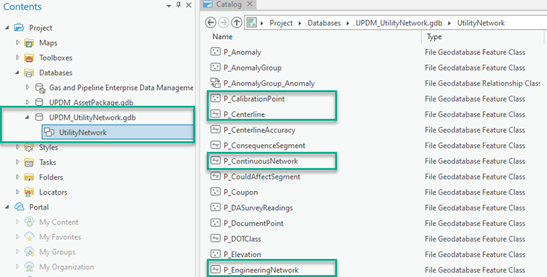
- The Gas and Pipeline Enterprise Data Management ArcGIS solution follows the LRS information model requirements with required features in the UtilityNetwork feature dataset. The Gas and Pipeline Enterprise Data Management is a unified solution for both networked and linear referenced pipelines based on ArcGIS Pro 2.6, ArcGIS Enterprise 10.8.1, UPDM 2020, and Utility Network Release 4.
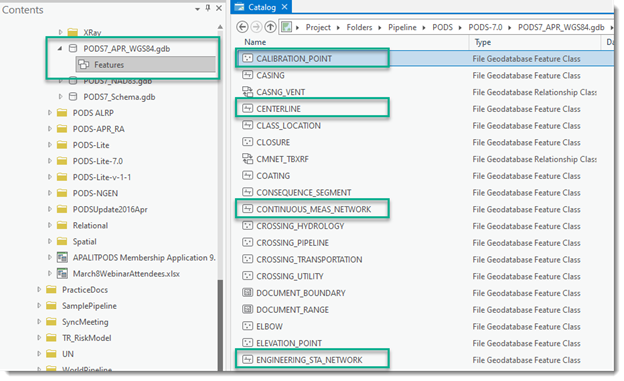
- The PODS 7.0 is also compatible with the LRS information model requirements with required features in the Features feature dataset.
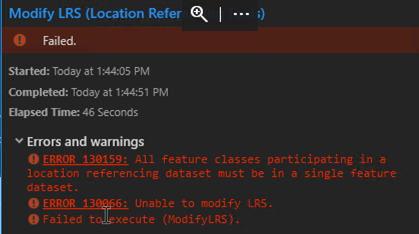
- APR implementations on versions of ArcGIS Pro 2.5 or older allowed for features to be outside a single dataset. When upgrading to ArcGIS Pro 2.6, the GIS administrator will be prompted to run the geoprocessing tool to Modify LRS. The following Error 130159 will be seen if the data model is not modified per the dataset requirements discussed above.
LRS Intersection
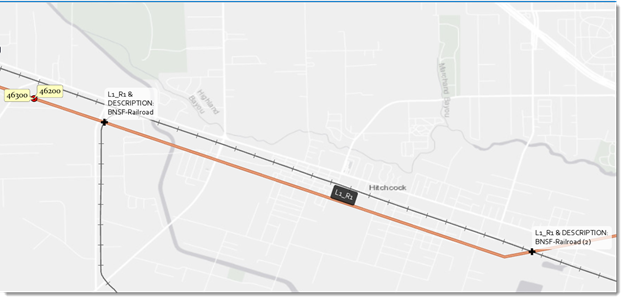
At ArcGIS Pro 2.6, you can now configure LRS intersection feature classes as well as generate and update intersections. The example below shows intersection of an LRS route with railroad layer.
The required fields for LRS intersection class are listed in the following table.
Field | Data Type | Description |
Intersecting ID | Guid | The name of the intersection ID field. |
Intersection Name | Text (1000) | The name of the intersection. |
Route ID | Text (1000) | The unique ID of the route. |
Feature ID | Text (1000) | The unique ID of the intersecting feature. |
Feature Class Name | Text (150) | The name of the intersection point feature class. |
From Date | Date | The date the network became active. |
To Date | Date | The date the network was retired. |
Measure | Double | The measure on the dominant route where the intersection is located. |
Here is a sample attribute table for the intersection of an LRS route with railroad layer.
Redline
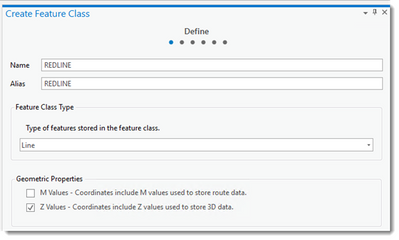
At ArcGIS Pro 2.8, the redline feature class that is a APR information model core object, must be z-enabled and cannot be m-enabled.
You must be a registered user to add a comment. If you've already registered, sign in. Otherwise, register and sign in.