- Home
- :
- All Communities
- :
- Products
- :
- ArcGIS Online
- :
- ArcGIS Online Questions
- :
- Unable to set default values for hosted tables
- Subscribe to RSS Feed
- Mark Topic as New
- Mark Topic as Read
- Float this Topic for Current User
- Bookmark
- Printer Friendly Page
Unable to set default values for hosted tables

- Mark as New
- Bookmark
- Subscribe to RSS Feed
- Permalink
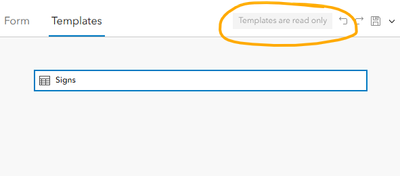
The only way to set default values for hosted layers is through Field Maps designer or Smart Forms templates in Map Viewer. This method does not support making those same changes to default values for hosted tables. It just says "templates are read-only". This makes it difficult to set the right form configurations, for example the "switch" format for choice lists.

- Mark as New
- Bookmark
- Subscribe to RSS Feed
- Permalink
I have the same issue for a yes/no domain, where I want "no" to be the default. When I set the form input type to switch or radio button and uncheck "allow no value", then the first item in the domain list became the default value. I fixed this by editing the domain list so that the default value (no) is the first item in the list.
- Mark as New
- Bookmark
- Subscribe to RSS Feed
- Permalink
Well, ok - that didn't work while collecting data. I republished my feature service with a default value defined for my yes/no field. Alternatively, you can create a feature template in ArcGIS Pro before publishing. Once published, field maps forms are populating with the default value of "no".
