- Home
- :
- All Communities
- :
- Products
- :
- ArcGIS Online
- :
- ArcGIS Online Questions
- :
- New Map Viewer- expand panels by default
- Subscribe to RSS Feed
- Mark Topic as New
- Mark Topic as Read
- Float this Topic for Current User
- Bookmark
- Printer Friendly Page

- Mark as New
- Bookmark
- Subscribe to RSS Feed
- Permalink
Finally dove into creating a new map using the new map viewer last night. When the map loads, the panels located along the left/right edges are collapsed by default. Is there a way to specify that they are expanded by default instead?
I haven't been a fan of the redesign and the default nature of just icons leaves a lot to be desired in terms of telling a user what they can do once the map loads. At least with the panels expanded there is some explanatory text to suggest what they can do.
Solved! Go to Solution.
Accepted Solutions


- Mark as New
- Bookmark
- Subscribe to RSS Feed
- Permalink
By default they are closed but once you open them this is stored in the browser cache so other times you revisit the app the panels will be expanded. Originally while in beta these were expanded but more users asked for more map view so they are now collapsed by default.
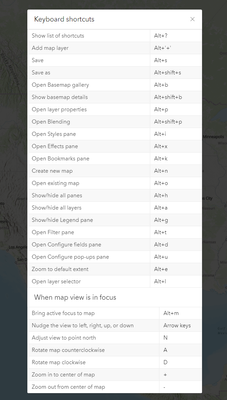
Once you get more comfortable with the Map Viewer we also have added a list of shortcuts to perform some actions on the app, layers and map view.


- Mark as New
- Bookmark
- Subscribe to RSS Feed
- Permalink
Odd! I see the opposite behavior, my panels are always open when I open the new map viewer.
Kendall County GIS


- Mark as New
- Bookmark
- Subscribe to RSS Feed
- Permalink
It seems to be linked to user profile somehow. If I open a map I created in new map viewer, it opens with the panel collapsed showing just the icons. If I open it in classic viewer, it opens to the contents panel.
If I open a map one of our other users created, it opens with the side panel expanded. Open that same map in classic viewer, and it opens to the legend panel, not the contents.
Not sure why/where this is set, but defiantly appear to be different depending on who created the map.
R_
- Mark as New
- Bookmark
- Subscribe to RSS Feed
- Permalink
By default they are closed but once you open them this is stored in the browser cache so other times you revisit the app the panels will be expanded. Originally while in beta these were expanded but more users asked for more map view so they are now collapsed by default.
Once you get more comfortable with the Map Viewer we also have added a list of shortcuts to perform some actions on the app, layers and map view.
- Mark as New
- Bookmark
- Subscribe to RSS Feed
- Permalink
For better or worse, that's the answer so I've marked it as such. I would still very much advocate for an option to either have them open or closed as a default. As a long term GIS user, I have no problems with adopting keyboard shortcuts but the problem is that we have to share our map products with others who aren't as savvy (which is what I am doing here). I guess I'll have to create a Webapp Builder app in order to make it more user friendly.
- Mark as New
- Bookmark
- Subscribe to RSS Feed
- Permalink
They are collapsed by default but if a user would like to open them they are persisted or lets say you only want the right toolbar open by default a user can open it and it will be persisted in multiple sessions. Majority of our feedback and user testing was showing ppl collapsing the toolbars. This isn't a web map specific property and really comes down to each individual user and their workflows. We also show tooltips so if you hover your mouse of the tools when the toolbar is active you see the name of the tool and don't sacrifice map view space.
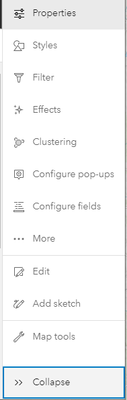
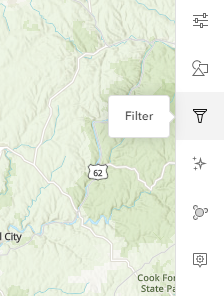
In Map Viewer Classic tools are hidden until you mouse over a layer and you have to click on an overflow to access them to see what is available vs. seeing them readily available in Map Viewer at the toolbar when the layer is selected.
The icons we have used are also extremely similar so if they have used Map Viewer Classic they icons which sounds like above they have
When you are in WAB the users are also being presented with just icons and no text.

- Mark as New
- Bookmark
- Subscribe to RSS Feed
- Permalink
I could swear that one or 2 of the WebApp templates weren't as icon cryptic but I could be wrong on that. One thing that the WebApps do better is consolidate all tools/functionality into one place. The constant ping-ponging from left edge to right edge to access and change settings is really annoying (go to the left side to select a layer, go back to the right side to access a property..). Also, the use of an "eye" icon instead of a checkbox to denote a layer's visibility isn't as obvious as ESRI thinks either.
I like the new map viewer functionality but I don't like the UI that's been built around it.
- Mark as New
- Bookmark
- Subscribe to RSS Feed
- Permalink
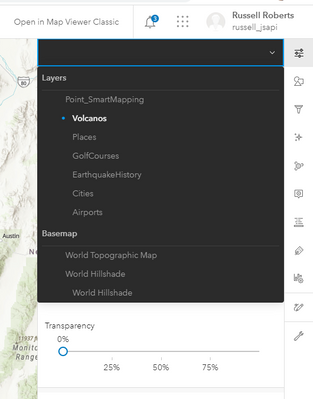
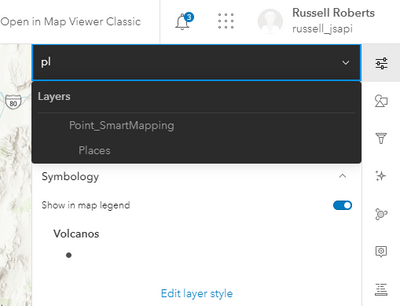
We have the layer switcher that allows you to switch layer focus to configure that layer that also supports filtering so you don't have to find the layer. That way all the tools are consolidated on the right toolbar and you don't need to ping pong.