- Home
- :
- All Communities
- :
- Products
- :
- ArcGIS Online
- :
- ArcGIS Online Questions
- :
- Re: Integers Displaying with Decimal Places Bug
- Subscribe to RSS Feed
- Mark Topic as New
- Mark Topic as Read
- Float this Topic for Current User
- Bookmark
- Printer Friendly Page

- Mark as New
- Bookmark
- Subscribe to RSS Feed
- Permalink
I have fields which are definitely integers. I have to use WebApp Builder because I need the notification list widget which to my knowledge is not on the product to be ported to Experience Builder, so the map being used is technically the map viewer classic version. When I add these fields to pop-ups in Map Viewer Classic, fields which are definitely integers, they display with 6 decimal places. When I search the method that comes up to fix this is to go into Configure Attributes and change the Format decimal places to 0 decimal places, which AGOL does not provide me the option to do.. because they're integers!!
They seem to display fine in the new Map Viewer but since the WebApp Builder uses the pop-up configuration from Map Viewer Classic I get these decimals displaying on integers. Not even all integers, just some so I'm hopeful there is some way to fix this, but I haven't found it yet. The only workaround I've come up with is to use arcade to format these fields, these fields which are integers, to round to the nearest integer. Which happens to be the same value they are, since they're integers. This is a parcel data set and there's over 100 fields in the full version. I don't want to write custom arcade expressions to round every integer into an integer when they are already integers.
Anyone have any ideas on where else to investigate why these integers are displaying with 6 decimal places (all zeroes, because they're integers) of accuracy?
Solved! Go to Solution.
Accepted Solutions
- Mark as New
- Bookmark
- Subscribe to RSS Feed
- Permalink
I figured out a better work around then creating a bunch of Arcade Expressions to round integers to the nearest integer. Seems like AGOL does honor the significant figures setting, it just won't expose them on integers. I found a double value, cracked open the JSON using AGOL-Assistant to see how it's coded, then used AGOL-Assistant to hard code that key/value pair into the fieldname format part of the map JSON I was trying to fix.
{
"fieldName": "XMP_AMT2",
"format": {
"digitSeparator": true,
"places": 0
}

- Mark as New
- Bookmark
- Subscribe to RSS Feed
- Permalink
Agreed, integers shouldn't have that issue.
Did you check the field's formatting in Visualization to see if the significant digits option can be changed?

- Mark as New
- Bookmark
- Subscribe to RSS Feed
- Permalink
Hadn't checked there but it has the same problem as anywhere else; it doesn't have a significant digits drop down because it's an integer. Thanks though.
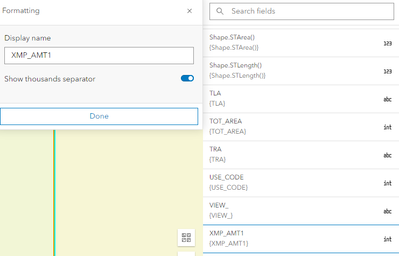
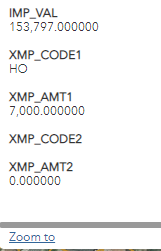
Part of me wonders if there's a way of tricking AGOL into thinking the integers actually are floats or a way of forcing the significant figures drop down to appear on an integer, then I could use it to round those integers to integers.

- Mark as New
- Bookmark
- Subscribe to RSS Feed
- Permalink
I have the same problem as you and the same result. I have set my field to integer and want to include 2 decimal places but I am not seeing or able to create integers
- Mark as New
- Bookmark
- Subscribe to RSS Feed
- Permalink
I figured out a better work around then creating a bunch of Arcade Expressions to round integers to the nearest integer. Seems like AGOL does honor the significant figures setting, it just won't expose them on integers. I found a double value, cracked open the JSON using AGOL-Assistant to see how it's coded, then used AGOL-Assistant to hard code that key/value pair into the fieldname format part of the map JSON I was trying to fix.
{
"fieldName": "XMP_AMT2",
"format": {
"digitSeparator": true,
"places": 0
}


- Mark as New
- Bookmark
- Subscribe to RSS Feed
- Permalink
Thank you for mentioning this workaround, after enough fiddling, I was able to get it working in field maps. This definitely seems like a bug, since like you said, decimal places shouldn't exist for integer fields. And also, field maps should honor the "never show separator" option selected in the web map (this was being ignored, in my experience).
Do we know if there is a bug number logged for this, and what the status might be?
Katie
If this post helped you, please consider giving a kudos and/or marking as the accepted solution. Thanks!

- Mark as New
- Bookmark
- Subscribe to RSS Feed
- Permalink
I don't have a bug number but I did have a case open with support. I chose not to try their potential solution because it was overly intrusive to a very complex service that is mission critical for staff. However, I did find a solution.
I discovered that adding a single Arcade expression to one of the integer fields in the popup caused all integer fields in the popup to correctly display with no decimals.
Specifically, using an expression:
Text($feature.FieldName, "#,###") if you want a thousand separator and Text($feature.FieldName, "#") if you don't.


This single line of code not only fixed the formatting for that field but also resolved the issue for the other integer fields in the same popup. This behavior was unexpected, but it effectively corrected the decimal‑place problem across the board.
I wanted to share this in case it helps with troubleshooting or documenting the issue for other users.
Best,
Todd
.

- Mark as New
- Bookmark
- Subscribe to RSS Feed
- Permalink
Thank you for this! I did find some inconsistent behavior with related tables: it seems to work for either the features or the related table. If I attempt to to this on both the layer and the table it the decimal places reappear.
