- Home
- :
- All Communities
- :
- Products
- :
- ArcGIS Online
- :
- ArcGIS Online Questions
- :
- Re: How to get attribute with last date modified f...
- Subscribe to RSS Feed
- Mark Topic as New
- Mark Topic as Read
- Float this Topic for Current User
- Bookmark
- Subscribe
- Mute
- Printer Friendly Page
How to get attribute with last date modified from related table using Arcade

- Mark as New
- Bookmark
- Subscribe
- Mute
- Subscribe to RSS Feed
- Permalink
Hello all,
I'm pretty new to Arcade and I'm having problems. I believe I need to be using FeatureSets in Arcade.
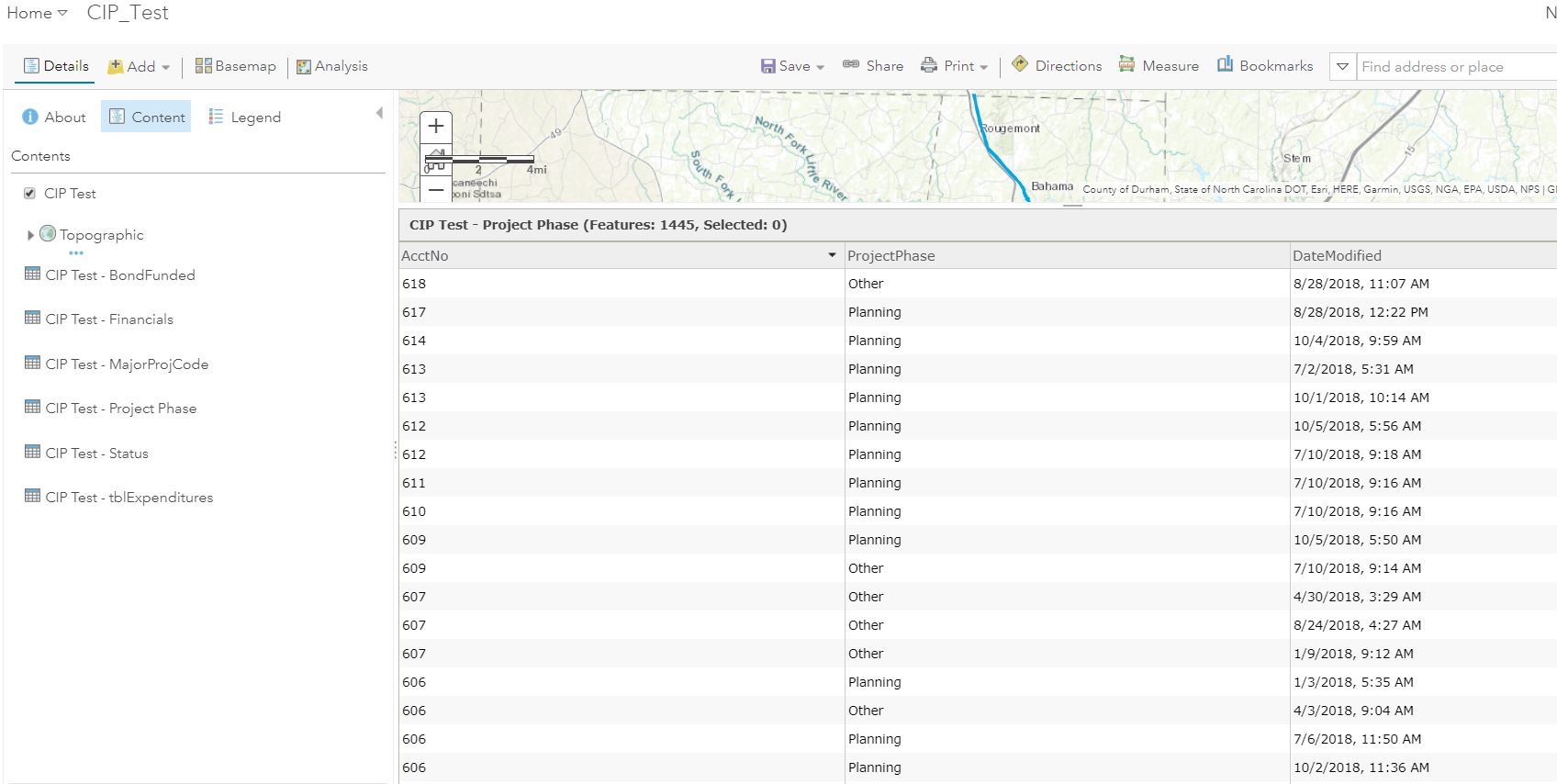
I have a hosted feature layer with several related tables, some of which are 1:M. In the CIP_Test pop-up, for the 1:M related tables, I only need to show the data from the rows with the latest "Date Modified".
I've attached a screenshot of the related table. Where there are duplicate AcctNo, I only want to show the ProjectPhase (and maybe other fields) for the record that was last modified.
Any suggestions on how to do this are much appreciated! I have gotten nothing but errors in everything I've tried from any forum posts I've found....


- Mark as New
- Bookmark
- Subscribe
- Mute
- Subscribe to RSS Feed
- Permalink
Hi Kathy Smikrud ,
I suppose that it should be possible feeding a row from the 1st related table when fetching the 2nd related table using the same FeatureSetByRelationshipName. If you can share the data I can look at it with more detail (AGOL user "[email protected]").
- Mark as New
- Bookmark
- Subscribe
- Mute
- Subscribe to RSS Feed
- Permalink
Hi Kathy Smikrud ,
To get the sum of the values in the repeat you can use the following expression:
// Get the related surveys from feature
var surveys = FeatureSetByRelationshipName($feature, "EscapementSurveys");
// get number of surveys
var cnt1 = Count(surveys);
var cnt2 = 0;
// initialize values (ignore SPECIES_CODE)
var mouth = 0; // MOUTH
var tidal = 0; // TIDAL
var live = 0; // LIVE
var dead = 0; // DEAD
// check if there are any suveys available
if (cnt1 > 0) {
// sort surveys on date
var surveyssorted = OrderBy(surveys, 'OBS_Date DES');
// take most recent survey
var survey = First(surveyssorted);
// get repeats for this survey
var repeats = FeatureSetByRelationshipName(survey, "repeat_SpeciesCounts");
cnt2 = Count(repeats);
if (cnt2 > 0) {
// we have repeats, now sum values
for (var repeat in repeats) {
mouth += repeat.MOUTH;
tidal += repeat.TIDAL;
live += repeat.LIVE;
dead += repeat.DEAD;
}
}
}
// create resulting text for pop-up
var result = "";
if (cnt2 > 0) {
// there are repeats, so construct the resulting text
result = "Mouth: " + mouth;
result += TextFormatting.NewLine + "Tidal: " + tidal;
result += TextFormatting.NewLine + "Live: " + live;
result += TextFormatting.NewLine + "Dead: " + dead;
} else {
// no repeats found, return a text to explain that
result = "No counts available";
}
// return the result
return result;See below the result in the pop-up:
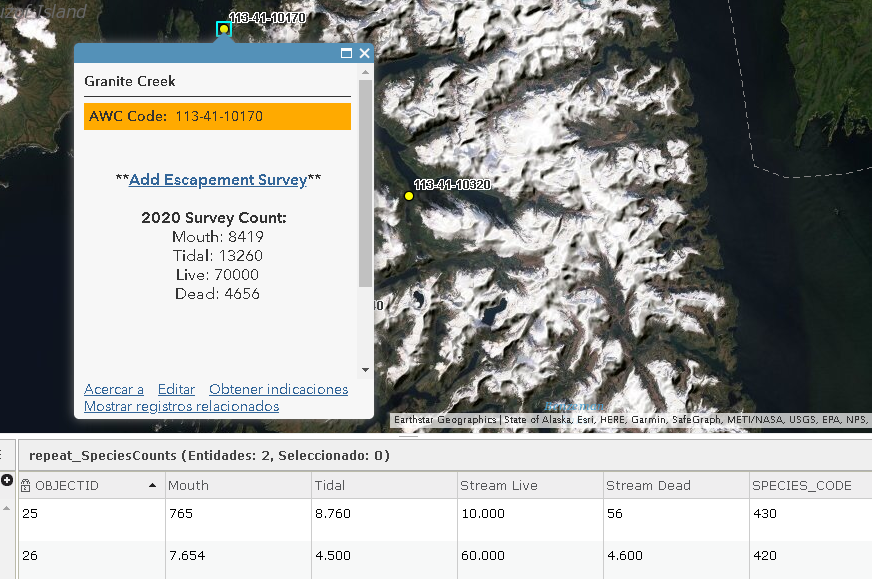
In case you want to show the counts per specie code, you can use the expression below:
// Get the related surveys from feature
var surveys = FeatureSetByRelationshipName($feature, "EscapementSurveys");
// get number of surveys
var cnt1 = Count(surveys);
var cnt2 = 0;
// check if there are any suveys available
var result = "";
if (cnt1 > 0) {
// sort surveys on date
var surveyssorted = OrderBy(surveys, 'OBS_Date DES');
// take most recent survey
var survey = First(surveyssorted);
// get repeats for this survey
var repeats = FeatureSetByRelationshipName(survey, "repeat_SpeciesCounts");
cnt2 = Count(repeats);
if (cnt2 > 0) {
// we have repeats, now aggregate the repeat per species: SPECIES_CODE
var stats = GroupBy(repeats, ['SPECIES_CODE'], [
{name: 'sumMOUTH', expression: 'MOUTH', statistic: 'SUM'},
{name: 'sumTIDAL', expression: 'TIDAL', statistic: 'SUM'},
{name: 'sumLIVE', expression: 'LIVE', statistic: 'SUM'},
{name: 'sumDEAD', expression: 'DEAD', statistic: 'SUM'}]);
// read the aggregation and create the text
for (var stat in stats) {
result += TextFormatting.NewLine + TextFormatting.NewLine + "Specie code: " + stat["SPECIES_CODE"];
result += TextFormatting.NewLine + " - " + "Mouth: " + stat.sumMOUTH;
result += TextFormatting.NewLine + " - " + "Tidal: " + stat.sumTIDAL;
result += TextFormatting.NewLine + " - " + "Live: " + stat.sumLIVE;
result += TextFormatting.NewLine + " - " + "Dead: " + stat.sumDEAD;
}
} else {
result = "No counts available";
}
} else {
result = "No counts available";
}
// return the result
return result;The result will display as this:
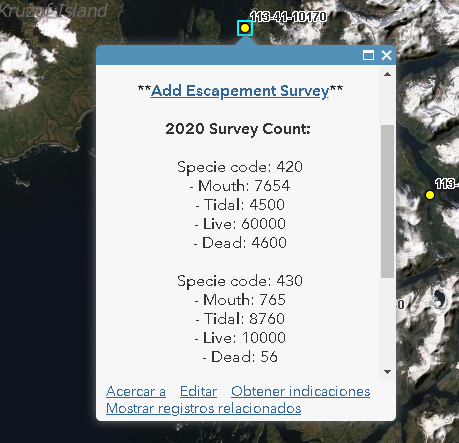
In your email you mentioned that you want to access the previous survey counts, so not the latest record. In that case you would still have to sort the surveys on date but now loop through the surveys and take the second. This is a bit longer than using the First function, but it can be done.

- Mark as New
- Bookmark
- Subscribe
- Mute
- Subscribe to RSS Feed
- Permalink
Hi Xander Bakker,
THANK-YOU SO MUCH! The latter code is exactly what I was hoping to do but unable to put the code together in how to access the counts in the second related table. In regards to accessing all previous survey counts at this time the goal was just to access the last survey count which is what you provided. I can't tell you how much I appreciate your help on this and its very exciting to see the results show up.
I am curious if the arcade will work offline in the Collector for ArcGIS app with iOS device which is really the goal for surveyors to be able to view previous survey counts when they are out. If this functionality isn't available now hopefully it is on the road map.
Again thank-you so much for your time in looking at the data and sharing the code!
Kathy
- Mark as New
- Bookmark
- Subscribe
- Mute
- Subscribe to RSS Feed
- Permalink
Hi kmsmikrud ,
I am glad that the expression is doing what you wanted to achieve. At this point I am not sure if the expression will work in Collector. Support for Arcade is incrementing with each release, but the best you can do is try it out and when you do, please post back your findings.
- Mark as New
- Bookmark
- Subscribe
- Mute
- Subscribe to RSS Feed
- Permalink
Hello @XanderBakker ,
This post helped me a lot as I am beginner to the world of Arcade so thanks so much.
I have one question, is there a way to make some loop that can go thro multiple related record and show them as one attribute (or more) in pop up.
This is how it looks now, only showing one related record:
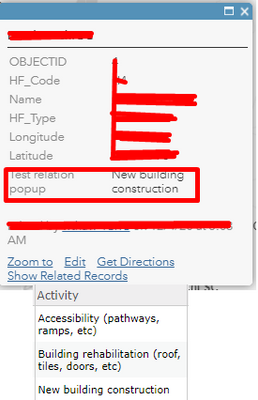
And code used was yours with some simple modifications:
var relatedrecords = OrderBy(FeatureSetByRelationshipName($feature,"ActivitesMaster"), "Activity DESC");
var cnt = Count(relatedrecords);

var relatedinfo = "";
if (cnt > 0) {
 var info = First(relatedrecords);
 relatedinfo = info.Activity
}

return relatedinfo;
Is something similar to For or While Loop available in Arcade? Main problem is that some features have 1 related attribute, and up to 3 or 4 in some different cases. This would help me and the several apps that I am developing.
Thanks in advance,
Ivan
- Mark as New
- Bookmark
- Subscribe
- Mute
- Subscribe to RSS Feed
- Permalink
Hi @IvanKuzmic ,
Sorry for the delay in my reply. I was (and still am on vacation).
You could try something like this:
var relatedrecords = OrderBy(FeatureSetByRelationshipName($feature,"ActivitesMaster"), "Activity DESC");
var cnt = Count(relatedrecords);

var relatedinfo = "";
if (cnt > 0) {
    for (var relatedrecord in relatedrecords) {
        if (relatedinfo == "") {
            relatedinfo = relatedrecord.Activity;
        } else {
            relatedinfo += TextFormatting.NewLine + relatedrecord.Activity;
        }
    }
}

return relatedinfo;- Mark as New
- Bookmark
- Subscribe
- Mute
- Subscribe to RSS Feed
- Permalink
@XanderBakker Thanks for this, sorry that you are working from vacation.
This is now working and showing activity as it was supposed to!
Thanks again and continue great work!
- Mark as New
- Bookmark
- Subscribe
- Mute
- Subscribe to RSS Feed
- Permalink
Hi @IvanKuzmic , glad to hear this!

- Mark as New
- Bookmark
- Subscribe
- Mute
- Subscribe to RSS Feed
- Permalink
Hi Xander-
Any idea why the Related Records would not be available under Globals > $feature ? I would like to use the FeatureSetByRelationshipName but I cannot without that. What is the typical cause of this? Thank you in advance!
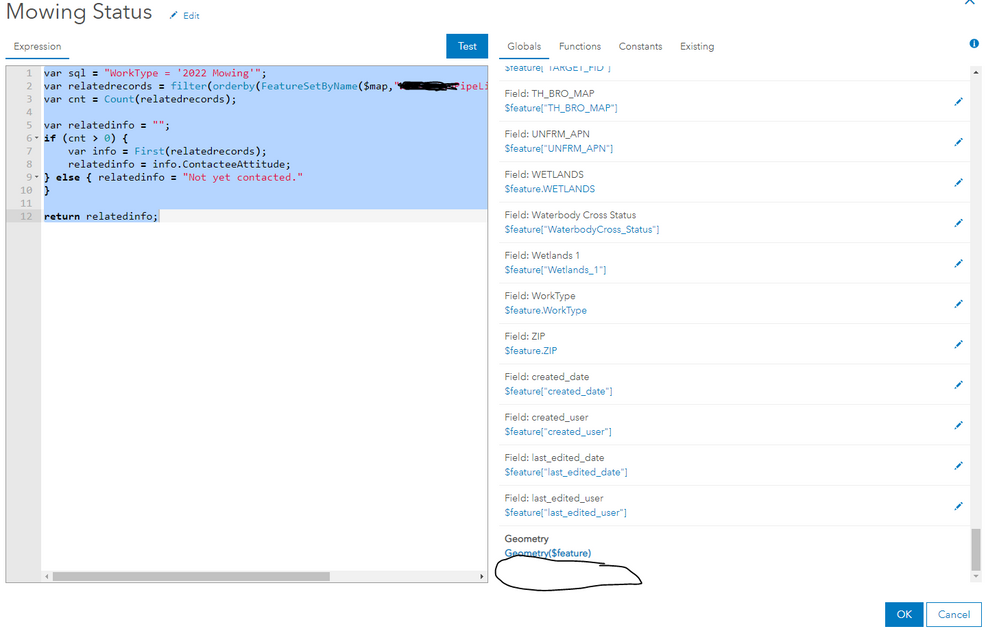

- Mark as New
- Bookmark
- Subscribe
- Mute
- Subscribe to RSS Feed
- Permalink
I see this when I am accessing the data from the datastore. However, when I publish the data from ArcPro with the Layer and its respective related table, I am then able to see the Related Records item under $feature.

- « Previous
- Next »
- « Previous
- Next »