Select to view content in your preferred language

Add GUID field to existing AGOL Survey123 feature layer — Field not auto-populating?

447
11
a week ago
Bud
by
Legendary Contributor

I have a Survey123 feature layer that was created using the Survey123 wizard.

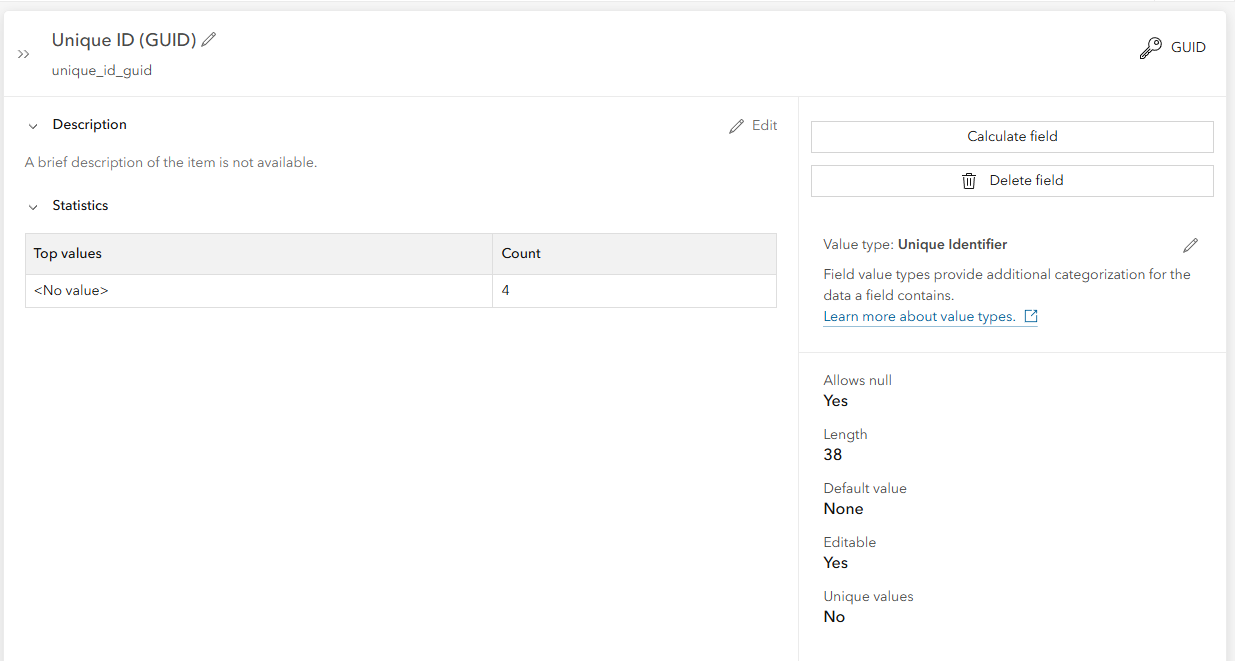
I need a custom auto-populated unique ID field, so I've added a GUID field using AGOL > Data > Fields. This is the resulting field:
Bud_0-1777056938401.png

Problem:

When I create new features in an Experience Builder app using the Editor widget, the new GUID field is not being populated. Why isn't it being populated?

Use Case: 

Auto-populate unique ID field in hosted feature layer (common ID between copy/pasted features in ExB...
I need a custom unique ID field so the values will be copy/pasted into a new feature in a different feature layer. The ExB editor widget matches fields in the source layer (the Survey123 layer) with fields in the destination layer, where the field names are an exact match. I can't use the OOTB OBJECTID or GlobalID fields from the source layer, because the destination feature will get new values in those fields, not the values from the source feature.

0 Kudos
11 Replies
MobiusSnake
MVP Regular Contributor

GUID fields don't autopopulate, they default to null.  They're typically up to the application or an editor to set.

You could make a hidden field in your S123 form for the question and use the uuid() function to populate it.

Alternatively, you can use the Admin REST API to create the field with a NEWID() default value, with the Add to Definition endpoint of the layer.  It may be possible to update an existing field's default value with this as well, but I haven't tried it.  This will make the field autopopulate with a new value in the same way that Global IDs are autopopulated:

{
  "fields":
  [
    {
      "name" : "MyID", 
      "type" : "esriFieldTypeGUID", 
      "alias" : "My ID", 
      "sqlType" : "sqlTypeOther", 
      "length" : 38, 
      "nullable" : false, 
      "editable" : false, 
      "domain" : null, 
      "defaultValue" : "NEWID() WITH VALUES"
    }
  ]
}


Bud
by
Legendary Contributor

@MobiusSnake This really helped me. Thanks.

Any idea where we can find documentation on NEWID() ?

0 Kudos
MobiusSnake
MVP Regular Contributor

I've never seen it mentioned in Esri doc.  I noticed it in Global ID field JSON definitions, read about it in T-SQL doc, then tried using it on a GUID field to see if it would work.  I've tried throwing other T-SQL functions into field defaults and view definition queries with mixed results.

Bud
by
Legendary Contributor

@MobiusSnake 

You mentioned T-SQL. Is the AGOL database SQL Server? I assumed it was PostgreSQL. But not my area of expertise.

0 Kudos
MobiusSnake
MVP Regular Contributor

I always thought it was PostgreSQL as well, but as far as I can tell NEWID() doesn't exist in PostgreSQL (although this is outside of my expertise as well).

I know concatenation can be done using the || operator, which I thought was a PostgreSQL thing and not a SQL Server thing, so I'm pretty fuzzy on what's going on under the hood.

0 Kudos
Bud
by
Legendary Contributor

This is a completely uneducated guess, but I wonder if it’s possible Esri created a custom SQL function in the AGOL PostgreSQL database called NEWID, mimicking the native SQL Server NEWID() function.

I’m probably wrong about that. Just making stuff up.

I wonder if a DBA could see a custom function like that in the on-prem PostgreSQL database that comes pre-canned with ArcGIS Portal, since it’s my assumption that database is basically a copy of the AGOL database.
https://enterprise.arcgis.com/en/portal/10.5/administer/linux/what-is-arcgis-data-store.htm Again, not my area of expertise.

0 Kudos
Bud
by
Legendary Contributor
I wonder if WITH VALUES explains why existing rows get back-populated by the Admin REST API JSON definition script you provided.
 
“When you specify WITH VALUES, then all existing rows will get that defined default value instead of NULL”
 
With that said, that Stack Overflow post pertains to SQL Server, not PostgreSQL. At first glance, WITH VALUES doesn’t seem to exist in PostgreSQL when I google it. So that’s similar to what you said about NEWID() being a SQL Server thing, not a PostgreSQL thing.
 
Are we sure "NEWID() WITH VALUES" is an instruction being sent directly to the database as native SQL? I don’t know how this kind of thing normally works.
 
Would database folks like @JoshuaBixby@AJR, or @MarceloMarques have any insight into this? 
 
 
0 Kudos
Bud
by
Legendary Contributor

I was playing around with default values in a integer column in a hosted feature layer.

1+1 worked as a default value:

{
  "fields":
  [
    {
      "name" : "MyID6", 
      "type" : "esriFieldTypeInteger", 
      "alias" : "My ID 6", 
      "sqlType" : "sqlTypeOther", 
      "length" : 38, 
      "nullable" : false, 
      "editable" : false, 
      "domain" : null, 
      "defaultValue" : "1+1"
    }
  ]
}

Bud_0-1777870771345.png


But when I tried OBJECTID+1, I got an error message:

{
  "fields":
  [
    {
      "name" : "MyID7", 
      "type" : "esriFieldTypeInteger", 
      "alias" : "My ID 7", 
      "sqlType" : "sqlTypeOther", 
      "length" : 38, 
      "nullable" : false, 
      "editable" : false, 
      "domain" : null, 
      "defaultValue" : "OBJECTID+1"
    }
  ]
}

The name \"OBJECTID\" is not permitted in this context. Valid expressions are constants, constant expressions, and (in some contexts) variables. Column names are not permitted.

Bud_2-1777870922718.png

I googled the second sentence of that error message, and it appears to be a SQL Server message. 

This message is a specific SQL Server error (Msg 128) that occurs when you attempt to use a column name in a database context where it is not allowed, such as within a DEFAULT constraint or during a data insertion where string quotes are missing.

Using Columns in Default Constraints: You cannot set a column's DEFAULT value to equal the value of another column in the same table.

https://share.google/aimode/tmot43yg8Iehd54KU 

So I guess that's more evidence that we're dealing with SQL Server?


Additionally, I've seen some JSON examples online that have "defaultValue": "GetDate() WITH VALUES".  GetDate() appears to be a SQL Server thing too.

0 Kudos
Katie_Clark
MVP Regular Contributor

@MobiusSnake You. Are. A. LIFE SAVER!

I've been monitoring these recent posts from @Bud closely because I have a very similar use-case/issue. In my workflow, I create feature layers with a python script that references a JSON file with the service definition. I only needed to add a slight modification - default value is just "NEWID()"

I'll share my workflow/screenshots in case it might help someone:

After creating the feature layer, I opened it in a web map and created a feature. At first I was worried because the interface looked like this:

Katie_Clark_0-1777077648866.png

But after submitting the form and checking the attribute table, the value was populated!!

Katie_Clark_1-1777077709762.png

I'm going to test further to see if I can get this integrated into the app I'm building, but this is huge. I really thought it wasn't possible to do this kind of thing and lots of research didn't turn up anything. Thanks again!

Best,
Katie

If this post helped you, please consider giving a kudos and/or marking as the accepted solution. Thanks!
