- Home
- :
- All Communities
- :
- Products
- :
- ArcGIS Online
- :
- ArcGIS Online Ideas
- :
- Map Viewer "Click to repair layer's data source"
- Subscribe to RSS Feed
- Mark as New
- Mark as Read
- Bookmark
- Printer Friendly Page

- Mark as New
- Bookmark
- Subscribe to RSS Feed
- Permalink
ArcGIS Pro has the ability to repair layer data sources when the data source cannot be found. The broken data source is shown in the Contents pane with an exclamation mark (!):
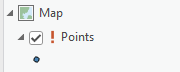
Selecting the exclamation mark opens the Change data source dialog so that the link to the data can be repaired.
I would like to see similar functionality in the ArcGIS Online Map Viewer that will allow for searching for a missing feature layer and repairing the link to the data source. Subsequent saving of the map would save any changes.

Good idea, right now AGOL shows a failed to add layer to map message for stuff like that but not a repair/change source indicator. This repair option would be very helpful instead of AGOL letting failed to add layers just being removed from your content.

Yes, this would be great. No more lost work!
PS - I believe this is possible in AGO Assistant. I am not fluent in it enough to know exactly how off the top of my head, but I am pretty sure I've done it.
Obviously, the click of a button you describe would be better either way 🙂

Similarly it would be nice to at least see the symbology of a broken layer (to remind myself what the symbol was before I remove the broken layer - until there is a way to repair the layer source anyway...). Anyone know of a way to see the symbology of a broken layer that I'm overlooking?
You must be a registered user to add a comment. If you've already registered, sign in. Otherwise, register and sign in.