- Home
- :
- All Communities
- :
- Products
- :
- ArcGIS Instant Apps
- :
- ArcGIS Instant Apps Ideas
- :
- Instant app Sidebar template: Option to change the...
- Subscribe to RSS Feed
- Mark as New
- Mark as Read
- Bookmark
- Printer Friendly Page
Instant app Sidebar template: Option to change the orders of the widgets on the left panel

- Mark as New
- Bookmark
- Subscribe to RSS Feed
- Permalink
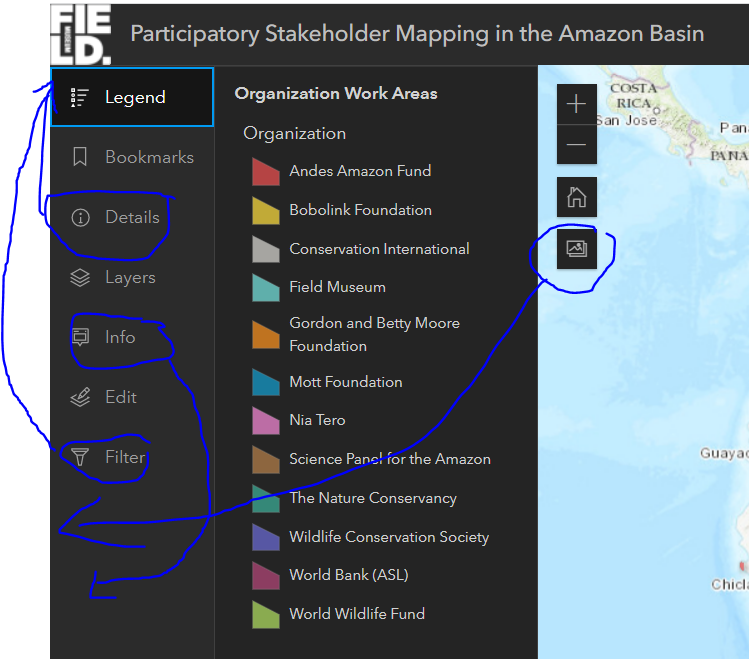
I am building an instant app using the sidebar template. I would like to be able to change the order of the widgets on the left panel. For example, I want the details and filter widget to be on top instead of at the bottom.
Also, I would like to move the screenshot widget from the map area to the left panel as well.
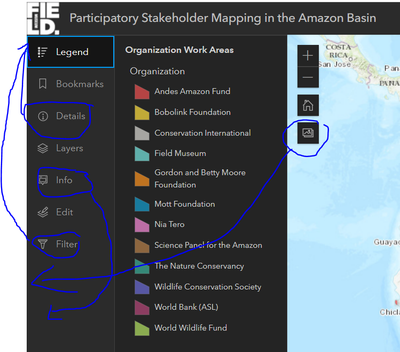

Yes please! I am attempting to rebuild an existing Web App Builder app using the Sidebar app, and part of that is trying to mimic the existing layout to ease the transition for users (the public). Being able to reorder the items would help a lot with that.


Have a big need for this!

I would also like the ability to re-arrange the widgets in the sidebar.
Also seems particularly odd that the 'Details' widget isn't at the top of the sidebar list as default (as even if the order is pre-defined I think having the details at the top would make more sense, as it's likely to be used to tell users about how to use the map or the other side bar tools).

@KatieQuantrell this is coming in the fall release of Arcgis Online. In that release you'll be able to update the order of the tools in the sidebar.
You must be a registered user to add a comment. If you've already registered, sign in. Otherwise, register and sign in.