Select to view content in your preferred language

2025 is Refreshing

753
10
03-17-2025 04:51 PM
ShannonCardoza
Esri Regular Contributor
3 10 753

Welcome ArcGIS for Excel Community!

What is one common task we do in the computer information or mapping industry; we are told to do this as basic troubleshooting or to apply the latest updates. If you guessed REFRESH, you are correct! It is more common than not to refresh a web page, refresh our map, or refresh to sync our data.  

Refreshing ensures that all the changes, updates, and modifications made by others are reflected in the current view. It helps to maintain consistency and accuracy, which are crucial for data integrity and decision-making. Additionally, refreshing can prevent potential conflicts and discrepancies arising from working with outdated information. 

Here is everything you need to know about the ‘refresh’ features in ArcGIS for Excel and how the workflows are defined. 

What can we refresh? 

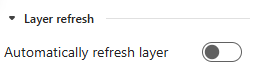
Layer refresh can be found under the Layer Properties tab. Toggle layer refresh on to automatically refresh the layer. Here you can manage settings and refresh intervals for live data layers, for example, live traffic. 
ShannonCardoza_0-1742255189343.png


The map refresh or Sync with ArcGIS can be found under the Map Data tab. You can sync the ArcGIS Online or ArcGIS Enterprise attribute table with the connected table in Microsoft Excel, as well as Sync pivot tables. 

ShannonCardoza_1-1742255189344.png

 It's important to mention that as you add a data layer to a map, the information added to the worksheet will refresh the map to load the new data. 

Conclusion 

In conclusion, the refresh features (map and layer) in ArcGIS for Excel provide a seamless and efficient way to keep your data and maps up-to-date. These tools enhance workflows and ensure that your visualizations are always accurate and current. 

10 Comments
ShareUser
Esri Community Manager

Thanks for refreshing my memory on excel, and helping me to learn about ARCGIS.online....

DougBrowning
MVP Esteemed Contributor

I have no Map Data tab at all?  @ShannonCardoza 

ShannonCardoza
Esri Regular Contributor

Good afternoon, @DougBrowning,

Thank you for the question! The map data tab will be 'activated' or 'appear' based on the data in the worksheet. See my interactions in A4E in this short video - 

Let me know if this matches your experience (fingers crossed).

Best,

SC

DougBrowning
MVP Esteemed Contributor

Oh well I was really just looking for a refresh button.  How do I do that to update the table in excel?

thanks

ShannonCardoza
Esri Regular Contributor

Hi @DougBrowning, so under the Map data tab, you have some options. Sync updated rows between your spreadsheet and the portal attribute table hosted in ArcGIS Online or ArcGIS Enterprise using Sync with ArcGIS. 

ShannonCardoza_0-1765928007453.png

I think this is what you were referring to but if not then you have found the correct blog to review for layer/map refreshing! To Add or Edit data, this blog maybe helpful.

All the best, 

SC

DougBrowning
MVP Esteemed Contributor

Yes that is the button but the issue is I have no Map Data tab show up.

DougBrowning_0-1765982153076.png


How do i get it to turn on?  thanks

ShannonCardoza
Esri Regular Contributor

Hello @DougBrowning , you have to highlight the row of data. 

ShannonCardoza_0-1766013766761.png

Hope this helps (and works)!

Best, 

SC

DougBrowning
MVP Esteemed Contributor

Still no.  Not sure what is up

DougBrowning_0-1766091178188.png


ShannonCardoza
Esri Regular Contributor

Good day @DougBrowning, that's interesting! Does layer exists in the TOC (the same layer is in TOC that I see in the map from your screenshot)?

One other mention to try is delete and re-add the layer, then check if the Map Data tab is there. If so, save and close the spreadsheet, reopen and see if the Map Data tab is still there?

-SC

DougBrowning
MVP Esteemed Contributor

Thanks but done all of that several times already.   Tried multiple computers as well.  Not sure what is up.  So close.  Thanks

Contributors
About the Author
Shannon has been with Esri since 2010. She is a Product Engineer on the ArcGIS for Microsoft 365 team with prior experience as a GIS Analyst and Support Service Representative for Esri's Support Services team. She holds an MBA degree from Grand Canyon University and a Business Management degree from the University of Redlands. As a Redlands native, she enjoys sharing the history of the town with others. In her spare time, you are likely to find Shannon enjoying quality time with her furbabies, tending to her mini farm, and traveling with her family.