- Home
- :
- All Communities
- :
- Products
- :
- ArcGIS Field Maps
- :
- ArcGIS Field Maps Questions
- :
- Field Maps and Power Automate, updates data
- Subscribe to RSS Feed
- Mark Topic as New
- Mark Topic as Read
- Float this Topic for Current User
- Bookmark
- Printer Friendly Page
Field Maps and Power Automate, updates data

- Mark as New
- Bookmark
- Subscribe to RSS Feed
- Permalink
Hello
I'm contacting you because I'm desperately trying to set up a workflow to receive an email notification when in response to a PB1 question, the user selects the "In charge" option (domain).
My layer is enabled for editing and keeps track of changes and users.
Thank you for your help
Beatrice


- Mark as New
- Bookmark
- Subscribe to RSS Feed
- Permalink
@HarryMoore - maybe you can help @BéatriceDUMETZ with what might be causing the issue?
Sean McGinnis - Principal Product Manager, ArcGIS for Microsoft


- Mark as New
- Bookmark
- Subscribe to RSS Feed
- Permalink
What is happening with that flow now? Will it run but not send the email, or not run at all? Also, you didn't include a screenshot of the yes/no conditions (Or I missed it). I have had trouble in the past where, when setting up a conditional with a domain field, I used the alias of the domain entry instead of the actual name of the domain entry, which you'd need to look at the domain itself to find. Maybe that is your issue?
- Mark as New
- Bookmark
- Subscribe to RSS Feed
- Permalink
I have a field map with a form that the company that does the rodent control in my sewer system uses in the field. There's a "problem" question (PB1). I want to receive an email when the company answers this question: "Network in charge" (In charge, selected from a list).
Either I receive no email, or I receive 150 emails without the required fields in my email. (My layer has 672 manholes to inspect.)


- Mark as New
- Bookmark
- Subscribe to RSS Feed
- Permalink
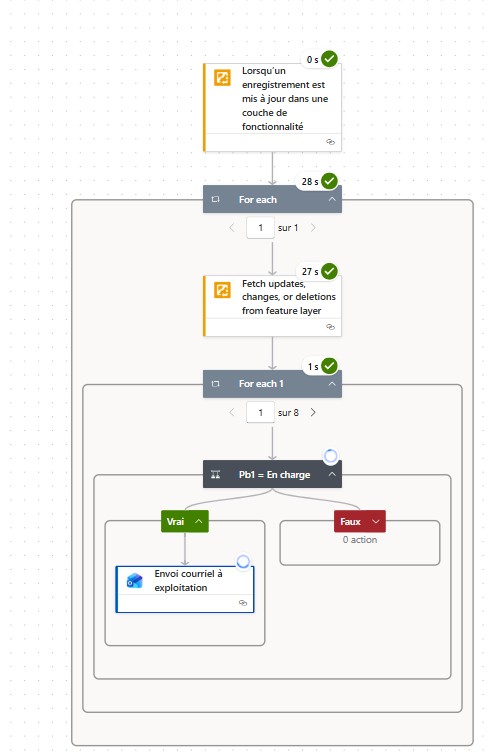
Hi @BéatriceDUMETZ - I looked through your flow and I think I know what might be causing the issue. The action you are using after the trigger appears to be the 'Get data from feature layer' action and not the 'Fetch updates, changes, or deletions from feature layer' action. Instead of getting the update you are expecting, you are getting the default 150 record response from a query against your layer. Here is a blog that can help you get the first steps configured correctly.
Please let me know how if that helps.
Sean McGinnis - Principal Product Manager, ArcGIS for Microsoft


- Mark as New
- Bookmark
- Subscribe to RSS Feed
- Permalink
Hi @BéatriceDUMETZ - unfortunately, it depends on a couple of factors. One positive, it seems like you are getting a smaller subset of information and not working with a default result set. The number of results would depend on the number of edits done within the window of the webhook firing. Can you take a look at the response that is coming from the 'Fetch' action? Are they the same edit repeated 8 times or are they a representation of the individual edits you have made while waiting for the webhook to trigger the flow?
Sean McGinnis - Principal Product Manager, ArcGIS for Microsoft
- Mark as New
- Bookmark
- Subscribe to RSS Feed
- Permalink
hi Sean,
Ultimately, my workflow seems to be working well; I received my first email yesterday. 😀
Thank you so much for your help.
I'm now moving on to the next step: retrieving the photo or PDF attachments and attaching them to the emails (knowing that I can have both, or even several of each). Do you have any advice for me?
