- Home
- :
- All Communities
- :
- Products
- :
- ArcGIS Experience Builder
- :
- ArcGIS Experience Builder Questions
- :
- Re: Web App Builder vs Experience Builder Function...
- Subscribe to RSS Feed
- Mark Topic as New
- Mark Topic as Read
- Float this Topic for Current User
- Bookmark
- Printer Friendly Page
Web App Builder vs Experience Builder Functionality

- Mark as New
- Bookmark
- Subscribe to RSS Feed
- Permalink
There seems to be quite a bit of functionality that has not or will not be replicated in experience builder. Here are some widgets I’m having problems reproducing their functionality in experience builder:
- Layer list/attribute table – the ability to open the attribute table from the layer list appears to not be possible in experience builder. You have to setup separate table widgets in experience builder for each layer. I think it was very useful for the user to be able to view records in the attribute table when necessary. You can also specify which layers in your map are viewable in the attribute table. I would love to see an example that proves me wrong!
- Select features – In web app builder, the user is given options on which layers to interactively select with the usual select by point, rectangle, polygon, circle, line, and lasso. In experience builder, the user can select using any of those methods but does not have any control on which layers are selectable. For example, if a user wants to only select plan ref’s for a given area, they will be returned those features plus any other layers that are turned on.
- Viewing selected feature details – Also within the select widget in web app builder, the user is given the ability to view selected records in a list and click through each one to view it’s popup details. The user is also given the option to pan, zoom, flash, export, view statistics, and view in attribute table. (see screenshot below) I really liked the flexibility of this widget. The “feature info” widget (2nd screen shot) in experience builder appears to be the closest reproduction of this, but the user is required to click through each selected record instead of viewing a list of all selected features.
- Draw widget – the web app builder widget gives the user the option to create text in addition to several other markup tools. The option to create markup text in experience builder does not appear to exist. This option is very useful for redlining areas in GIS that need corrections.


- Mark as New
- Bookmark
- Subscribe to RSS Feed
- Permalink
Hi @shildebrand
For your first question, it has been supported in the Map Layers widget:
https://doc.arcgis.com/en/experience-builder/latest/get-started/whats-new.htm

Try finding it in the View in Table data action configured in the Map Layers widget. One or more tables can be configured and you can add all layers in them:
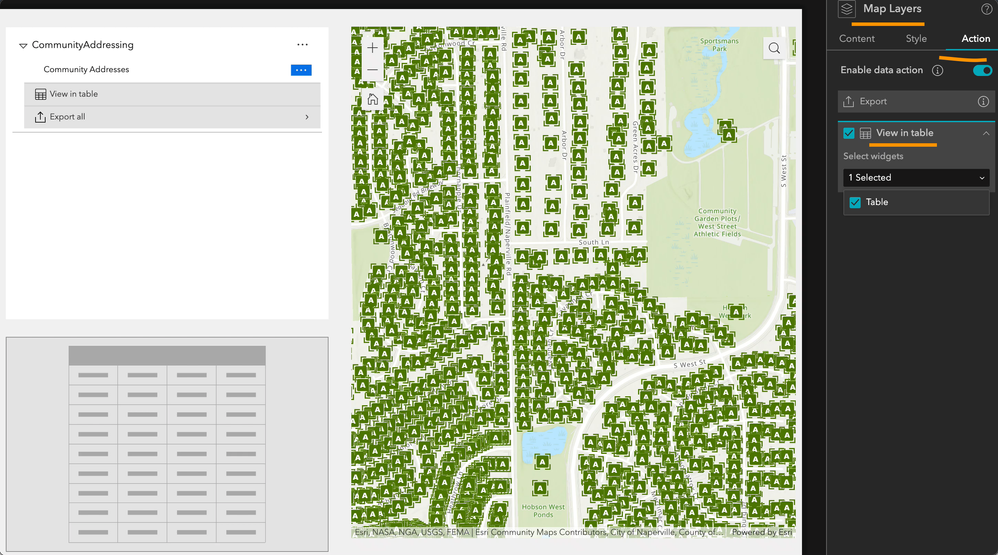
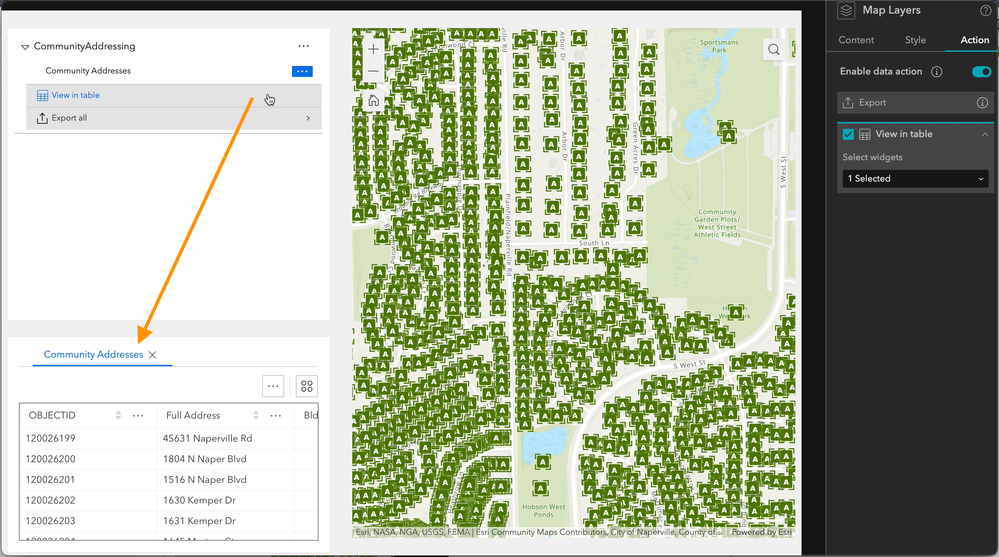
As for No.2 & 3 about the select behavior, the Map widget select tool provides basic & simple selection choices. More advanced functions are under evaluation.
For the Draw widget text symbols, we are currently communicating with the corresponding parties, who will evaluate the potential enhancement possibilities.
Thanks for bringing these up.
- Mark as New
- Bookmark
- Subscribe to RSS Feed
- Permalink
Thank you! This is definitely an improvement, but it's still lacking the functionality that web app builder provides. I cannot seem to find a way to select one or multiple records in the table and zoom/export those features. These options are available when you set up individual "sheets", but then those sheets are not linked to the map layers widget.
By the way, is there a way to collapse/minimize the table to the bottom of the map view, as it was configured in web app builder? I have multiple widgets setup in a vertical sidebar, but it appears that you cannot setup a second horizontal sidebar to hold the table.

- Mark as New
- Bookmark
- Subscribe to RSS Feed
- Permalink
I found in another post that improvements to the standalone select widget is on track for Q1 of 2024. Seeing that Portal 11.2 is out and doesn't have it, will there be another release in the next month?

- Mark as New
- Bookmark
- Subscribe to RSS Feed
- Permalink
The Select widget has been added along with the latest AGOL release. Let us know if you encounter any other issues, thanks.
Tonghui
