99% of our users do not have ArcGIS Online accounts, but rather Enterprise/Portal accounts.
The most common issue I encounter is a user entering their Enterprise credentials using the AGOL login. We train them not to do so and even mention that in the training materials, but it's still happening.
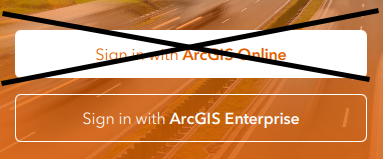
Every Esri app that I support provides the same login options when you first open the app (the example below is QuickCapture).
My question: is there a way to hide the "Sign in with ArcGIS Online" option for users that do not have AGOL accounts and will never have one?
I understand that both options are being used, but in our organization we have thousands of Enterprise users vs. a few dozen AGOL users.
I cross-post this on the ArcGIS Online question pages as well.
Solved! Go to Solution.
Hey @doronwen
There currently isn't a method of doing this, but there are outstanding ideas that need traction to gain some attention, this here is the link: https://community.esri.com/t5/arcgis-field-maps-ideas/mdm-deployment-to-hardwire-enterprise-url-only...
I would kudo and put in your use case and hopefully it will get noticed soon! I'll post this on the other post as well!
Cody
I think the problem is that there is no way for the app to know if a person will never use AGOL. Like if you open the app downloaded fresh from the app store, the app has no way of knowing if a person is never going to have an AGOL account, so therefore, it has to show both options.
With that being said, I believe a solution for this already exists when the app is managed through an MDM. I have personally never tried this before, but per Esri's technical whitepaper, you can pre-configure a Portal URL through the MDM and it will bypass the default display screen (where you select AGOL or Enterprise) and instead, will take you straight to the sign-in page of Portal.
You can find more information in this technical paper: https://support.esri.com/en-us/technical-paper/arcgis-mobile-apps-and-mobile-device-management-mdm-s...
Hey @RyanUthoff
Thank you for sending this paper, I had actually tried this prior with our current MDM system and Intune and it had unfortunately not ended up working for us, for me at least, once we had entered the information in, it still required the user to select sign in with enterprise, but the link was filled in, users still unfortunately continued without it.
I do think an MDM method would be the proper way, but there should be some type of switch or setting that can be flipped on the app after the first login, to enable only one being used. I wouldn't mind during our training to just flip the button on the app prior to giving them their devices.
Cody
Hey @doronwen
There currently isn't a method of doing this, but there are outstanding ideas that need traction to gain some attention, this here is the link: https://community.esri.com/t5/arcgis-field-maps-ideas/mdm-deployment-to-hardwire-enterprise-url-only...
I would kudo and put in your use case and hopefully it will get noticed soon! I'll post this on the other post as well!
Cody
I think the problem is that there is no way for the app to know if a person will never use AGOL. Like if you open the app downloaded fresh from the app store, the app has no way of knowing if a person is never going to have an AGOL account, so therefore, it has to show both options.
With that being said, I believe a solution for this already exists when the app is managed through an MDM. I have personally never tried this before, but per Esri's technical whitepaper, you can pre-configure a Portal URL through the MDM and it will bypass the default display screen (where you select AGOL or Enterprise) and instead, will take you straight to the sign-in page of Portal.
You can find more information in this technical paper: https://support.esri.com/en-us/technical-paper/arcgis-mobile-apps-and-mobile-device-management-mdm-s...
Hey @RyanUthoff
Thank you for sending this paper, I had actually tried this prior with our current MDM system and Intune and it had unfortunately not ended up working for us, for me at least, once we had entered the information in, it still required the user to select sign in with enterprise, but the link was filled in, users still unfortunately continued without it.
I do think an MDM method would be the proper way, but there should be some type of switch or setting that can be flipped on the app after the first login, to enable only one being used. I wouldn't mind during our training to just flip the button on the app prior to giving them their devices.
Cody
Hmm, that's odd. I'm not able to (easily) test the MDM myself, just going off what the technical paper said. Esri is claiming you can bypass the default screen, but also, I wouldn't be surprised if that is not correct or if the wording is misleading though. At least it provides a pre-set URL, which I suppose is better than nothing. But I also agree that it would be nice to bypass the default page completely.
Hey @CodyPatterson
I did find an Esri video where they did a demo that confirms that setting the portal URL within an MDM automatically opens the sign-in page when opening Field Maps. You can see how it works by starting at 24:00. I guess maybe that doesn't work for everyone like in your case though.
Hey @RyanUthoff
If I could get mine to do that, it would be an actual dream, I'll reach back out to Esri support and see if they can help guide me through it again, not sure if it's our MDM system or something else!
Cody
