- Home
- :
- All Communities
- :
- Products
- :
- ArcGIS Business Analyst
- :
- ArcGIS Business Analyst Ideas
- :
- Better infographic panel element control
- Subscribe to RSS Feed
- Mark as New
- Mark as Read
- Bookmark
- Follow this Idea
- Printer Friendly Page

- Mark as New
- Bookmark
- Subscribe
- Mute
- Subscribe to RSS Feed
- Permalink
When creating infographics you build panels. These panels can be of any shape and size, but they can also be saved to My panels for use in other places. Panels you have created in an infographic and then saved to My panels are annoyingly rigid, and do not re-format if placed in a new location.
It's already possible to set "Infographic padding" and "Table padding" from the Infographic template theme, but you can't set it (there at least) for a "Chart", and there is no control at all for a multi-element panel.
What I propose is a better system of control when creating panels, anywhere:
- A guide system - you should be able to add guides at specific offsets from the edges of a panel.
- The ability to snap to the guide system - If you have guides, that are for example offset from each edge to 5mm, you should be able to snap a new text box to those guides.
- If you set a guide to 5mm from an edge, you should be able to lock that offset, so that if you place the panel in a different sized space, the guide will always be offset from the edge by 5mm.
- Guides should be able to offset and lock from edges and panel centre lines.
- If you snap a text box to a locked guide, when you place the panel into a different sized location, the text box should re-size to remain snapped to the guides.
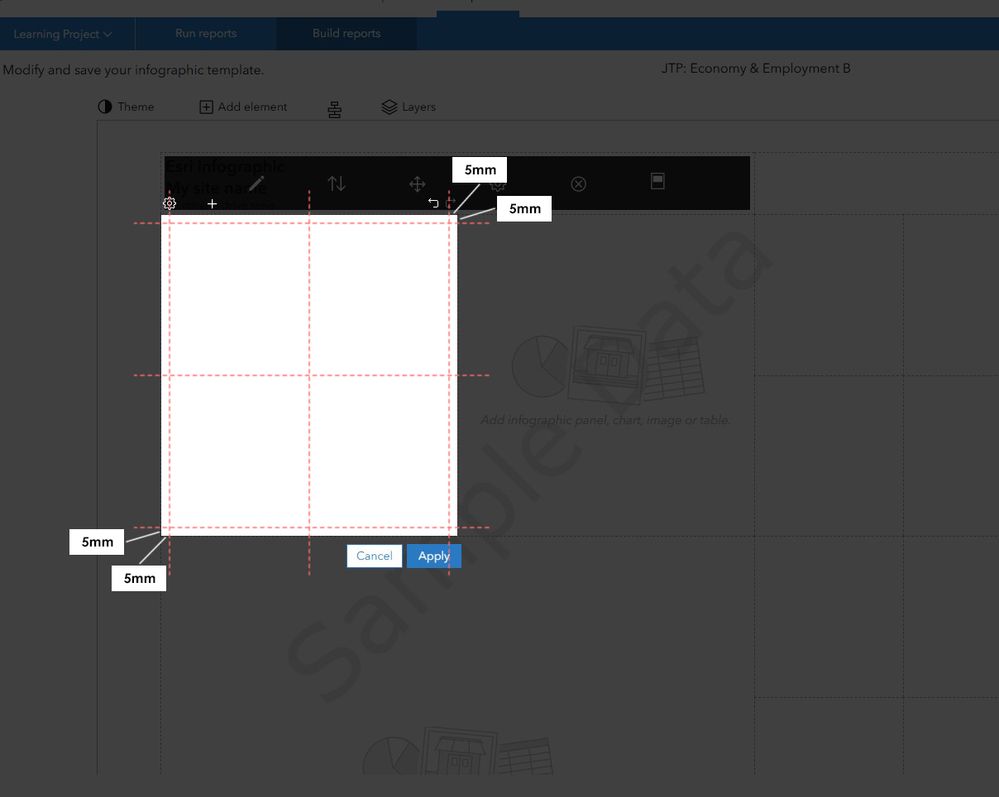
That would be so useful.


Hi @BillSands, thank you for the input! It sounds like the goal is to make the infographic editor more responsive, allowing for consistent padding and alignment that holds up even when panels are resized. We're definitely looking into ways to make professional design more automated and less manual. Thanks for helping us improve!
You must be a registered user to add a comment. If you've already registered, sign in. Otherwise, register and sign in.