Turn on suggestions
Auto-suggest helps you quickly narrow down your search results by suggesting possible matches as you type.
Cancel
- Home
- :
- All Communities
- :
- Products
- :
- 3D
- :
- 3D Questions
- :
- Trouble animating layers in ArcScene...time sensit...
Options
- Subscribe to RSS Feed
- Mark Topic as New
- Mark Topic as Read
- Float this Topic for Current User
- Bookmark
- Subscribe
- Mute
- Printer Friendly Page
Trouble animating layers in ArcScene...time sensitive, PLEASE HELP!
Subscribe
4209
2
03-26-2014 06:12 AM

03-26-2014
06:12 AM
- Mark as New
- Bookmark
- Subscribe
- Mute
- Subscribe to RSS Feed
- Permalink
Hello,
I'm trying to animate a couple of Arc Hydro Ground Water (AHGW) projects I made in ArcScene (I have already posted this in the Aquaveo AHGW forums but haven't gotten a response yet and I'm getting desperate for time!!). I've read and watched a number of tutorials on ArcGIS animation, but still can't find the answer I'm looking for. I want to make an animation where I show different layer attribute IDs fading in and out opposed to showing the entire layer all at once.
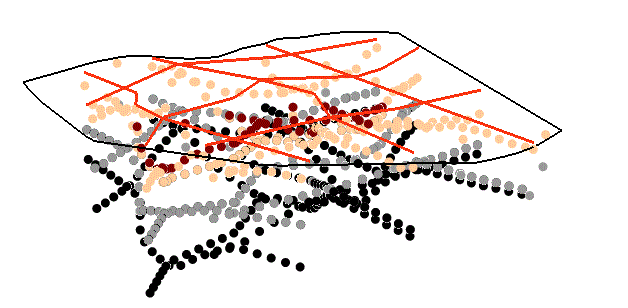
For example, I want to animate the Geosection to Points tutorial layers such as the Borepoints, GeoSection, Horizon rasters, and GeoVolumes where I show the borepoints for different horizons separately fading in and out, then the GeoSection, followed by the different horizon rasters, and lastly the Geovolume horizonIDs (see some of the representative screen captures I'd like to animate turning on and off).
I think what I want to do is make a Group Animation, however, when I do that, it shows every layer in the ArcScene project in its entirety, for example ALL the borepoints for different horizons, the entire GeoVolume (i.e., all three horizons at once), etc.. When I try to make individual keyframes of different layer attribute IDs (e.g., borepoints for horizons -5 through 7 independently), all I get is one track with 4 keyframes that are all the same, which is simply the last keyframe I made of borepoints for horizon ID=7 (I tried to upload a video where I captured a key frame of each of the borepoint IDs -5, 5, 6,and 7 selected and displayed separately, but apparently we can't upload videos?).
Your help would be greatly appreciated.
Thank you,
Stephanie
I'm trying to animate a couple of Arc Hydro Ground Water (AHGW) projects I made in ArcScene (I have already posted this in the Aquaveo AHGW forums but haven't gotten a response yet and I'm getting desperate for time!!). I've read and watched a number of tutorials on ArcGIS animation, but still can't find the answer I'm looking for. I want to make an animation where I show different layer attribute IDs fading in and out opposed to showing the entire layer all at once.
For example, I want to animate the Geosection to Points tutorial layers such as the Borepoints, GeoSection, Horizon rasters, and GeoVolumes where I show the borepoints for different horizons separately fading in and out, then the GeoSection, followed by the different horizon rasters, and lastly the Geovolume horizonIDs (see some of the representative screen captures I'd like to animate turning on and off).
I think what I want to do is make a Group Animation, however, when I do that, it shows every layer in the ArcScene project in its entirety, for example ALL the borepoints for different horizons, the entire GeoVolume (i.e., all three horizons at once), etc.. When I try to make individual keyframes of different layer attribute IDs (e.g., borepoints for horizons -5 through 7 independently), all I get is one track with 4 keyframes that are all the same, which is simply the last keyframe I made of borepoints for horizon ID=7 (I tried to upload a video where I captured a key frame of each of the borepoint IDs -5, 5, 6,and 7 selected and displayed separately, but apparently we can't upload videos?).
Your help would be greatly appreciated.
Thank you,
Stephanie




2 Replies

by
Anonymous User
Not applicable
03-28-2014
03:18 AM
- Mark as New
- Bookmark
- Subscribe
- Mute
- Subscribe to RSS Feed
- Permalink
Original User: jbswain
It should be possible through the group animation to fade in and fade out between layers. The key will be to sync that in to different movements. Here is some help that discusses it further. You are on the right track the group animation is the right way to do it. Here is also a video that should help.
It should be possible through the group animation to fade in and fade out between layers. The key will be to sync that in to different movements. Here is some help that discusses it further. You are on the right track the group animation is the right way to do it. Here is also a video that should help.
03-28-2014
09:19 AM
- Mark as New
- Bookmark
- Subscribe
- Mute
- Subscribe to RSS Feed
- Permalink
Thanks Jeff. I've already looked at both the tutorial you posted and the video. I think I've figured it out myself, or at least have found a work-around.
Stephanie
Stephanie