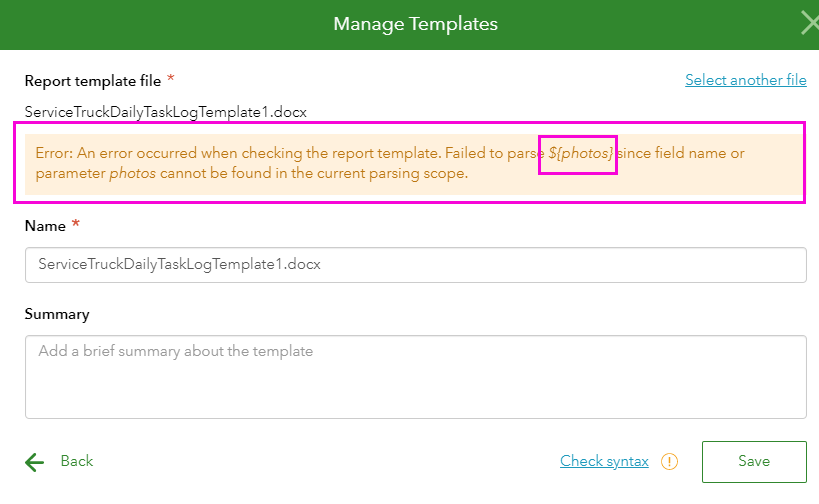
I am trying to create a report that will put the repeats in a table row by row (this works fine), but then I want to place the pictures that are taken within the repeats at the end of the table. I think I am following the syntax examples correctly. When I try to load the report template with the photos portion, it gives me an error ‘Failed to parse ${photos} since field name or parameter photos cannot be found in the current parsing scope’.
When I do it without the photos portion, it works fine. Probably a syntax problem but I cannot figure it out. I have attached some screen shots and the xlsx form and report template.
Using Connect 3.10.323
Thanks, Elizabeth
Hi @ElizabethHovsepian thanks for providing your XLSForm and report template.
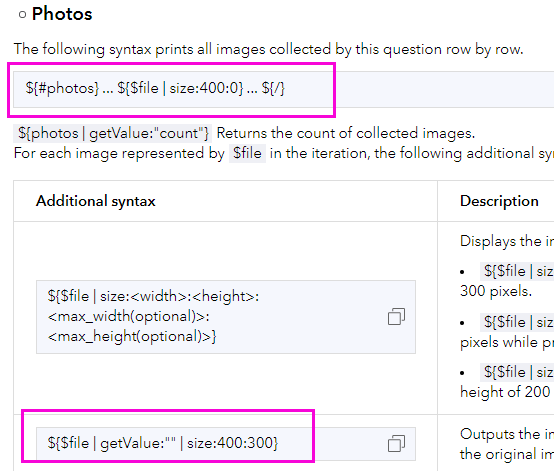
The photos question is inside the tasks repeat, so in the report template this question must be placed inside the repeat's start and end tags (noting that if your repeat is in a table, the start and end tags must be in the first and last cells in the table, respectively).
Please find attached an example report template showing a couple of options:
For more information, please see the section on repeats in the Report templates documentation.
Hope this helps. Best, Jim
Hi @AirX ,
Sorry for the late reply. It is possible to dynamically add pages. Before the open tag ${#individual_entry} and close tag ${/} is the content that will be repeated for each entry.
So you can use:
${#individual_entry}
Use field within repeat: ${dot1}
Use field outside repeat: ${$layers[0].pavethick}
page break
${/}
The generated report will look like this:
---On the page 1---
Value of dot1 in the 1st repeat instance
Value of pavethick
---On the page 2---
Value of dot1 in the 2nd repeat instance
---On the page n---
Value of dot1 in the nth repeat instance
Currently, you placed ${individual_entry} and ${/} in the same table cell, so the content between these tags will be repeated within this table cell only. The best practice is to use the open and close tag to wrap the entire section that you want to repeat for each entry. In my pervious reply, although I didn't produce the result your expected, you can still reference it to update your template.
This is the template:
This is the generated report with 2 individual entries:
Thanks,
Ruth
Ruth,
Ok, the main thing I am trying to accomplish is if it's possible to DYNAMICALLY add pages when needed if a repeat is used in the survey. (Add another page for each repeat so we do not need a report with a bunch of blank pages if not needed). The section you have highlighted in yellow has a mix of info that IS and IS NOT contained in the repeat.
I have checked with our developer if multiple ${imageQ} are written continuously, we may not be able to extract the template tags correctly. To fix the image exporting issue, please split multiple ${imageQ} with spaces or line breaks. Or you can use different font styles for them like the screenshot below:
I am not quite sure about "all the individual entries are being exported together on the same page entry". I guess you may want to repeat the highlighted section for each individual entry and I have included a modified template and an exported report for your reference.
If this is not the case, please let me know what is your expected output.
@Ruth_JiatengXu,
We are gettin close! I do have images that exist in those instances. I have updated my template using your doc and got past the errors although now the report has exported with no images and all the individual entries are being exported together on the same page entry. (I hope this makes sense)
KP
When no image exists, the syntax ${qname|getValue:""|size:420:0} raises an error. You can use ${if qname}${qname|getValue:""|size:420:0}${/} to pass an empty image question. Please check the updated template "images.docx".
The repeat syntax can also be used to repeat an entire section, in case you want to repeat the middle part of your template for each individual entry. I include another template "repeat.docx" for your reference.
x
Jim,
Thanks for your response I got that info entered but seem to be encountering some parsing errors with questions not located within the repeats.
Hi @AirX
You can display each repeat record on a new page by adding a page break inside the repeat block. For example:
${#my_repeat}${first_question_in_repeat}${second_question_in_repeat}...etc...${last_question_in_repeat} <Page break goes here>${/} <Repeat's closing tag will be on the first line of the next page of the template>
cc: @RuthJiatengXu
Hello, @Jim-Moore. I'm hoping to piggyback off this thread. We have a survey and report template that we are trying to update using repeats. Our current survey for capturing found utilities uses multiple groups of questions if more than one utility is found then we have separate templates for findings I.E. (1 utility, 2 utilities, 3 utilities, etc.) I hope to simplify this using repeats and having our report template output our findings dynamically EX. having PG1 of our template add another page(s) if multiple utilities are encountered instead of using multiple templates for more than one utility.
Thank you, Jim. I got it to work as needed. Thanks for giving me the example for the 2nd type.
Elizabeth
Membros conectados podem postar, seguir atualizações e mais. Novo aqui? Registre uma conta gratuita.
Find useful guides, FAQs, and documents to help you navigate and make the most of Esri Community.