https:\/\/www.brentozar.com/blitz/dbcc-checkdb-not-run-recently/<\/<A>. Em resumo, Checkdb executa v�rias verificaes internas no banco de dados para identificar poss�veis corrups e outros problemas. Portanto, o bom executá-lo de vez em quando para evitar tais problemas.<\/P><\/<\/>H3 id="toc-hId-942184022">Validar as Avaliaes<\/>H3>P>o � til validar as avaliaes antes de tomar a��o porque, por v�rias razoes, as informaes retornadas podem ter imperfei extasciitildeoes ou exigir algum julgamento. <\/><\/>For example, in the "Instance" category below, there are 2 "Critical" Memory Pressure Warnings evaluations, but the Memory Pressure evaluation is only reporting "Informationals", not "Warnings" or "Criticals".<\/><\/> <\/><\/>In this case, the situation is explained by the fact that there many different indicators of memory pressure. At any given time, and over time, they do not necessarily all point to the same conclusion. Thus, you must weigh the related information before concluding that action is warranted (and what action is warranted).<\/><\/>In other cases, the evaluations may benefit from your judgement about the detailed information provided in the findings sheet. For example, this detail about "Long Elapsed Time Queries" has surfaced that there are some queries that spend very long time in SQL Server.<\/><\/>
 <\/><\/>In the first row, there is a query which has an average duration of 72 seconds (third column). However, it has only be executed 6 times in the period for which these statistics support.<\/><\/>Egdbhealth does not know the period of the statistics (perhaps they were just flushed a few moments ago). And, egdbhealth does not know if 6 executions is a lot or a little. Here, it is more than other queries, but it is not many in absolute terms. Finally, egdbhealth does not really know what "slow" is for this particular query. Perhaps this supports a "batch" process that is expected to take a long time. To make this determination, you would scroll over to the right (not in this screen capture) to view the SQL statement to see what the query is doing. Then, you can make an informed judgement, based on how your system is used, and the reasonable expectations that users have for its performance, about whether or not these queries with "long elapsed times" are ones that should be actionable for you.<\/><\/>Try to Resolve the Evaluation<\/><\/>Your understanding of the evaluation will guide your efforts to address the problem. In some cases, such as the one below, egdbhealth will point to Internet-based resources that will help you plan and carry-out the actions.<\/><\/>
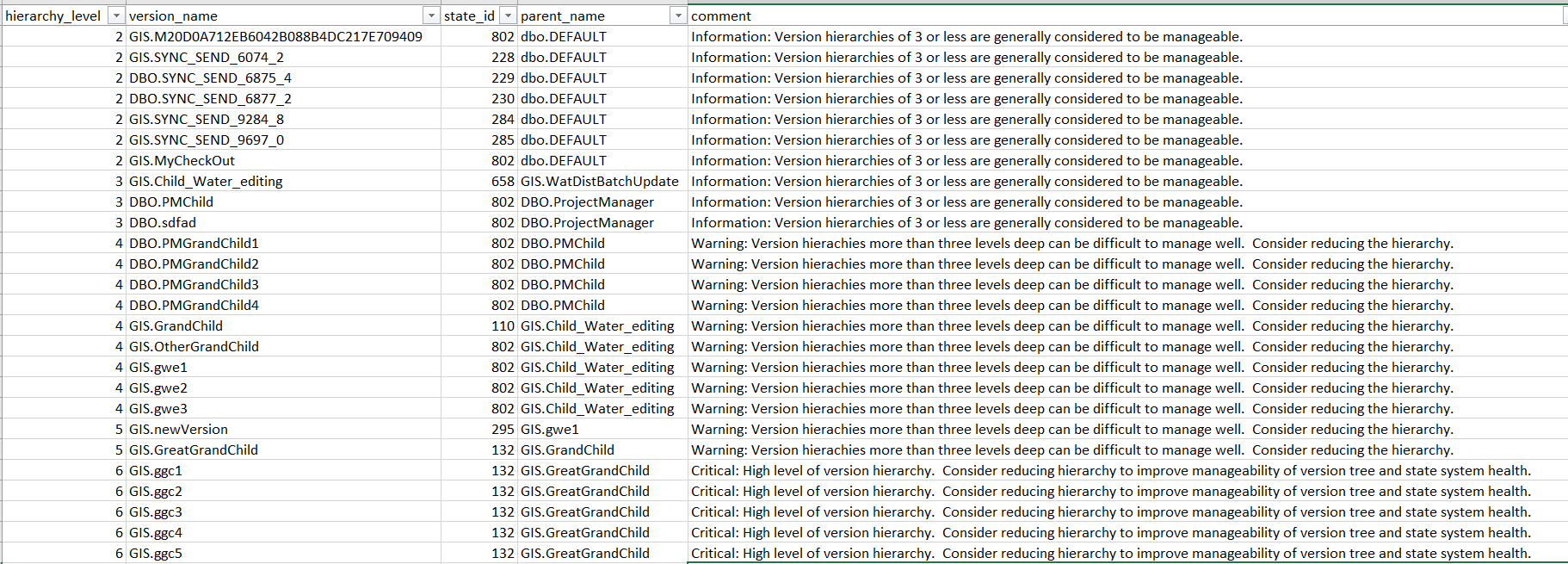
 <\/><\/>In this case, egdbhealth recognized that the SQL Server instance is running on virtual hardware. In the case of VMWare (and perhaps other platforms), best practice advice suggests that the minimum server memory and maximum should be set to the same value. Once you understand it, this change is relatively straight-forward to make and may require only a brief consultation with the virtual machine platform team to confirm that it corresponds with best practices in their minds also.<\/><\/>In other cases, egdbhealth's guidance will be more oblique and you will need to rely upon specialists within your organization, Esri Technical Support, or your own Internet research to come up with an action plan. <\/><\/>Sometimes actions will involve changes that will take a considerable amount of organizational and/or system change. In the example below, egdbhealth is suggesting that the performance of the versioning system could be improved by having less hierarchy in the version tree. Changing the way versioning is used by an organization is a major undertaking that requires planning and time. In this case, you can expect to spend time planning changes, socializing them within your organization, and then carrying it out.<\/><\/>
 <\/><\/>Validate the Resolution<\/><\/>Running egdbhealth again, after your initial efforts to resolve the evaluation(s) will effectively validate whether or not your efforts succeeded. Note that, when you run egdbhealth again on the same eGDB, the prior Expert Excel file is placed in the "archive" subdirectory for your reference. (The Content Excel file is not re-created, because its information is less volatile.)<\/><\/>Naturally, you hope to find all of the "Criticals" or "Warnings" that you addressed have disappeared in the new Expert Excel output. And, this can be expected where you have correctly understood the problem and taken effective action.<\/><\/>For example, a finding such as the one below (that the most recent compress failed) will be resolved in the "OVERVIEW_EXPERT" sheet as soon as you address the problem. In this case, as soon as you successfully compress and re-run egdbhealth, this evaluation will be resolved.<\/>
 <\/>
<\/>
<\/P>
 <\/P>
<\/P>
<\/P>
A planilha de detalhes e outras planilhas na categoria Versioning ilustrare3o que sua compresse3o recente ne3o ocorreu durante o hore1rio comercial (se esse for o caso). Assim, vocea resolveu a avaliae7e3o. E, com o tempo, egdbhealth permitire1 que ela concorde. <\/P>
<\/P>
Finalmente, vocea descobrire1 que algumas avaliae75es s03o vol
til. Em execu75es repetidas do egdbhealth, elas parecer3o estar presentes ou ausentes sem rela75es com suas a75es especdficas. Por exemplo, a avalia75 abaixo relata a porcentagem de registros da tabela base que est3o nas tabelas delta (A e D tabelas). Onde essas porcentagens so altas, oferece uma avalia75 negativa.<\/P>
<\/P>
 <\/P>
<\/P>
<\/P>
A acão que você pode ter tomado em resposta é comprimir o eGDB. A eficácia dessa ação, no entanto, dependeria da reconciliação e postagem que está ocorrendo no sistema. Portanto, se não houve nova atividade de reconciliação e postagem, a compressão não teria alterado a avaliação. Por outro lado, se houve atividade de reconciliação e postagem, ou se uma versão muito antiga foi excluída, a compressão pode ter resolvido muitas das constatações. Também é verdade, no entanto, que mesmo com as reconciliações ideais, postagens e compressões, os editores podem estar gerando mais atualizações que estão populando as tabelas delta ao mesmo tempo em que você está despopulando-as.<\/P>
<\/P>
O exemplo Memory Metrics discutido anteriormente neste artigo é outro caso onde você pode esperar volatilidade nas avaliações. Isso ocorre porque os indicadores de pressão de memória serão acionados por diferentes condições no banco de dados. Seu julgamento informado será necessário para determinar se as avaliações recorrentes indicam um problema que precisa de mais ação.<\/P>
<\/P>
O ponto é que o objetivo de tomar uma ação não é necessariamente alcançar um relatório limpo com nenhuma avaliação negativa. O objetivo deve ser ter apenas as avaliações apropriadas para seu sistema. No processo, você terá aprofundado sua compreensão do seu sistema eGDB e oferecido muitas melhorias tangíveis aos usuários desse eGDB.<\/P>
<\/P>
Resumo<\/H2>O principal objetivo do egdbhealth é ajudar os administradores a entender e melhorar as características de saúde dos eGDBes. Focando na saída do arquivo Expert Excel e priorizando sua análise com base no esquema de classificação Critical/Warning/Informational, você pode abordar os aspectos de um eGDB que mais precisam de investigação. Algumas das avaliações oferecidas pelo egdbhealth podem exigir vários tipos de pesquisa para entender e determinar um curso de ação. Colegas, Suporte Técnico Esri e recursos da Internet podem ser usados para construir seu conhecimento. Quando você tomar medidas para melhorar a saúde do seu eGDB, certifique-se de executar o egdbhealth novamente para validar e documentar seu progresso.<\/SPAN><\/P><\/P>Espero que ache isso útil, nã hesite em postar suas perguntas aqui:




