A couple of years ago, I read this great post from @IsmaelChivite: Survey123 Tricks of the Trade: Quick guide to modernize HTML formatting tags in your survey. It explains how to use html in Survey123 including how to change the font color of choices in a list. I've done this quite a bit but, I just discovered that the html code is written to the label for each choice in the feature layer. I don't want this. I'm now considering no longer using html for choices in a list.
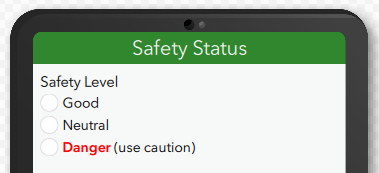
I've attached an XLSForm for a simple survey that demonstrates what I'm talking about. Here are some screenshots. The survey looks good:
The displayed labels are not ideal:
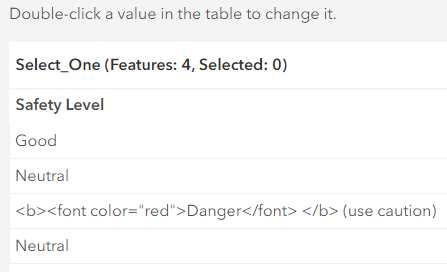
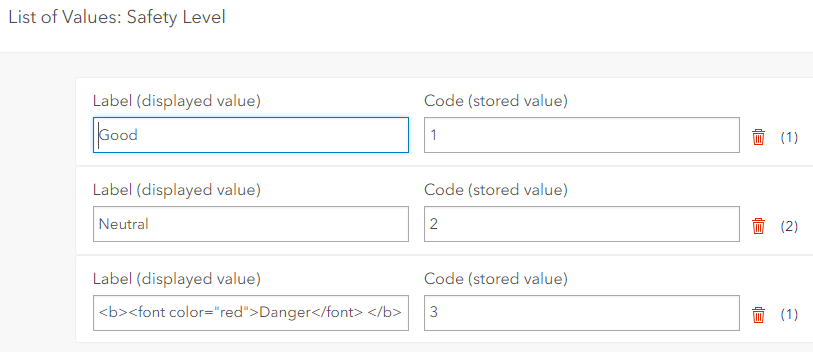
I suppose that I could modify the label, but this isn't a solution. I think I have 15+ choices in multiple lists that use html. And I'd have to remember to do this every time I publish the XLSForm for the first time.
The comments in this html formating select one list post from Nov. 2021 mention the same issue. The post is marked as Solved, but no action was taken on the comments.
If html is going to be recommended for choice lists then I think that issues like this should be fixed or at least disclosed. I was also hoping to use html in constraint messages as well but that doesn't appear to be fully supported.
I'm using Survey123 Connect 3.18.124.
Thanks, Chuck




