This is kind of an update to this idea from 2013--I thought it might warrant a new post since the original post references ArcMap and implementing a feature that now exists.
I would like to be able to specify where a leader line connects to the text it's coming from by using the points on the bounding text box. This could be an option in the Callout section of Format Text Symbol properties, similar to how you can specify an anchor point on a text element in a layout.

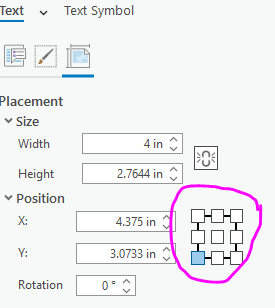
As I'm doing more work with annotations, I'm finding that the auto-placement of leader lines is lacking. If I don't want the leader line connecting to the text in a weird way, I have to place it somewhere that is not ideal relative to the feature it's pointing to or other elements in the map.
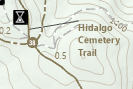
For instance, with the label above, the leader line is automatically placed in the upper left corner and pointing above the text. It'd look better if the line connected to the point in the middle of the left edge (to the "C" in "Cemetery") but to do that I'd need to move the text up, which would obscure the service road (gray dashed line) running above the label. If I could just set the line to connect to the center point, it would save me whole lot of time moving the text around in different places in the hopes that the line will magically snap to where I want it!









