While we have tried several times, we do not use the ArcGIS Visual for one reason: Interaction between Power BI visuals and ArcGIS data requires users to open the Join layers interface. In my organization (and another I collaborate with) we have found this to be a significant encumbrance for end users. The more natural method would be to use the normal selection tool with the active layer assigned to the ArcGIS layer. What makes matters more confusing is that the normal selection box appears to support interaction with the ArcGIS layer, but it does not!
Take a look: Everyone I work with assumes they can interact between ArcGIS and Power BI visuals when the normal selection dialog - why wouldn't they?. Then they get frustrated and assume the ArcGIS visual is mal-functioning when they discover they cannot interact through this method.
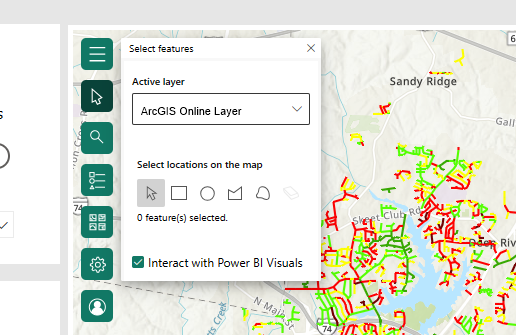
This is the 'normal' selection tool. It appears to support interaction between an ArcGIS layer and Power BI visuals, but it does not.
Here's a video I made to show users how to interact between ArcGIS and PowerBI visuals. It has NOT convinced anyone that the requirement is easy for the typical user. The dialog box that is open looks remarkably similar to the selection dialog displayed above. Why have this???? Why not make it so interaction can occur with the normal selection interface????



