Hello everyone,
I recently moved from working with ArcGIS Pro 2.9.5 to ArcGIS Pro 3.1.3.
I have noticed one error/ bug.
In my data, in some of the places, the points are not exactly on top of the line. The data are migrated to UN with the help of FME. The data is correct in geometric network. However, in ArcGIS pro, it seems like the point is not on top of the line, when it is really zoomed in.
When I perform a Connected Trace from this line, the point is not selected. Hence, it is a problem. It looks like the data is not correctly configured, but this was not a problem in old version of ArcGIS PRO.
This does not give any dirty Areas.
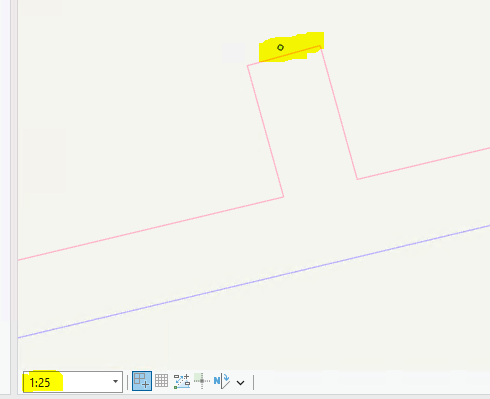
Has anyone else encountered the similar Problem? Is it a bug from this PRO version?
It would be great if I could get an idea regarding this issue.
Thank you in advance
-Shlesha



