皆さん、こんにちは。
こちらのブログ記事を参考にしています: https://www.esri.com/arcgis-blog/products/arcgis-online/mapping/introducing-related-record-editing-in-map-viewer/
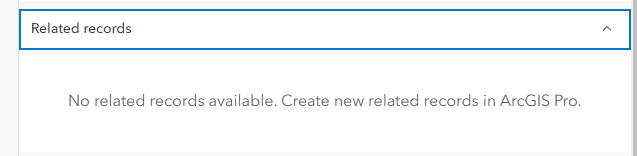
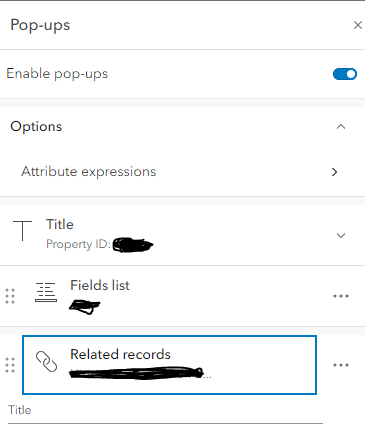
フォームの下部に新しい「関連レコード」要素が表示されています。ところが、下向きの矢印をクリックして展開すると、「利用可能な関連レコードはありません。ArcGIS Pro で新しい関連レコードを作成してください」と表示されます。
でも、関連レコードはありますし、ポップアップに表示されるよう設定もしています!
ということは、これはバグでしょうか?同じ問題が起きている方や、解決方法をご存じの方はいらっしゃいますか?
ありがとうございます。
Andrea
Alright, from taking a look at the service you sent me @AndreaB_ you actually have relationship configured where the table is the parent and the feature is the child.
Currently this is not supported in AGOL, but may be something we consider adding support for in the future. I would suggest swapping the order of the relationship so it goes from feature - table. Thanks!
Thanks. Here is the new idea post I created: https://community.esri.com/t5/arcgis-online-ideas/map-viewer-forms-related-records-support-for-table/idi-p/1348931
Yeah, so in a simple relationship the table record will remain but I should have said - the foreign key will be changed to Null, introducing errors into the foreign key field. Understandably more of a problem with 1:M not so much in a 1:1, but still. I tested it with my data and a table record with the foreign key field changed to Null wouldn't help much if you were trying to tie it back to your data for some reason. That Esri documentation on this was helpful - https://pro.arcgis.com/en/pro-app/3.1/help/data/relationships/relationship-class-properties.htm
Thanks again!
Hi @Andrea,
could you provide additional details?
Are you referring to a feature-to-feature or feature-to-table relationship?
Hi @EmilyGeo,
Thanks for the reply. It is a feature-to-table relationship. I was configuring the form for the parent feature.
Is this a 1-1, 1-M, or M-M cardinality @AndreaB_
Also, would you be able to share your data with us so we can take a closer look
Hi @bbollin,
This is a 1-1. Thank you.
Thanks for figuring that out. I think we have our geodatabase relationship set up table as parent and feature as child to preserve the table records in case the feature is deleted - as described in this best practice help documentation. https://pro.arcgis.com/en/pro-app/3.1/help/data/relationships/relationship-class-properties.htm
For this particular case, I was just testing the new AGOL functionality and I'm not sure our workflow would use hosted feature services and editing features in that hosted relationship. I think if we need this functionality it would be more likely an Enterprise Portal related data feature service in an AGOL map. So we await that future enhancement to be available some day.
I would add my strong support for table - feature relationships in AGOL also. Is there an Idea already posted somewhere that you know of?
Thanks!
@AndreaB_you should be able to achieve the same deletion prevention by making it a simple relationship, not composite. The latter will delete any child features when the parent is deleted, the former (which is the default choice) only deletes the parent feature.There is not an idea already that I am aware of. I'll pass the feedback to the team as well, but creating an ideas post in AGOL would be great to gain more traction.
I'm having this same issue, but I believe I have the relationship configured with the feature as the parent. Would you be able to assist me with this?
@MDB_GISWhat is the relationship and how did you set it up in Pro?
It's a one to many relationship and I did set it up in Pro.
@AndreaB_ were you able to configure portal related data feature service in AGOL map? attempted that but limited success on my end.
when using portal related data feature service in AGO map, in the form builder, i dont see the "related records" section to configure the form for the related table.
Hi @AnatoliHailemariam, I didn't go further with this yet because we have to change the direction of our Related tables. We have it related from the Table to the Feature Class and it doesn't work that way. I confirmed it with Esri tech support. So when we change our relationship class direction (to from Feature Class to destination - Table) then it should work. So look at the direction of your relationship class.
Tnx @AndreaB_ I understand the direction matters and inmy case the origin is the feature and destination is table. to be clear here are the steps I took
1. create relationship class in pro ( feature origin and table destination : one to many )
2. published that to portal for arcgis 10.9.1
3. add the url of that published feature layer with related table in AGOL map ( not portal map)
4. go to forms section in agol map and no related records as it is shown in my screen capture of previous comment
on the other hand
2. publish it to AGOL
3. add the url of that published feature layer with related table in AGOL map
4. go to forms section in agol map and now I am able to see the related record section and ready to config the form
So, using portal hosted relationship class in agol map to configure form ultimately to edit the relationship isn't supported?
I've done every combination of things mentioned in this thread, in both parent-child directions, with all combinations of relationship type, with both a published map and a fresh map after publishing a hosted layer, after recreating the relationship umpteen times, and I still get "No related records available. Create new related records in ArcGIS Pro", despite seeing the related records in the popup.
I am repeatedly coming to the conclusion that the esri ecosystem is hot garbage.
@CPB_CBcan you send me a direct message and share your test case or log a support bug? If you see the related records in the pop-up, the form builder will allow you to add them.
Hi,I am having the same exact problem that this thread has not been able to solve. Any updates on if this will be getting solved anytime soon?I can see that I have related records and they show up in the popup but then I get this message (see attached) which says that I dont. How do I get around this?
Same here. Related Tables are busted in so many ways that it's difficult to pin down any single method that works.
At first I thought it was just many-to-many relationships that don't show up, but even adding a simple one-to-one relationship, I can't navigate the records from the source and destination the way I'm supposed to be able to.
There are also a minefield of posts from the last 5 or so years expressing similar frustrations. It seems this is something ESRI breaks pretty often. That's really unfortunate, because setting up relates like this is the easiest thing in the world in any other RDBMS, and is the basic scaffolding that allows us to enjoy the benefits of an RDBMS. ">😫
Hi @SaraWazir,
This looks like it is working correctly. This message you highlighted on the screenshot on the right is an alert -it means you already put the related records element in the form, and there are no more to add.
The element highlighted on the left side if the screen indicates that you have placed the related records element on the bottom of the form.
That means the related records appear at the bottom of the form when you update an existing feature, like so:
Hello all,
I have a similar problem.
I have 2 feature layers (Inititatives and Fairs) with a M:N relationship in ArcGIS Pro.
I've published the map with the three elements in AGO.
The map is inside a Experience Builder app.
Then the app in embedded on this website https://italyworldsfairs.org/world-s-fairs-network
I added the map in AGO to my ArcGIS Pro project.
I've added three relations, then erased two records.
Now on ArcGIS Pro project the map shows correctly 1 record in the relation table and in the pop-ups.
But in the same map visualized in AGO and in the web app, there are still the two related records that I erased, while in the feature layer in AGO, under data, the table for Initiative shows 2 related records, then in the related table on the right there is 1 record (there should be nothing related)....
How is this possible?
I attach all screens.
Any help is very welcome, thanks
The solution that I found is creating the points for Fairs and Initiatives in the web map and the relations from there.
If I use ArcGIS Pro, or from the data table ofthe feature, or another map with loaded the same feaures, it's a mess
今日は2026年11月10日ですが、私の読み取りが正しければ、この問題はまだ解決していないのでしょうか?ここで皆さんが抱えている問題は、どれも私も同じです。AGOLでは利用できるはずだと表示されますが、実際には利用できません。
私の問題は、関連テーブルで施設の新しい記録(点検など)を追加できないことでした。
@SpreaficoAlessandra最初から作成しましたか?それとも、レイヤーを用意して、そこから関連テーブルを作成しましたか?
ログインすると、投稿したり、更新をフォローしたりできます。初めてですか?無料アカウントを登録しましょう。
Find useful guides, FAQs, and documents to help you navigate and make the most of Esri Community.