Hello,
I'll try to keep this short. I represent a large goverment organisation in Sweden. I am a GIS coordinator for the user side of the organisation and of my daily tasks is to recommend best practices, to keep performance up within the typical large organisation restraints (central SDE, network drives)
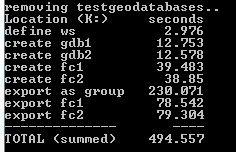
I have a benchmark script that does this:
1 - creates two file gdbs at the same location (arcpy.CreateFileGDB_management x 2)
2 - creates two empty featureclasses in one of them (arcpy.CreateFeatureclass_management x 2)
3 - exports both featureclasses with one command (arcpy.FeatureClassToGeodatabase_conversion(fcs))
4 - then exports them both again, this time one by one
When I do this on my local harddrive, i.e. my computer, it takes around 10 seconds all together to execute the script.
When I run the script on a network drive, it takes upwards of 8 to 10 minutes (!!!!!)

Where do I start? Any good resources I should read? I am not a windows network specialist and I have no idea why it is like this. Any feedback is greatly appreciated, thank you.






