This is Part 3 of a series of Q&A around customizing Print widget and printing service. For context, Part 1 and Part 2.
So far...
- COMPLETE - Managed to publish custom print services with custom layout templates that meet my needs.
- COMPLETE - Managed to hook the print widget into that service and limit user input to a choice of "layout template" and "output filename'.
- Question: What's the use of taking user input for an output filename if the printResultDijit's url is linked some gobbledeegook PDF in the print service output directory ? I've not been managed to tell the print service what kind of file names it should generate for the printing output. Is that possible?
 The "My Favorite Output" link actually takes you to some PDF with a very different name.
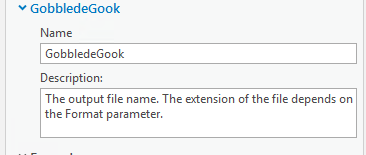
My understanding of the Share as Web Tool menu is that the parameter Output File does not actually specify the name of the file that will be generated but rather than name of the variable for that name??
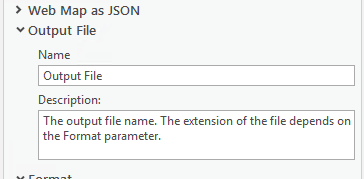
If I enter "gobbledeegook", that actually changes the name of the parameter...
Long story short, how can I turn a download link such as:
arcgisoutput/Custom_GP_Services/MyGPService_GPServer/_ags_ea388fcde7ab4bb498c2004ee55ec796.pdf<SPAN class="line-numbers-rows"><SPAN></SPAN></SPAN>
into something like
arcgisoutput/Custom_GP_Services/MyGPService_GPServer/no_gobbledeegook.pdf<SPAN class="line-numbers-rows"><SPAN></SPAN></SPAN>
or - if that's not possible - at least:
arcgisoutput/Custom_GP_Services/MyGPService_GPServer/no_gobbledeegook_except_ags_ea388fcde7ab4bb498c2004ee55ec796.pdf
<SPAN class="line-numbers-rows"><SPAN></SPAN></SPAN>


