AGS/Portal 10.7.1
New to Arcade.
I've published an image service (with features enabled so I also get a feature service) containing a parcel polygon layer, a polygon layer of City Lots, and a table with Owners info. Data is referenced from a registered geodatabase. The popup for Parcels I successfully configured in Arc Pro doesn't work in Portal so I added the feature layer to a map and have been trying to fix the Arcade expressions. I have one expression successfully intersecting Parcels and City Lots returning city lot numbers, but the one where I try to "join" Owners to Parcels isn't working. I used this Esri blog as a starting point.
<SPAN class="comment token">// Parcel number of the selected feature in Parcels layer</SPAN>
<SPAN class="keyword token">var</SPAN> ppn <SPAN class="operator token">=</SPAN> $feature<SPAN class="punctuation token">.</SPAN>PPNUMBER
<SPAN class="token function">Console</SPAN><SPAN class="punctuation token">(</SPAN><SPAN class="string token">"ppn: "</SPAN> <SPAN class="operator token">+</SPAN> ppn<SPAN class="punctuation token">)</SPAN>
<SPAN class="comment token">// Access the Owners table in the feature layer</SPAN>
<SPAN class="keyword token">var</SPAN> fs <SPAN class="operator token">=</SPAN> <SPAN class="token function">FeatureSetByName</SPAN><SPAN class="punctuation token">(</SPAN>$datastore<SPAN class="punctuation token">,</SPAN><SPAN class="string token">"Parcel Owners"</SPAN><SPAN class="punctuation token">)</SPAN>
<SPAN class="token function">Console</SPAN><SPAN class="punctuation token">(</SPAN><SPAN class="string token">"fs: "</SPAN> <SPAN class="operator token">+</SPAN> fs<SPAN class="punctuation token">)</SPAN>
<SPAN class="token function">Console</SPAN><SPAN class="punctuation token">(</SPAN><SPAN class="string token">"Count before filtering: "</SPAN> <SPAN class="operator token">+</SPAN> <SPAN class="token function">Count</SPAN><SPAN class="punctuation token">(</SPAN>fs<SPAN class="punctuation token">)</SPAN><SPAN class="punctuation token">)</SPAN>
<SPAN class="token function">Console</SPAN><SPAN class="punctuation token">(</SPAN><SPAN class="string token">"ppn: "</SPAN> <SPAN class="operator token">+</SPAN> ppn<SPAN class="punctuation token">)</SPAN>
<SPAN class="comment token">// SQL statement for selecting Owners table records by parcel number</SPAN>
<SPAN class="comment token">// PPN_ is the parcel number field in Owners table</SPAN>
<SPAN class="keyword token">var</SPAN> filterStatement <SPAN class="operator token">=</SPAN> <SPAN class="string token">"PPN_ = @ppn"</SPAN>
<SPAN class="token function">Console</SPAN><SPAN class="punctuation token">(</SPAN><SPAN class="string token">'filterStatement: '</SPAN> <SPAN class="operator token">+</SPAN> filterStatement<SPAN class="punctuation token">)</SPAN>
<SPAN class="comment token">// Filter Owners table to only parcel numbers matching the current parcel</SPAN>
<SPAN class="keyword token">var</SPAN> owners <SPAN class="operator token">=</SPAN> <SPAN class="token function">Filter</SPAN><SPAN class="punctuation token">(</SPAN>fs<SPAN class="punctuation token">,</SPAN> filterStatement<SPAN class="punctuation token">)</SPAN>
<SPAN class="token function">Console</SPAN><SPAN class="punctuation token">(</SPAN><SPAN class="string token">"filtered count: "</SPAN> <SPAN class="operator token">+</SPAN> <SPAN class="token function">Count</SPAN><SPAN class="punctuation token">(</SPAN>owners<SPAN class="punctuation token">)</SPAN><SPAN class="punctuation token">)</SPAN>
<SPAN class="token function">Console</SPAN><SPAN class="punctuation token">(</SPAN><SPAN class="string token">"filtered owners: "</SPAN> <SPAN class="operator token">+</SPAN> owners<SPAN class="punctuation token">)</SPAN>
<SPAN class="comment token">// For testing purposes, get the first filtered Owner table record</SPAN>
<SPAN class="comment token">// Future for loop to get all owner names</SPAN>
<SPAN class="keyword token">var</SPAN> o <SPAN class="operator token">=</SPAN> <SPAN class="token function">First</SPAN><SPAN class="punctuation token">(</SPAN>owners<SPAN class="punctuation token">)</SPAN>
<SPAN class="token function">Console</SPAN><SPAN class="punctuation token">(</SPAN><SPAN class="string token">"first owner: "</SPAN> <SPAN class="operator token">+</SPAN> o<SPAN class="punctuation token">)</SPAN>
<SPAN class="comment token">// Console("filtered owners count: " + Count(owners))</SPAN>
<SPAN class="keyword token">return</SPAN> o<SPAN class="line-numbers-rows"><SPAN></SPAN><SPAN></SPAN><SPAN></SPAN><SPAN></SPAN><SPAN></SPAN><SPAN></SPAN><SPAN></SPAN><SPAN></SPAN><SPAN></SPAN><SPAN></SPAN><SPAN></SPAN><SPAN></SPAN><SPAN></SPAN><SPAN></SPAN><SPAN></SPAN><SPAN></SPAN><SPAN></SPAN><SPAN></SPAN><SPAN></SPAN><SPAN></SPAN><SPAN></SPAN><SPAN></SPAN></SPAN>The console output says it starts with 15976 owner records, which matches what I see in the table, then filters it down to one matching record, but "o" always returns Null and if I try to access fields with like "o.L_NAME" or "o[L_NAME]" it errors with "Execution Error:Runtime Error: Cannot call member method on null."
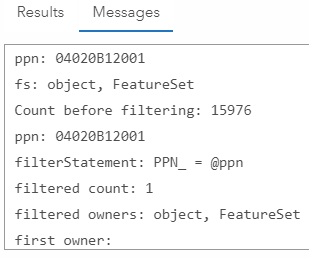
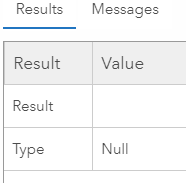
I've also tried filtering "fs" with Top instead, and hard coding a parcel number I know has multiple owner records. I've also tried returning "owners" and get an empty FeatureSet.
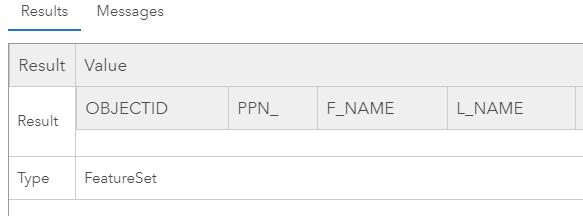
It's like even though Count is saying there's records in the FeatureSet it's actually always Null/empty.
There's a relate between Parcels and Owners too, but I'm not trying to access it that way and I don't see a way to do it with what's available in the expression builder.


