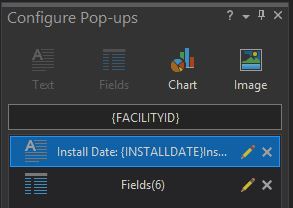
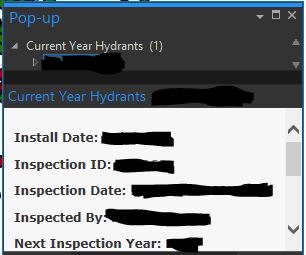
I am using ArcGIS Pro version 2.5. I have configured pop-ups as you can see in the two images below.
I have read that you can publish the layers and these configured pop-ups will follow to Portal which my version is 10.7.1.
https://community.esri.com/thread/246120-pop-up-created-in-pro-does-not-work-when-published-to-portal
https://community.esri.com/thread/212571-how-do-you-display-popups-configured-in-pro-with-expressions-to-display-correctly-in-a-webmap
My workflow is like the first post's for publishing. Share tab -- Publish web layer -- I am referencing registered data -- Publishing both Feature and Map Image. I do not have version issues like the second post with my Portal being above 10.6.
After the publish goes though, when I open the web map and load the data in, none of the pop-up configuration transfers. The custom text, selection of fields, and expressions do not publish. I have tried this with the image layer, the feature layer, registered data, and hosted data.
Is there something that I am missing?
Thanks for your thoughts!
To answer my own question. This issue was found to be caused when publishing directly to an ArcGIS server and not when publishing to the Portal.
Good afternoon Brandon,i was wondering if you would mind expanding on your answer here. what do you mean by 'publishing to portal' versus 'publishing to server'? i am running into a similar problem and i thought it was merely a matter of publishing the service, but it isn't working for me.
sd = xmap.getWebLayerSharingDraft("FEDERATED_SERVER", "MAP_IMAGE", "TESTING POPUPS")
(thinking the above was where you were publishing to server, i also tried
sd = xmap.getWebLayerSharingDraft("HOSTING_SERVER", "FEATURE", "TESTING POPUPS")
)then
sd.exportToSDDraft("C:/admin/popupdraft.sddraft")
then
arcpy.StageService_server(in_service_definition_draft=r"C:\admin\popupdraft.sddraft", out_service_definition=r"C:\admin\popupdraft.sd")
and finally
arcpy.UploadServiceDefinition_server(in_sd_file=r"C:\admin\popupdraft.sd", in_server="https://<hostname>/server", in_folder_type="EXISTING", in_folder="Test")
in none of my attempts so far have i been able to see the popupInfos represented in the default webmap of portal.
thank you for your time.
Thanks for this post - I am having the same issue and it was helpful. Follow-up question for you: is the server that you're publishing to federated with your Portal? We decided against federating this time around and are wondering if that makes any difference with the pop-up transfer.
@BrandonPetry2 Can you expand on how you solved this issue while publishing to Portal vs Server? I have some layers that will accept the ArcPro configured Popup- and others with near identical pop-up configuration will not show, and when opening it in a webmap, the layer has its pop-up off and not configured.
Same here with ArcGIS Pro 3.1 and Enterprise 11. Configured popups do not survive a publishing process coded with python and arcpy. However, when published manually with ArcGIS Pro, popups are OK. Obviously there must be a difference, a secret burried in ArcGIS Pro which is not available in the Python API.
I've got the same issue with ArcGIS Pro 3.1 and Enterprise 11.1. Similarly to @Adrian we have published not manually, but via Poweshell DSC (not python and arcpy) for multiple services exported as offline SDs.
Publishing from Pro (still 3.1) and overwriting these services applies the popup config as configured in Pro, just as it says it will:
It would be great if this issue was resolved so that popup config was applied without needing to overwrite published services from Pro, as the DSC/Python publishing is very useful for portal migration. Otherwise it would be good to know if this is expected behaviour, or a limitation of automated publishing methods.
I have also just performed a manual publish of offline SD via ArcGIS Server directly using Pro 3.2.0 and Enterprise 11.2, and the issue still appears to occur with no popups enabled / configured once published.
Hi all,
the issue with pop-ups should probably be fixed in ArcGIS Pro 3.3. 🙂
BUG-000154648 for ArcGIS Pro (esri.com)
This is good news. Thanks for the answer.
I just installed ArcGIS Pro 3.3.1 and tested it. I've published a hosted feature service with custom popup configuration (custom text labels, subset of fields, etc.). This information is still not transfered to the service when publishing with arcpy. I think the Bug-000154648 addressed only the disabled popup after publishing, not the missing custom popup configuration.
We used fiddler to reverse engineer the publishing process from ArcGIS Pro. At the very end of the process, a call to the Portal API /data endpoint is transferring all the popup information. This is not done in the publishing process with arcpy. We cannot do this call ourselfs, because the popup schema on the service is different than the schema in an ArcGIS map. We would have to write a complex transformation script, which is obsolete, because it is already there. ArcGIS Pro is using it to publish services.
See the following discussion for detailed information about this topic: https://community.esri.com/t5/arcgis-pro-questions/popup-information-not-published-to-arcgis/td-p/119079
What can we do bring popups defined in ArcGIS Pro to services in a fully automated service publishing environment?
Running version 3.3.1 and having the same issue. If I publish a hosted feature layer to our Portal the popups transfer.
This is very inconvenient. Wasted a bunch of time configuring popups for no reason and I get to do it again.
Hi Darryl,
I am having the same issue when publishing referenced Map Services from ArcGIS Pro 3.3.1 to our ArcGIS Enterprise 11.3. Although pop-up were configured in Pro, but disabled when viewing in Portal.
Wondering if you have had any solution or finding?
Thanks,
AB
Hello, we have been facing this problem for a year and the source of the problem has only just been identified. Since at least version 11.1 (the problem was probably there before...), we could see that the pop-up configuration was lost if we published via SD file with the Python for ArcGIS API, whereas a publication by ArcPro did not have this problem. Since ArcPro 3.3.x, popup configuration is also lost after publishing. Technical Support just discovered that it was the disableServicesDirectory property set to true in /portaladmin/security/config that was causing the problem. Setting it to false does not cause issues for the Python API for ArcGIS and for ArcPro 3.3.x.Disabling the portal directory is part of Esri security best practices and should not be disabled in a production environment according to them. Two bugs will be created to correct this situation (one for Pro and one for the Python API. I don't have the bug ID yet). So, using an older version of Pro may be a temporary solution if possible for you.
https://enterprise.arcgis.com/en/portal/latest/administer/windows/security-best-practices.htm
https://enterprise.arcgis.com/en/portal/latest/administer/linux/disabling-the-arcgis-portal-directory.htm
Hi! See the long explanation in my other comment below of this conversation. In summary, the problem appeared on 3.3.x. In the meantime, you should use an older version of Pro if the Portal's disableServicesDirectory property cannot be set to false
We still facing this problem with the newest versions of ArcGIS Pro, arcpy and ArcGIS Enterprise. As I mentioned in a previous post, there's an inside analysis of the problem in this thread: https://community.esri.com/t5/arcgis-pro-questions/popup-information-not-published-to-arcgis/td-p/119079
Unfortunately there's not a workround which can be used in a productive system. We face the situation, that we have a fully automated publishing and update process for our entire service landscape (>800 services), but we still have to publish all services by hand because of missing popups.
I appreciate the information, that two bugs are already opened to this topic. Can someone provide us with the bug ID? I want to hook into the information flow for those bugs.
Hi,
@Adrian The following bug is supposed to be fixed when publishing from Pro 3.5 to ArcGIS Enterprise 11.5. We haven't tested it yet:BUG-000171619 for ArcGIS Pro
There was also this bug fixed for version 11.4BUG-000169719 for Portal for ArcGIS
Les membres connectés peuvent publier, suivre les mises à jour, et plus encore. Nouveau ici ? Inscrivez-vous gratuitement.
Find useful guides, FAQs, and documents to help you navigate and make the most of Esri Community.