How can I display multi-lined attributes in Pro? In ArcMap you do it by changing the cell height. It is NOT a wrap text scenario. It was created in the text properties (see below). I also have some other multi-line attributes which were created using python \n with the same problem. How can I change the appearance of the cell height in Pro? Is this just yet another thing they decided not to include in Pro?
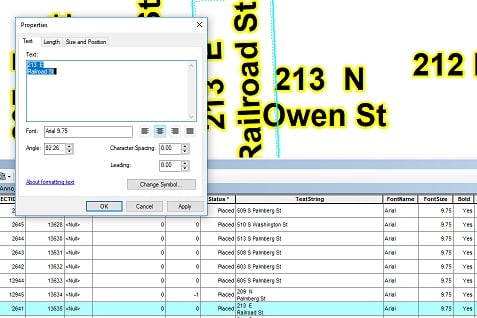
Text properties in ArcMap:
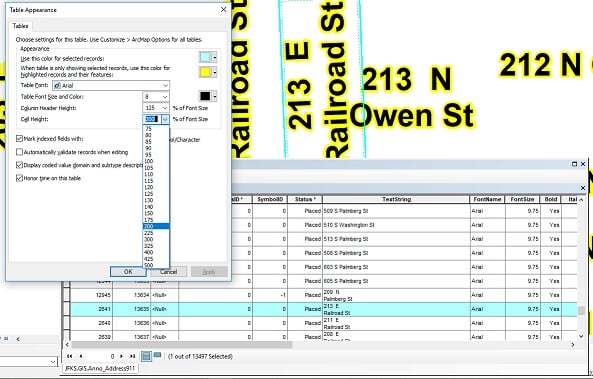
How to change in ArcMap:
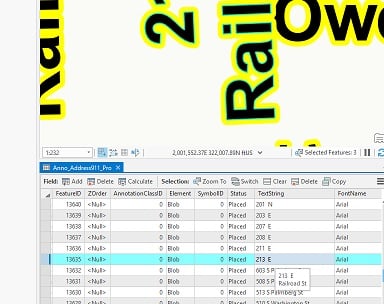
Pro?:
Kory Kramer
@MatthewDriscoll I added a comment on https://community.esri.com/t5/arcgis-pro-ideas/be-able-to-see-an-entire-cell-in-pro-attribute/idi-p/923742 Will copy it here:
While not implemented exactly like ArcMap, we have heard you and in the upcoming release of ArcGIS Pro 3.2 (available by ~mid-November) you will see new options for table appearance.
Example for columns and rows:
The ability to control table font has also been added along with more functionality to control selection and highlighting color (with the ability to coordinate those colors with selection color of features in the map).
Look for these when ArcGIS Pro 3.2 is released!
Please try working with the new functionality once you are able to update to ArcGIS Pro 3.2 and let us know how it works for you. Thank you!
I found an answer that worked for me. Enable 'Stack Label' and use a comma as the stacking separator.
Hi Matthew - sorry that I didn't communicate more clearly (been out of the country for a few weeks and sifting through the "backlog") Yes, this is not possible in ArcGIS Pro - I just cross-linked the Idea and the discussion for discoverability. Thank you for posting that and I see that you already marked it as an arcmap equivalency idea so it will be reported that way in discussions with the development teams.
Cheers
Kory,
You linked me back and forth to both my question and idea. So is the answer no we cannot see our multi-lined attributes in Pro?
https://community.esri.com/ideas/17051-be-able-to-see-an-entire-cell-in-pro-attribute-tables-equivalent-to-arcmap
When you say short term work around do you mean that it is in the short term plan to be able to work with same annotation feature classes in both platforms?
I understand Matthew - this transition phase from ArcMap to ArcGIS Pro is not a one time pattern if you will. I've been using Esri technology since 1992 (mostly as a customer and the last 12 years as an Esri Instructor) and "we've" gone through this before with ArcInfo Workstation->ArcView GIS->ArcMap->ArcGIS Pro. ArcMap is a 20+ year product now and has developed into an amazing application albeit through years of growing pains. ArcGIS Pro will get there in time - AGP is on a rapid release cycle in the sense we'll have 2.4.x releases between now and the end of the year to address bugs, add equivalency items and add new functionality. ArcGIS Pro 2.5 more than likely is next year again with functional equivalency items, bug fixes and new functionality.
RE: annotations - correct in the sense that ArcMap authored annotation is read-only in AGP. If you wish to make ArcMap annotation editable in AGP, then you'd use Upgrade Dataset to convert it to the new AGP annotation model. This makes it unusable in ArcMap as you mentioned. The short term workaround if you're using both ArcMap and AGP is to have one annotation feature class for ArcMap (read/write) and one annotation feature class for AGP (read/write). Not ideal I know but it's an option.
Esri staff is reading and responding to GeoNet threads daily. If there's anything I can assist with, please let me know.
Robert,
2.3 and 2.4. Weekly I get questions from users of how do I do this thing I could do in ArcMap in Pro. Most of the time it turns out you cannot. I see post on here everyday with the same problem. Many of the times it is simple things just like this. You would think be able to simply read an entire attribute wouldn't be a problem.
Another big thing for us is that we cannot make it so it is only one ESRI platform our users will have to learn. With ArcMap and Pro annotations not being compatible on both it makes it very hard for us to justify spending this much on ESRI products much longer if we have to train everyone on both.
Matthew - curiosity question - what release of ArcGIS Pro are you using? ArcGIS Pro 2.4 had a lot of enhancements to get closer to functional equivalency of ArcMap but it's not there yet. There are items the developers do have to add certainly - such as this item - to meet the needs of our customers. As an Esri Instructor, I have zero pull on the development direction of ArcGIS Pro but do assist customers as best as I can.
Matthew - I looked at the Esri internal sites and did not find any information about this item. In addition, I searched the ArcGIS Ideas page for an existing idea that "may" have been written for this requested item but did not find one either. I'd recommend you add this to an ArcGIS Idea to get traction/visibility with the ArcGIS Pro developers.
Les membres connectés peuvent publier, suivre les mises à jour, et plus encore. Nouveau ici ? Inscrivez-vous gratuitement.
Find useful guides, FAQs, and documents to help you navigate and make the most of Esri Community.