Note: This post, from 2015, covers features that are not present in the newer versions of ArcGIS Open Data.
----------------
One of the easiest ways to start customizing your ArcGIS Open Data site is to start with the header. The this is section at the top of the page that displays your logo and site name.
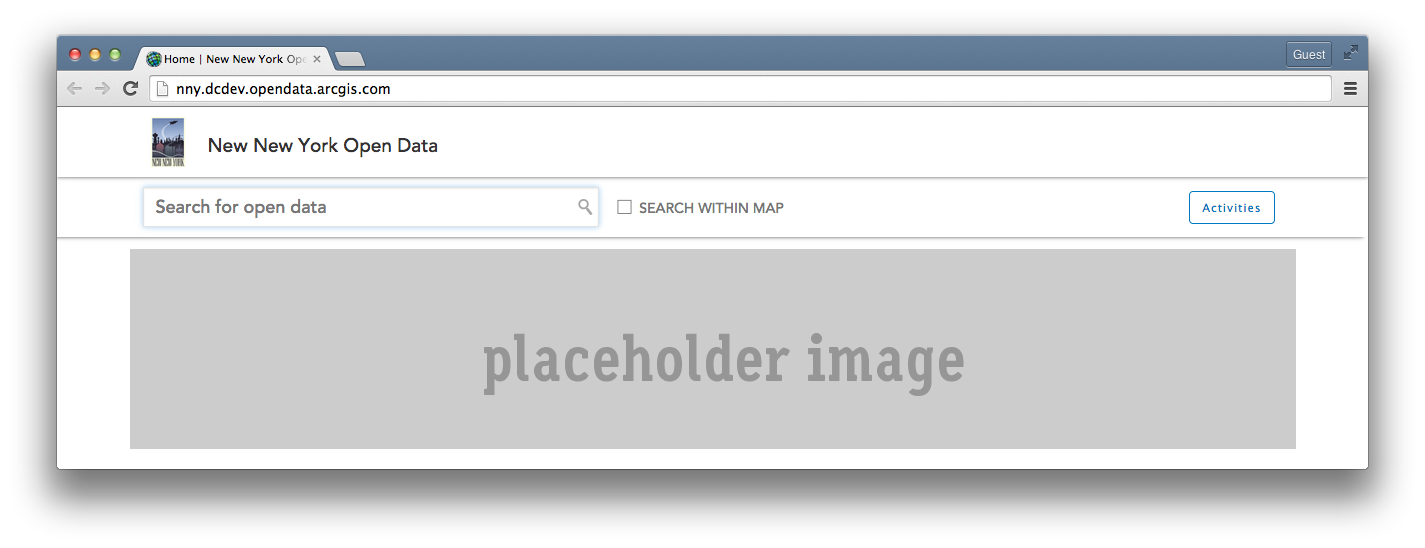
If you use your browsers developer tools to inspect the generated CSS, these are the classes that style it by default:
<SPAN class="selector token">#header</SPAN>
<SPAN class="punctuation token">{</SPAN>
<SPAN class="property token">position</SPAN>
<SPAN class="punctuation token">:</SPAN> relative
<SPAN class="punctuation token">;</SPAN>
<SPAN class="property token">width</SPAN>
<SPAN class="punctuation token">:</SPAN> 100%
<SPAN class="punctuation token">;</SPAN>
<SPAN class="property token">min-height</SPAN>
<SPAN class="punctuation token">:</SPAN> 60px
<SPAN class="important token">!important</SPAN>
<SPAN class="punctuation token">;</SPAN>
<SPAN class="property token">height</SPAN>
<SPAN class="punctuation token">:</SPAN> auto
<SPAN class="punctuation token">;</SPAN>
<SPAN class="property token">background</SPAN>
<SPAN class="punctuation token">:</SPAN> #fff
<SPAN class="punctuation token">;</SPAN>
<SPAN class="property token">box-shadow</SPAN>
<SPAN class="punctuation token">:</SPAN> 0
0
5px
#555
<SPAN class="punctuation token">;</SPAN>
<SPAN class="punctuation token">}</SPAN>
<SPAN class="selector token">.header-image</SPAN>
<SPAN class="punctuation token">{</SPAN>
<SPAN class="property token">float</SPAN>
<SPAN class="punctuation token">:</SPAN> left
<SPAN class="punctuation token">;</SPAN>
<SPAN class="property token">height</SPAN>
<SPAN class="punctuation token">:</SPAN> 50px
<SPAN class="punctuation token">;</SPAN>
<SPAN class="property token">margin-bottom</SPAN>
<SPAN class="punctuation token">:</SPAN> 10px
<SPAN class="punctuation token">;</SPAN>
<SPAN class="property token">padding</SPAN>
<SPAN class="punctuation token">:</SPAN> 0
20px
0
0
<SPAN class="punctuation token">;</SPAN>
<SPAN class="punctuation token">}</SPAN>
<SPAN class="selector token">.site-brand</SPAN>
<SPAN class="punctuation token">{</SPAN>
<SPAN class="property token">position</SPAN>
<SPAN class="punctuation token">:</SPAN> relative
<SPAN class="punctuation token">;</SPAN>
<SPAN class="property token">display</SPAN>
<SPAN class="punctuation token">:</SPAN> inline-block
<SPAN class="punctuation token">;</SPAN>
<SPAN class="property token">float</SPAN>
<SPAN class="punctuation token">:</SPAN> left
<SPAN class="punctuation token">;</SPAN>
<SPAN class="property token">margin-top</SPAN>
<SPAN class="punctuation token">:</SPAN> 10px
<SPAN class="punctuation token">;</SPAN>
<SPAN class="property token">font-size</SPAN>
<SPAN class="punctuation token">:</SPAN> 1.5em
<SPAN class="punctuation token">;</SPAN>
<SPAN class="property token">color</SPAN>
<SPAN class="punctuation token">:</SPAN> #444
<SPAN class="punctuation token">;</SPAN>
<SPAN class="property token">margin-right</SPAN>
<SPAN class="punctuation token">:</SPAN> 20px
<SPAN class="punctuation token">;</SPAN>
<SPAN class="punctuation token">}</SPAN>
<SPAN class="selector token">.site-logo</SPAN>
<SPAN class="punctuation token">{</SPAN>
<SPAN class="property token">color</SPAN>
<SPAN class="punctuation token">:</SPAN> #333
<SPAN class="punctuation token">;</SPAN>
<SPAN class="property token">float</SPAN>
<SPAN class="punctuation token">:</SPAN> none
<SPAN class="punctuation token">;</SPAN>
<SPAN class="property token">font-family</SPAN>
<SPAN class="punctuation token">:</SPAN> "
Avenir LT W01 65 Medium"
,Arial
,sans-serif
<SPAN class="punctuation token">;</SPAN>
<SPAN class="property token">font-size</SPAN>
<SPAN class="punctuation token">:</SPAN> 19px
<SPAN class="punctuation token">;</SPAN>
<SPAN class="property token">line-height</SPAN>
<SPAN class="punctuation token">:</SPAN> 1.25em
<SPAN class="punctuation token">;</SPAN>
<SPAN class="property token">margin-left</SPAN>
<SPAN class="punctuation token">:</SPAN> -5px
<SPAN class="punctuation token">;</SPAN>
<SPAN class="property token">margin-right</SPAN>
<SPAN class="punctuation token">:</SPAN> 20px
<SPAN class="punctuation token">;</SPAN>
<SPAN class="punctuation token">}</SPAN>
<SPAN class="line-numbers-rows"><SPAN></SPAN><SPAN></SPAN><SPAN></SPAN><SPAN></SPAN><SPAN></SPAN><SPAN></SPAN><SPAN></SPAN><SPAN></SPAN><SPAN></SPAN><SPAN></SPAN><SPAN></SPAN><SPAN></SPAN><SPAN></SPAN><SPAN></SPAN><SPAN></SPAN><SPAN></SPAN><SPAN></SPAN><SPAN></SPAN><SPAN></SPAN><SPAN></SPAN><SPAN></SPAN><SPAN></SPAN><SPAN></SPAN><SPAN></SPAN><SPAN></SPAN><SPAN></SPAN><SPAN></SPAN><SPAN></SPAN><SPAN></SPAN><SPAN></SPAN><SPAN></SPAN><SPAN></SPAN><SPAN></SPAN><SPAN></SPAN><SPAN></SPAN><SPAN></SPAN><SPAN></SPAN><SPAN></SPAN><SPAN></SPAN><SPAN></SPAN><SPAN></SPAN><SPAN></SPAN><SPAN></SPAN><SPAN></SPAN><SPAN></SPAN><SPAN></SPAN><SPAN></SPAN><SPAN></SPAN><SPAN></SPAN><SPAN></SPAN><SPAN></SPAN><SPAN></SPAN><SPAN></SPAN><SPAN></SPAN><SPAN></SPAN><SPAN></SPAN><SPAN></SPAN><SPAN></SPAN><SPAN></SPAN><SPAN></SPAN><SPAN></SPAN><SPAN></SPAN><SPAN></SPAN><SPAN></SPAN><SPAN></SPAN><SPAN></SPAN><SPAN></SPAN><SPAN></SPAN><SPAN></SPAN><SPAN></SPAN><SPAN></SPAN><SPAN></SPAN><SPAN></SPAN><SPAN></SPAN><SPAN></SPAN><SPAN></SPAN><SPAN></SPAN><SPAN></SPAN><SPAN></SPAN><SPAN></SPAN><SPAN></SPAN><SPAN></SPAN><SPAN></SPAN><SPAN></SPAN><SPAN></SPAN><SPAN></SPAN><SPAN></SPAN><SPAN></SPAN><SPAN></SPAN><SPAN></SPAN><SPAN></SPAN><SPAN></SPAN><SPAN></SPAN><SPAN></SPAN><SPAN></SPAN><SPAN></SPAN><SPAN></SPAN><SPAN></SPAN><SPAN></SPAN><SPAN></SPAN><SPAN></SPAN><SPAN></SPAN><SPAN></SPAN><SPAN></SPAN><SPAN></SPAN><SPAN></SPAN><SPAN></SPAN><SPAN></SPAN></SPAN>#HEADER is the id for the entire block element.
When customizing the CSS, we only need to add the rules that we want to override. So first, lets make the background red, since that our official organization color. Next, we want to change the height of our header to be 120px tall. Then, lets get rid of the drop shadow.
<SPAN class="selector token">#header</SPAN> <SPAN class="punctuation token">{</SPAN>
<SPAN class="property token">min-height</SPAN><SPAN class="punctuation token">:</SPAN> 120px <SPAN class="important token">!important</SPAN><SPAN class="punctuation token">;</SPAN>
<SPAN class="property token">background</SPAN><SPAN class="punctuation token">:</SPAN> #b41710<SPAN class="punctuation token">;</SPAN>
<SPAN class="property token">box-shadow</SPAN><SPAN class="punctuation token">:</SPAN> none<SPAN class="punctuation token">;</SPAN>
<SPAN class="punctuation token">}</SPAN>
<SPAN class="line-numbers-rows"><SPAN></SPAN><SPAN></SPAN><SPAN></SPAN><SPAN></SPAN><SPAN></SPAN></SPAN>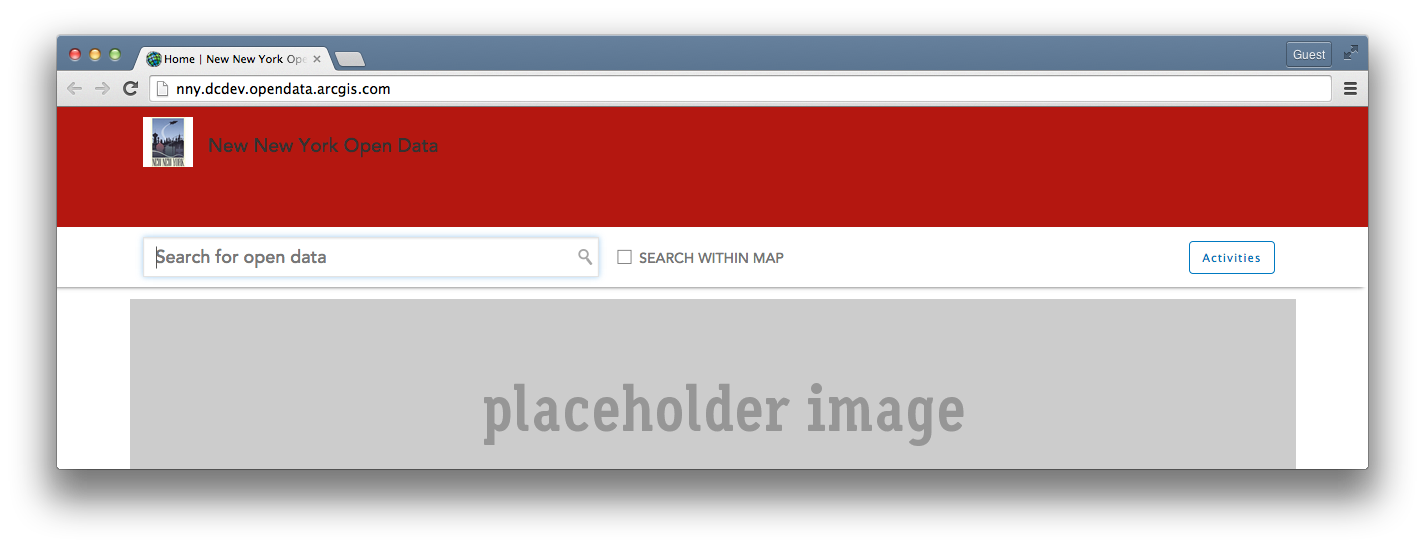
Next, let's adjust our .header-image to take advantage of the increased header height. To figure out the maximum height without having to adjust anything else, make the .header-image 20px less than your header height. In our example, that would be 100px.
<SPAN class="selector token">.header-image</SPAN> <SPAN class="punctuation token">{</SPAN>
<SPAN class="property token">height</SPAN><SPAN class="punctuation token">:</SPAN> 100px<SPAN class="punctuation token">;</SPAN>
<SPAN class="punctuation token">}</SPAN>
<SPAN class="line-numbers-rows"><SPAN></SPAN><SPAN></SPAN><SPAN></SPAN></SPAN>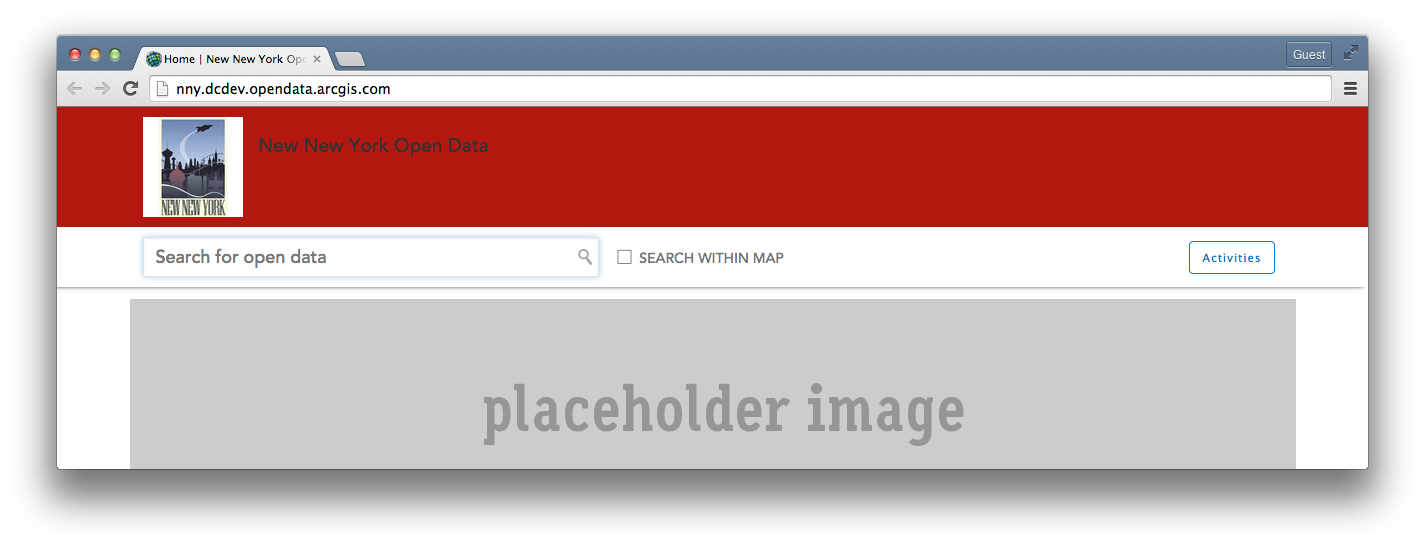
Our site name needs a little work now, so we'll edit the classes for the .site-logo next. Our organizations official colors are red and yellow, so lets change the color to #ffed86. We'll also want to increase the font-size and adjust the line-height to keep it centered.
<SPAN class="selector token">.site-logo</SPAN> <SPAN class="punctuation token">{</SPAN>
<SPAN class="property token">color</SPAN><SPAN class="punctuation token">:</SPAN> #ffed86<SPAN class="punctuation token">;</SPAN>
<SPAN class="property token">font-size</SPAN><SPAN class="punctuation token">:</SPAN> 32px<SPAN class="punctuation token">;</SPAN>
<SPAN class="property token">line-height</SPAN><SPAN class="punctuation token">:</SPAN> 2.5em<SPAN class="punctuation token">;</SPAN>
<SPAN class="punctuation token">}</SPAN>
<SPAN class="line-numbers-rows"><SPAN></SPAN><SPAN></SPAN><SPAN></SPAN><SPAN></SPAN><SPAN></SPAN></SPAN>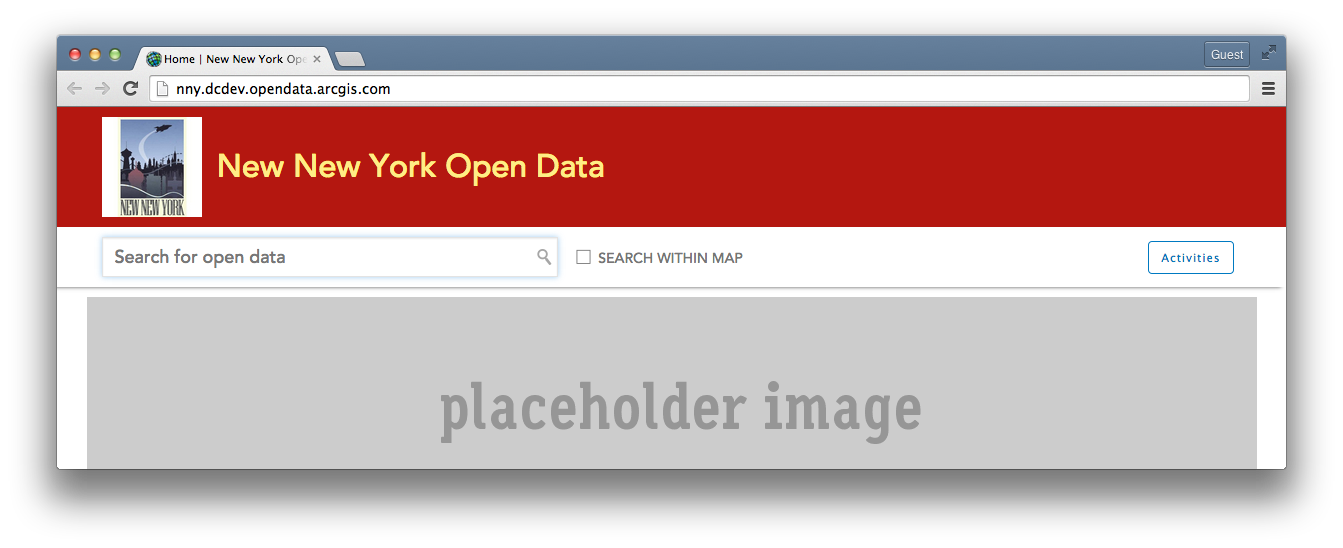
That's starting to look better. However, when I roll over the site name, the color to indicate its link hover state is still dark gray. Instead, let's just make this a slightly darker shade of our bright yellow when we add the .site-logo:hover rules.
<SPAN class="selector token">.site-logo:hover</SPAN> <SPAN class="punctuation token">{</SPAN>
<SPAN class="property token">color</SPAN><SPAN class="punctuation token">:</SPAN> #d9c52e<SPAN class="punctuation token">;</SPAN>
<SPAN class="punctuation token">}</SPAN>
<SPAN class="line-numbers-rows"><SPAN></SPAN><SPAN></SPAN><SPAN></SPAN></SPAN> Last, if we want to get tricky and add a background image to the header, we can add just a couple rules to our #header css to pull in the image, center it and make it always scale with the width of the browser.
<SPAN class="selector token">#header</SPAN> <SPAN class="punctuation token">{</SPAN>
<SPAN class="property token">min-height</SPAN><SPAN class="punctuation token">:</SPAN> 120px <SPAN class="important token">!important</SPAN><SPAN class="punctuation token">;</SPAN>
<SPAN class="property token">background-image</SPAN><SPAN class="punctuation token">:</SPAN> <SPAN class="token function">url</SPAN><SPAN class="punctuation token">(</SPAN>
<SPAN class="property token">http</SPAN><SPAN class="punctuation token">:</SPAN>//vignette4.wikia.nocookie.net/en.futurama/images/3/32/New_New_York_Cityscape.jpg<SPAN class="punctuation token">)</SPAN><SPAN class="punctuation token">;</SPAN>
<SPAN class="property token">background-position</SPAN><SPAN class="punctuation token">:</SPAN> 50%<SPAN class="punctuation token">;</SPAN>
<SPAN class="property token">background-size</SPAN><SPAN class="punctuation token">:</SPAN> cover<SPAN class="punctuation token">;</SPAN>
<SPAN class="property token">box-shadow</SPAN><SPAN class="punctuation token">:</SPAN> none<SPAN class="punctuation token">;</SPAN>
<SPAN class="punctuation token">}</SPAN>
<SPAN class="line-numbers-rows"><SPAN></SPAN><SPAN></SPAN><SPAN></SPAN><SPAN></SPAN><SPAN></SPAN><SPAN></SPAN><SPAN></SPAN><SPAN></SPAN><SPAN></SPAN></SPAN>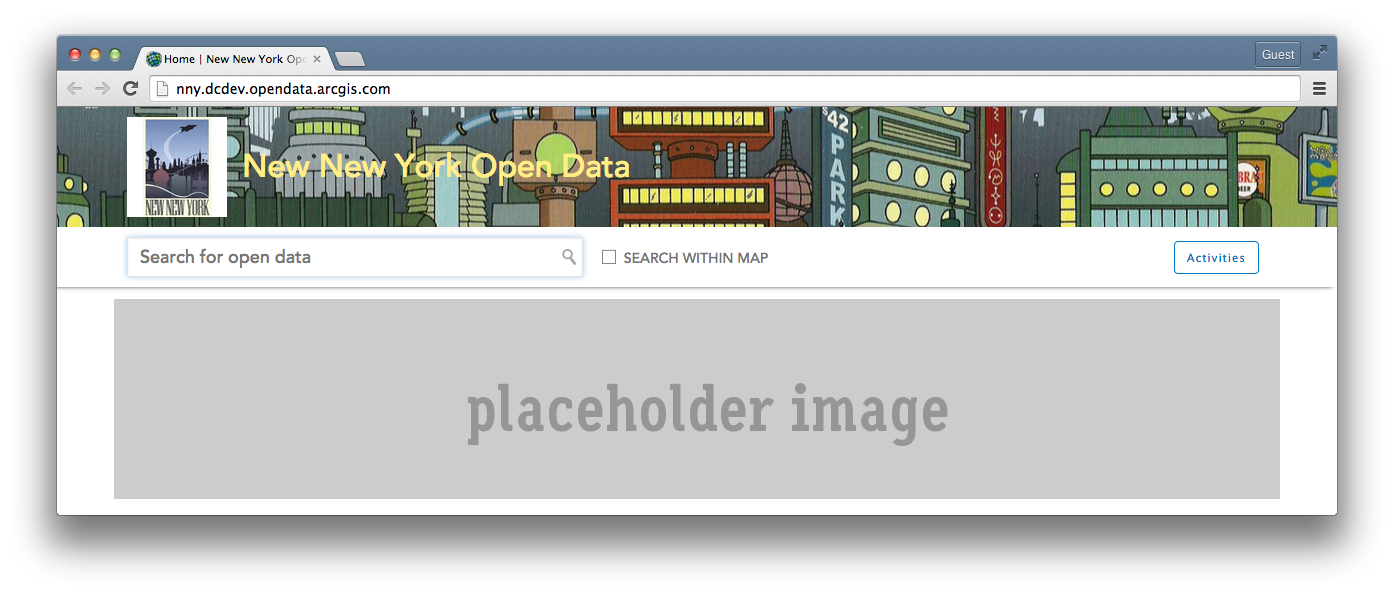
Hope this helps! If you customize your site's header, add a screenshot below and show us how you did it!




