I've created a Survey123 form to gather contact info from residents in a certain study area, which will be publicized via a postcard mailed out using USPS carrier routes.
For ease of use, we decided against using a geopoint question, but I still wanted some QA/QC mechanism. So, I took the 300-ish unique concatenated street/suffix/quadrant combinations found in the relevant geography and included them in a choice list for a select_one question with autocomplete appearance. Respondents still enter their street number and unit number (if applicable) into unconstrained text fields. My plan is to geocode our responses once the survey closes.
Works great! But I've just been informed that the survey will also be pushed out to neighborhood associations, a local elected official's email list, and other recipients who will almost surely hame home addresses outside of this study area.
When I include an "Other" entry in the choice list, it only appears if the respondent has the presence of mind to type in "Other" when their own address doesn't work – not the most intuitive setup. What I want is for the "Other" to always appear as an option, but I've had no luck using Excel wildcard characters in the Name field or simply typing out every letter in the alphabet.
Is there a way to make sure "Other" always appears in the autocomplete choice list, e.g., in both scenarios below?
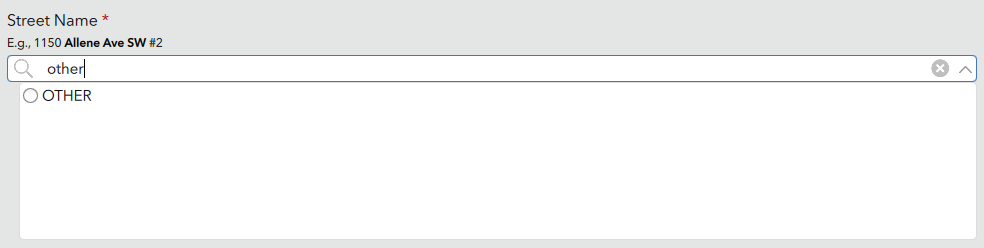
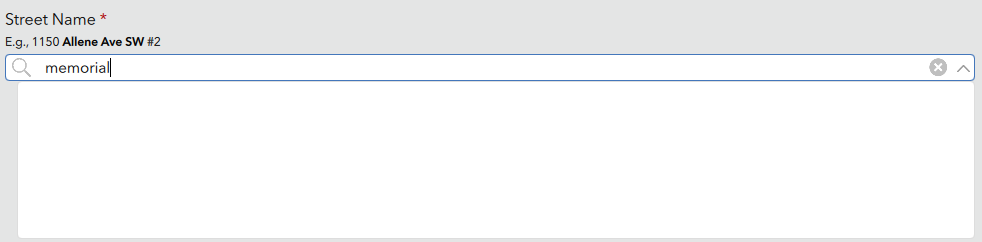
Thanks,
Will Tucker

