Hi all, hi Jayanta Poddar 
My previous topic: How to work on LAN with ArcGIS Server
I installed Windows Server 2012 R2, ArcGIS Server 10.2.2 and SQL Server 2012 on my Server computer. I can create a GeoDatabase by use Create Enterprise Database tool.
I can use Arcmap in this computer to Add, Replace, Edit, Query data in this Geodatabse. But I don't know how to use this Geodatabse on another computer on LAN - which installed ArcGIS Desktop 10.2.2 and SQL Native Client. I turned off Antivirus and Firewall both Client and Server computer. But nothing change.
On Server Computer:
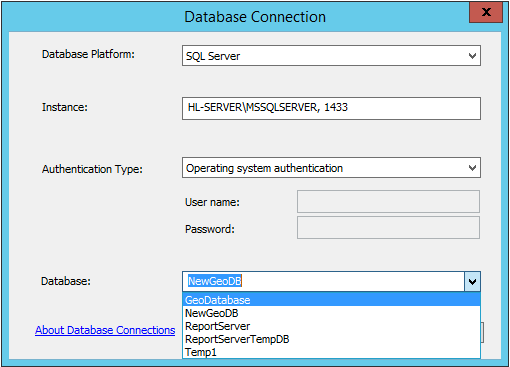
On Client:
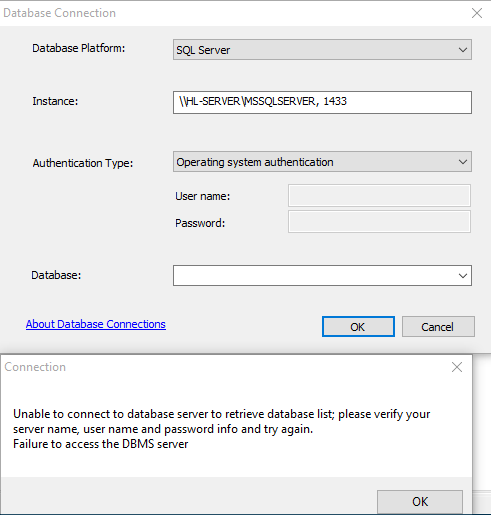
I have tried
\\HL-SERVER\MSSQLSERVER, 1433
\\HL-SERVER\MSSQLSERVER@1433
\\HL-SERVER:1433\MSSQLSERVER
\\192.168.1.108\MSSQLSERVER, 14333
everything i can think out, but the same error
Can you tell me the parameter to enter in Instance and Authentication Type to connect to Database server?
Once again, i am sorry if any hard to understand, my English is not good ^_^
Thanks so much!



