Existing functionality: Currently, when you insert an "Table Attribute" dynamic text element into a layout in ArcGIS Pro, you set the input source to a table (layer) in a single map frame and can filter the values to return by changing the "Query" from 'All rows' to 'Visible rows' or 'Custom query' (SQL Expression).
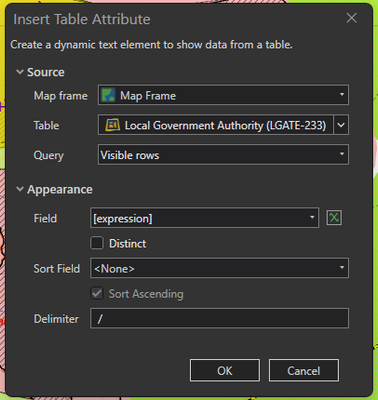
IDEA: Add an new 'By search table' option to the "Query" list that lets you filter the available rows using a spatial relationship with another layer (with X units of another feature/s).
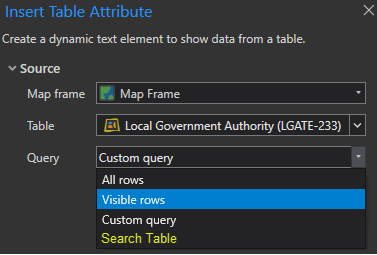
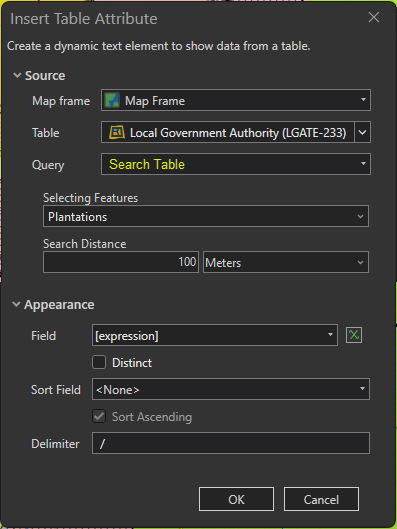
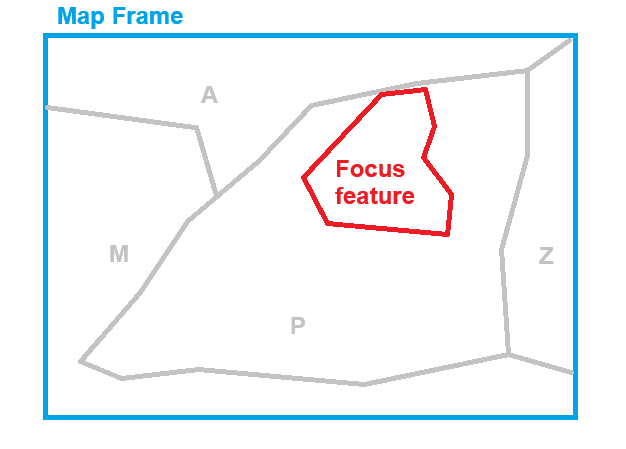
USE CASE: I have many scenarios come up in my map production where we try to minimise the amount of manual input required by our users over elements in the layout. This feature would hopefully enable us to perform search between 2 layers in the map, so that a focus feature set by a definition query or map series (e.g. a Plantation) can be used to select one or multiple intersecting features from another layer (e.g. Local Government Authority) to then display on the layout. In the image below, it would return only features "A" & "P" (with a 100m search distance) instead of All rows (A-Z) or Visible rows (A,M,P & Z) from the grey layer.
This would be a relatively simple tool to use with similar functionality to Select by Location or any number of other tools that use an input layer and search distance parameters.

