I've been testing and preparing for a process of republishing nearly 100 feature services in our ArcGIS Online environment. The main aim is to update the coordinate systems of our feature services to use the standard WGS84 Web Mercator Auxiliary Sphere for all data hosted in ArcGIS Online. Currently, we have a number of projections in use, and as we prepare to migrate all our non-AGOL data to GDA2020, we want to ensure that we have nothing left that uses GDA94 to prevent shift issues occurring.
After a recent migration in AGOL hosting from US to APAC servers, we lost a lot of editor tracking information. To prevent this happening again, I've been researching how to preserve the existing Creator and Editor information when publishing feature services as a V2 layer. I couldn't find any clear documentation on how to make this happen, but have now figured it out and will detail below for others in the future.
Restrictions:
1. Currently, if you load an existing feature service into ArcGIS Pro, use the Export Features geoprocessing tool to save as a feature class, and then share the output as a new Web Layer, any Creator and Editor fields will be included with their original values but they will NOT be used for editor tracking. Once published, if you then enable editor tracking in AGOL on the new layer, it will create new fields for this purpose.
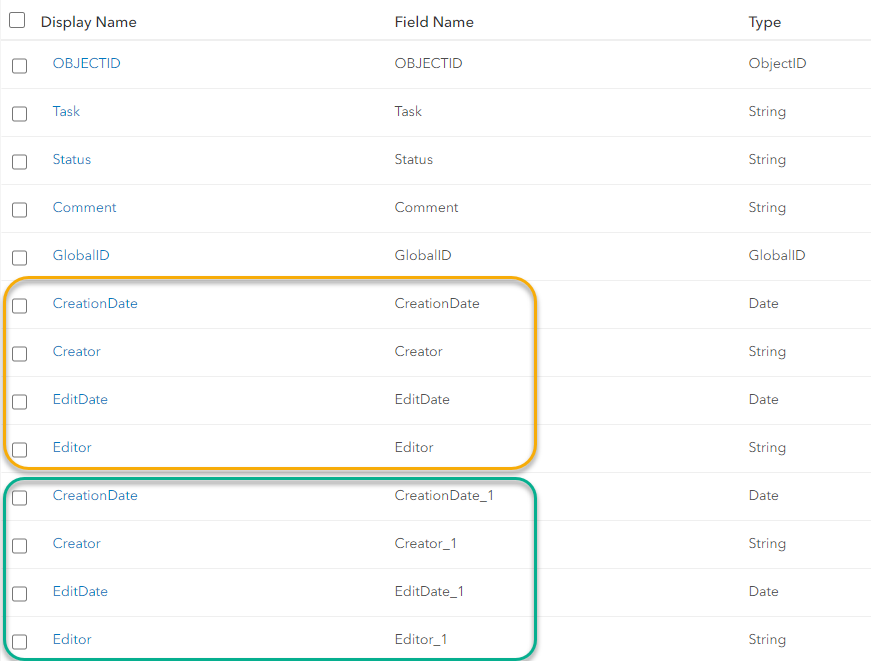
On top of this, there is no way of manually updating values in editor tracking fields. Even if you turn Editor Tracking on a feature service off, then try to edit or calculate the field in ArcGIS Pro, it will fail. The values need to be there from the beginning.
2. Also, you can't simply Export Features and use the included CreationDate and EditDate fields as they are now automatically set as High Precision fields (as indicated by the *). The Enable Editor Tracking tool will only accept Low Precision date fields, and there is no way to downgrade a field or change it in the Field Map when using Export Features.
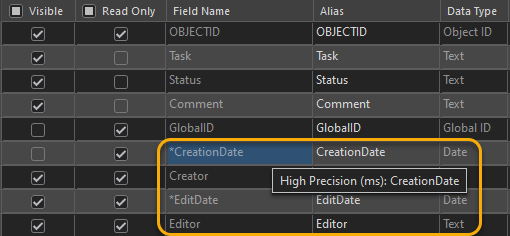
Workaround:
Below are the steps I took to publish a new feature service using existing data in an old feature service, preserving editor tracking information and working around the high precision field limitations.
1. Add old feature service to ArcGIS Pro
2. Use "Export Features" to create a copy of the data as a feature class in a File Geodatabase with the existing CreationDate and EditDate fields renamed (I've added a 1 to the end) and new CreationDate and EditDate fields created with no source field (set as Date type).
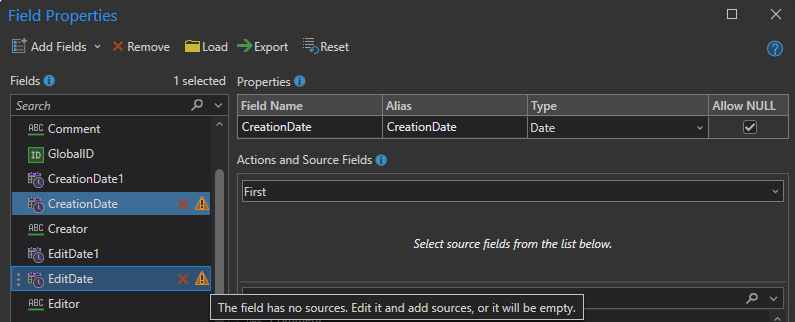
3. Use Calculate Field geoprocessing tool to calculate your empty CreationDate and EditDate fields from the renamed fields with original values.


4. Use "Enable Editor Tracking" geoprocessing tool to register existing fields for editor tracking
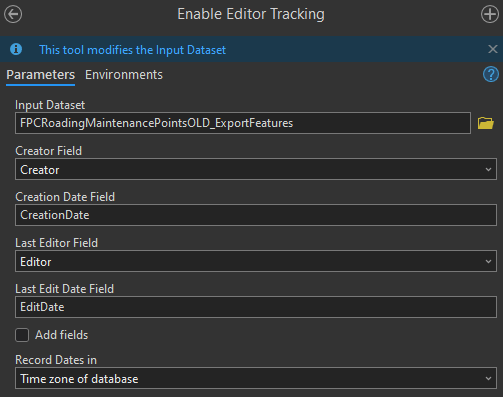
5. Delete original (renamed) CreationDate and EditDate fields.
6. Publish the layer by selecting "Share as Web Layer" from the sharing menu and ensure you check the "Enable editing and allow editors to:" option and the "Preserve editor tracking info" option. You may also need to customise your Timezone settings depending on what you selected in previous step.
Now.....to figure out how to preserve the info when running the Append tool (not holding high hopes based on what I've already found elsewhere in the Community...)




