If a feature class has an alias, and I add that feature class to a map, Pro uses the alias as the layer name in the Contents pane automatically.
- Is there a way to toggle the Contents pane to show for each layer its table name instead of its alias name?
I'm looking for something equivalent to the Show Field Aliases and Show domain and subtype descriptions toggles that we have for attribute tables:
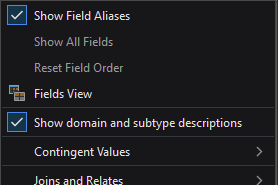
I apologize for asking what seems like such a simple question, but I haven't been able to answer this for myself through exploring the UI or reading web search results. I have that same feeling as when I ask my wife if we're out of milk, knowing she's going to walk to the fridge and point to the carton, right at eye level, that I failed to notice.
For context, I use Pro exclusively for database design/management, and not for mapping/editing/analysis. Correspondingly, the aliases and descriptions tend to obfuscate, rather than facilitate, my workflows. Ideally, I'd like to disable table, field, subtype, and domain aliases/descriptions by default.
(FYI, there is an existing idea for disabling field aliases by default; please upvote if you'd find that useful.)
Thanks in advance.





