ArcGIS Pro 3.2.1 (ArcMap doesn't seem to behave this way)
"When applying a selection or filter, a selection of zero records can result. For example, selecting a value that is not present in the attribute field results in a selection of zero records. A geoprocessing tool that uses the layer as input will use no records from the input. This case is typically accompanied by a warning indicating that the input or output is empty."
That applies even if the "Show Selected Records [Only]" in the attribute table option isn't used.
Thoughts:
That behaviour is surprising to me. I would have thought if no records were selected, then the selection wouldn't be honoured (or the selection wouldn't exist). But that's not the case.
Although, I think I understand why it was designed that way. It would be equally surprising to accidently utilize all records, if you were expecting your selection to only return a subset of records.
I'm aware that GP tools indicate the following: "Use the filtered records: 0". And as the docs suggest, "This case is typically accompanied by a warning indicating that the input or output is empty." Screenshot of the GP output message. However, this is such a special case, that I'm wondering if more can be done in the map to make it clearer to users that a selection of zero records is currently applied.
Idea:
Make it more obvious in the map that a selection of zero records is currently applied. When looking at the usual indicators in the attribute table or in the map tab, it isn't obvious that a selection is applied.
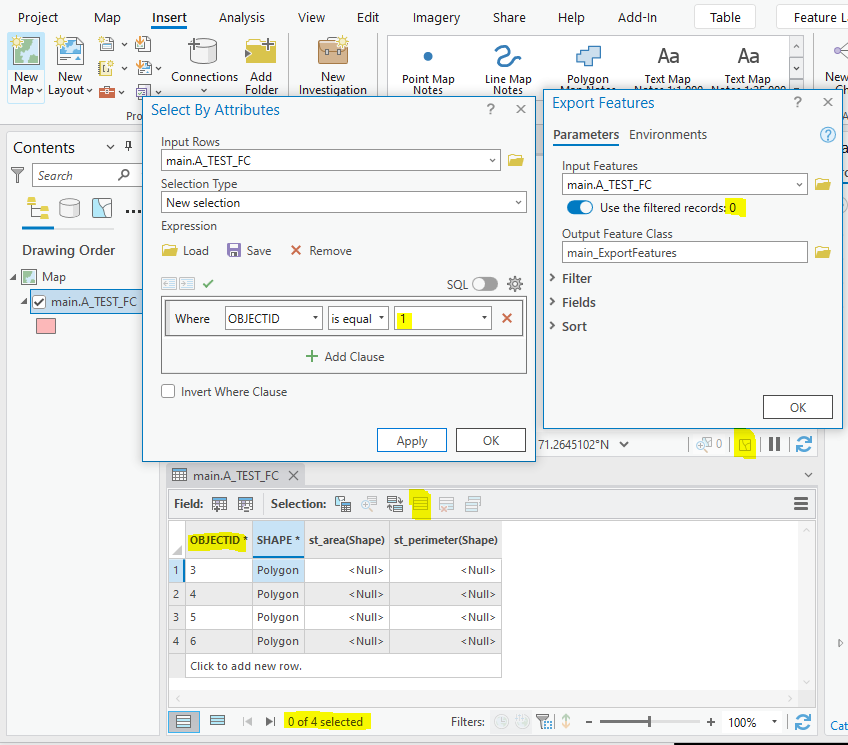
While the GP tool does indicate it, I wonder if there are other use cases where we would have no way of knowing that a selection was applied, such as Python scripting.
Edit: To be clear, "0 of 4 selected" in the attribute table, and "0" at the bottom right corner of the map tab don't necessarily tell us that a selection of zero records has been applied. "0 of 4 selected" and "0" could be true if there isn't a selection applied, which is an entirely different scenario.
And I hinted at this earlier, but I'l clarify: The Clear buttons in the attribute table and in the bottom-right corner of the map tab are greyed out, which would suggest that a selection is not applied. But that's not the case, a selection has been applied. The fact that those Clear buttons are greyed out is inconsistent with the Clear buttons in the ribbon and in the Contents Pane —> Selection tab. The latter buttons are not greyed out, which paints a confusing picture for the user.
Related: Attributes Pane — Update common field in multiple FCs using single action






