ArcGIS Pro 2.6.8; Oracle 18c 10.7.1 EGDB:
Often, database views that are not registered with the geodatabase have issues in ArcGIS Pro. Examples:
- Esri Case 3308236 Use Explore tool on mobile and file GDB spatial views
BUG-000156931 - Unable to select features using the Explore or selection tool from a view in a mobile geodatabase in ArcGIS Pro. - Esri Case 03490768 - Database view on feature with nil geometry hangs when added to map
- Other issues, such as when selecting features from a database view in the map or in the attribute table.
The solution is to register the view with the geodatabase.
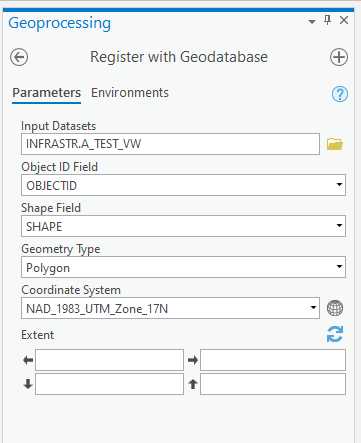
However, registering views with the geodatabase is a cumbersome process, especially if we need to frequently replace a view due to a DDL change like adding or removing a field from the view. Related idea: Unregister with Geodatabase GP Tool
One thing that's particularly clunky is: setting the extents when registering a view.
Rather than manually enter the extents by copy/pasting from elsewhere, could we have the option of importing the extents from an existing FC? For example, use a boundary FC that is a polygon that surrounds our subject area; we'd never have features outside that boundary.

