I was configuring pop-ups for an image service in Map Viewer, and wanted to change the number of digits displayed for the numeric fields displaying pixel values. I have several processing templates available for this service, and wanted to display the values for several of them. When I went into the list of fields to edit the format, all of the fields displaying pixel values are listed as being text rather than numeric.
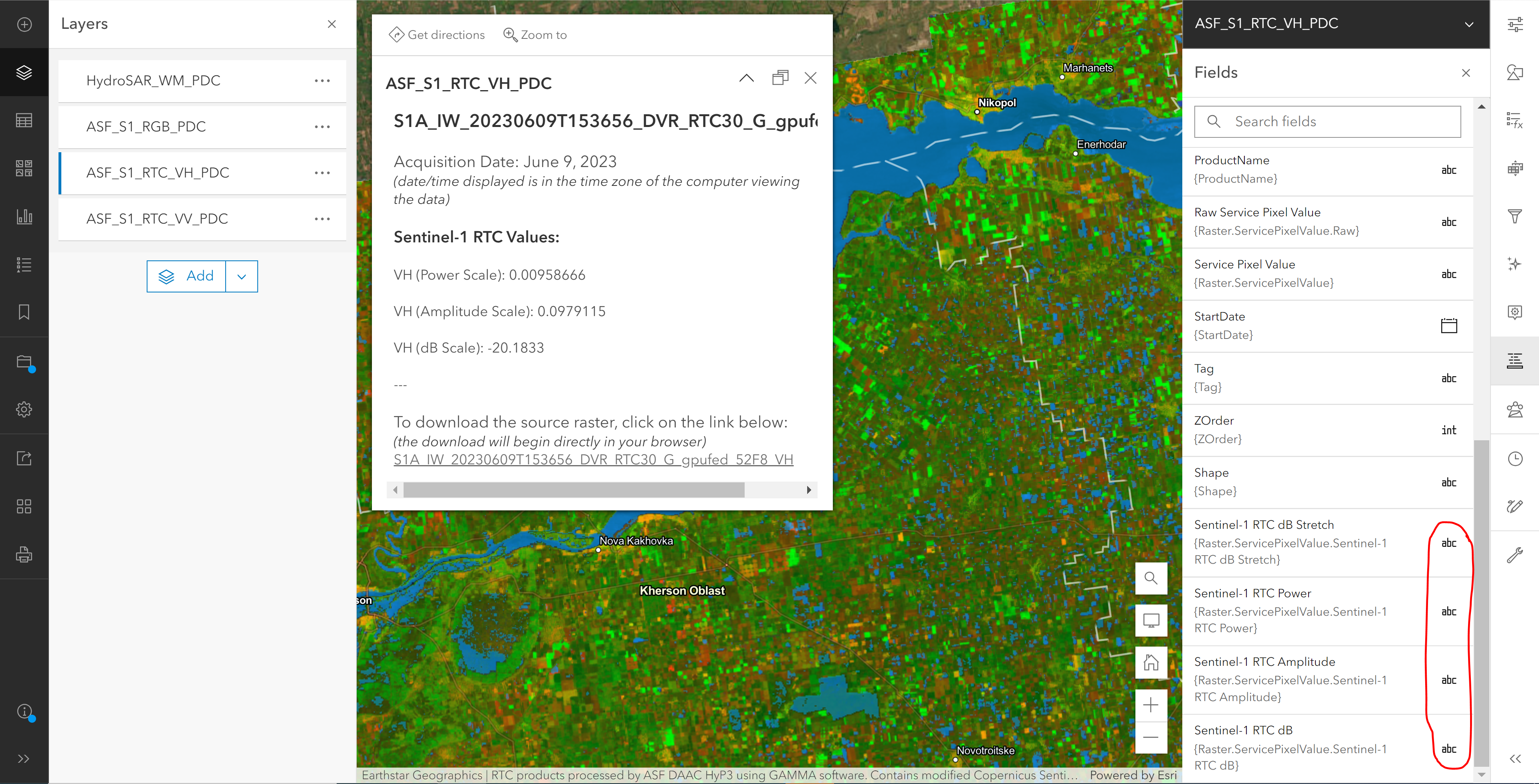
As such, there are no options for changing the number of digits displayed. For at least two of the fields, the values were being displayed as 0 in the pop-up (because the pixel values are all less than 0; with no decimals displayed, there's no meaningful information).
I opened the map in Map Viewer Classic, and was able to change the numeric formatting as desired. When I saved the map and reopened it in the new Map Viewer, the fields were still listed as text format. At least the pop-ups now display all of the decimal places - I don't need all 8, but it's better than having none.
I notice that even the field for the raw pixel values is listed as text rather than numeric, so it's not just impacting fields related to the processing templates.
I thought there might be a problem with my service, but I opened up some web maps I'd configured in the past. The numeric fields that I had been able to format as numeric in the past are now also displayed as text, so it looks like something has changed (fairly recently) in the Web Viewer platform to cause this problem. Is this a known issue? Or is there a workaround?



