Hi,
I was reading this blog post on the December 2021 update and was hoping for some clarification on this bug, which was marked as resolved in the post:
- BUG-000130873 The Survey123 web application does not honor HTML tag formatting set on surveys published from Survey123 Connect.
I have a Survey123 form, which I am designing in the latest version of Connect. The URL I am creating works perfectly in Connect when I test, but as soon as the form is published the web form (which I have embedded in a Dashboard) does not work. Please see details below.
I am having some issues with an a href statement working properly. It works perfectly in the field app and Connect (latest version downloaded today). Here is what I see in my form within a Dashboard; the blacked out portion is a read-only URL to SharePoint, while the hyperlink is in a 'note' and should say "View Project Files" and bring the user to the SharePoint location from above:
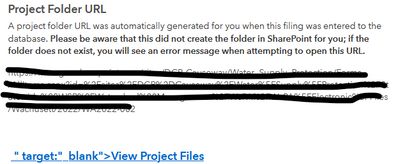
The URL is completely different than what is specified; it goes here instead: https://survey123.arcgis.com/share/v3.14/
I have tried the a href statement with a : and = after 'target' and get the same result. Here is the XLSForm:

Is this expected behavior? Any advice would be appreciated.


