For context, I'm using Enterprise 10.7.1 and Pro 2.4.2.
I have a feature class joined one-to-one with a table. Both are in enterprise databases (built on SQL Server 2016, 64 bit). The feature class has the shape, the table has the data that I want to display in the pop-ups. The symbology is based on a custom Arcade expression, which works great in Pro and in a Portal web map.
Here's my problem: I have a custom expression set up to calculate the percentage of each political party. Here is the expression for Democrats:
<SPAN class="token function">round</SPAN><SPAN class="punctuation token">(</SPAN><SPAN class="punctuation token">(</SPAN><SPAN class="punctuation token">(</SPAN>$feature<SPAN class="punctuation token">[</SPAN><SPAN class="string token">'DBName.User.RegisteredVoterCount.DEMOCRATIC'</SPAN><SPAN class="punctuation token">]</SPAN><SPAN class="operator token">/</SPAN>$feature<SPAN class="punctuation token">[</SPAN><SPAN class="string token">'DBName.User.RegisteredVoterCount.TOTAL'</SPAN><SPAN class="punctuation token">]</SPAN><SPAN class="punctuation token">)</SPAN><SPAN class="operator token">*</SPAN><SPAN class="number token">100</SPAN><SPAN class="punctuation token">)</SPAN><SPAN class="punctuation token">,</SPAN><SPAN class="number token">1</SPAN><SPAN class="punctuation token">)</SPAN><SPAN class="line-numbers-rows"><SPAN></SPAN></SPAN>
(Note that I have replaced the name of the database with "DBName" and the user name with "User" in the syntax above.)
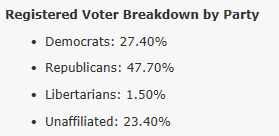
It works great in the Pro pop-up:
I published it as a Map Image Layer to Portal. All of the expressions came through.
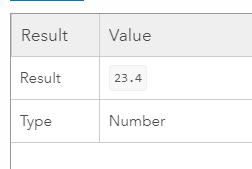
It works great when I test it in the custom expression builder in the Portal web map:
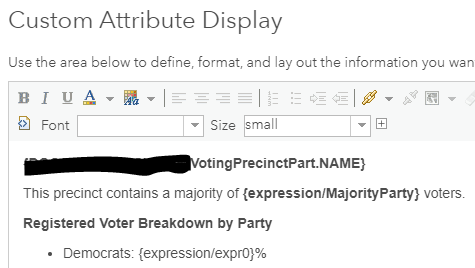
But when I add it into the pop-up:
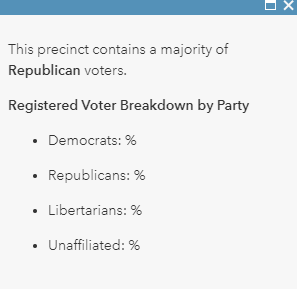
The value doesn't display:
OK, fine. So I publish it as a Feature Layer and turn off editing capabilities. Now my custom Arcade symbology and my pop-ups don't work.
My leading suspect is the join: does anyone know if Portal Arcade has problems with joins?


