Hi Esri community,
We are about to move on-prem SQL DB to Azure SQL Server. I had an empty SQL database created on the Azure SQL server instance, which can be connected from my local Azure Data Studio/VS Code. With the exact same settings, however, I can't connect from a database connection in ArcGIS Pro, v3.3.1.
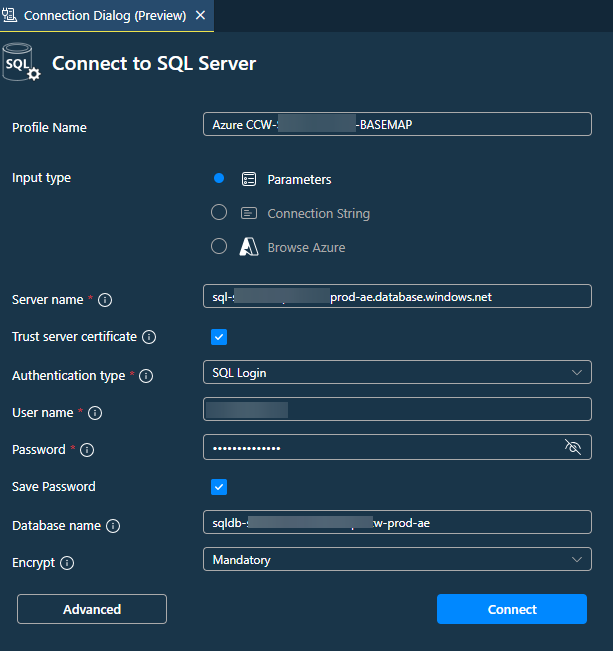
Here are the connection settings in VSCode, working all good.
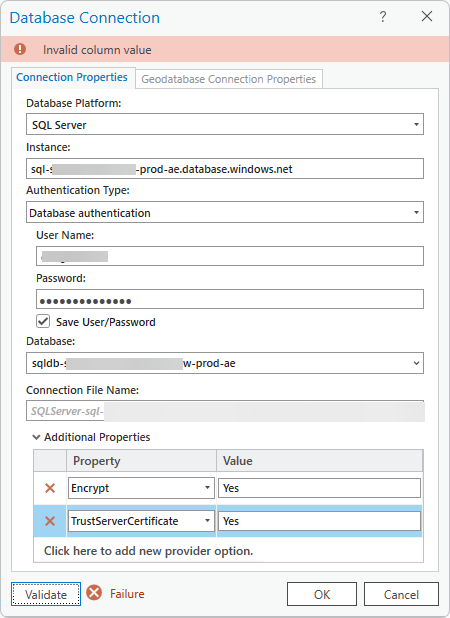
Here are the DB connection settings in ArcGIS Pro, which failed to connect with an error "Invalid column name".
Extra notes:
1. Was suspecting the dash character in the instance and database name, but didn't find any evidence from official source of documentation.
2. Tried other settings as well e.g. Port=1433, or change Yes to yes/true/True etc.
3. What made me think is that VSCode can connect successfully, but ArcGIS Pro can't do it with the exact same parameters from the same environment.
Was there any syntax error in my config? Much appreciated if someone can shed some light on it.
Thanks,
Hua



