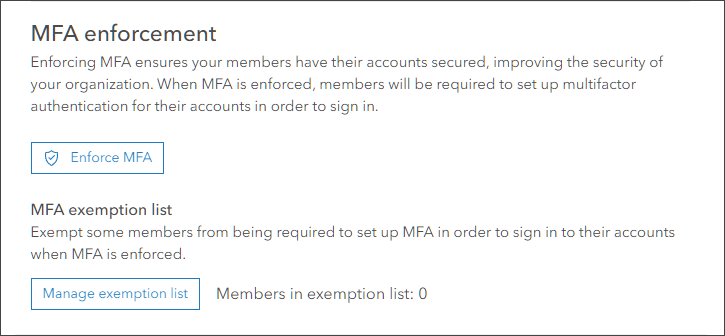
I am reviewing the document Configure multifactor authentication for ArcGIS logins and I am not seeing the button they refer to that Enforces MFA.
Is there something that I should check off before seeing this option available?
I am at Enterprise Portal 11.2 and this article was written in November 2023, so I can't imagine I am out of date.
Thank you in advance!
That seems to be the case. There is an idea submitted that it should be possible to enforce for ArcGIS logins as well. You can upvote it here: Multi-Factor Authentication (MFA) Force for all us... - Esri Community
@AndreasHall So there is no way to enforce MFA unless we essentially use SSO and enforce it through our SSO method of choice?
I have already enabled MFA, but this button does not appear.
Hello @Jonathan_Marin,
The option you are trying to see is available after you enable the MFA setting in your portal or AGOL. Its not specific to ArcGIS online or Ent, and is same in both. You just need to enable MFA and you will see these options.
In the doc you shared its clearly mentioned:
It's an issue if you are not seeing these options post enabling MFA.
That blog is about ArcGIS Online (which is easy to miss) and the screenshot is also from ArcGIS Online. I think that for Enterprise, you enforce MFA at the Identity Provider (IdP) level. You can read more about it from the link below.
Multi-factor authentication with ArcGIS | ArcGIS Architecture Center
Signed in members can post, follow updates, and more. New here? Register a free account.
Find useful guides, FAQs, and documents to help you navigate and make the most of Esri Community.