I have a multipart polyline FC that has true curves (Oracle 18c SDE.ST_GEOMETRY).
I want to update the coordinates of the vertices in the lines via ArcPy — without losing the true curves:
import arcpy
connection = "Database Connections\my_conn.sde"
feature_class = connection + "\my_owner.my_fc"
spatial_reference = arcpy.Describe(feature_class).spatialReference

with arcpy.da.Editor(connection) as edit_session:
    with arcpy.da.UpdateCursor(feature_class, "SHAPE@") as cursor:
        for row in cursor:
            geometry = row[0].densify("ANGLE", 10000, 0.174533)
            parts = arcpy.Array()
            for part in geometry:
                points = arcpy.Array()
                for point in part:
                    point.M = geometry.measureOnLine(point)
                    points.append(point)
                parts.append(points)
            row[0] = arcpy.Polyline(parts, spatial_reference)
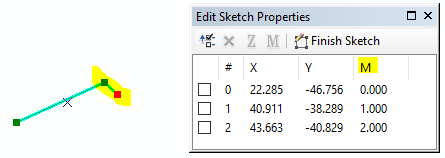
cursor.updateRow(row)The script reconstructs and replaces the geometry of the lines. So, unfortunately, it removes the true curves from the shapes.
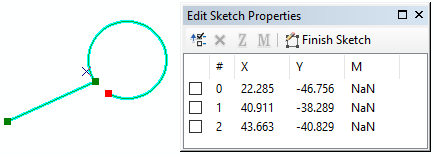
Before running script:
After running script:
Idea:
Could ESRI consider giving us a clean way to edit vertices — without removing the true curves from the SHAPE?
- I don't want to densify the curves into straight segments...I want to keep the true curves.
- It would be ideal if there were a clean way to do this; not a workaround like converting to JSON and parsing out the curve info from the JSON text (would be messy/fragile).
For example, a simple method like this would be helpful:
UpdateVertex (shape, partNum, vertexNum, [z, m])
#It wouldn't replace the shape or replace the vertex. It would *update* a coordinate in the vertex.
#So the true curves would remain intact.




