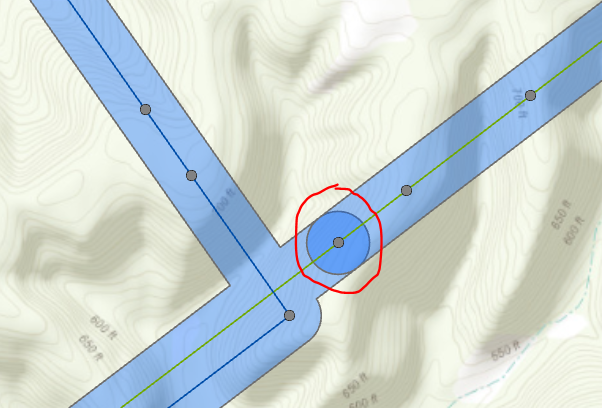
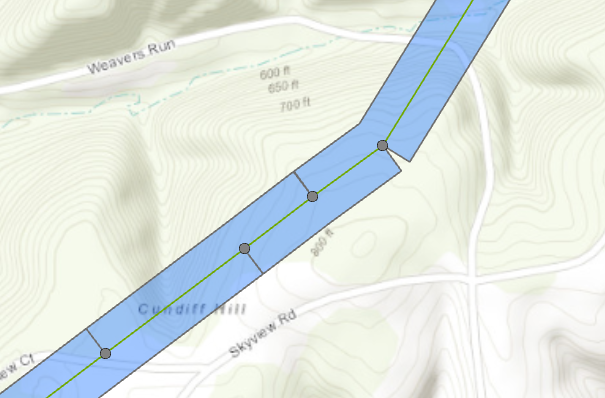
I am looking for a way to remove the overlapping portion of a rounded end buffer where 2 features meet. They are in the same feature class. I cannot use flat ends because of the jagged edges and slivers where the buffer is not wide enough (image 2 example).
Hmmm. Cool.
Check this method, then.
Use Select By Location tool > Use the buffer polygon as the Input and Selecting Features. Relationship = COMPLETELY WITHIN
This should select the overlapping polygons. You can delete it from the Edit tab.
Our enterprise is using version 2.6.6. This is what the disconnect is. Thank you.
This tool was introduced at ArcGIS Pro 2.7. What version do you have?
Thank you @JayantaPoddar. It looks like it should be in the Analysis > Overlay Toolbox but yet I do not see it in my Pro session:
You could use Remove Overlap (Multiple) geoprocessing tool. Keep your Buffer layer as the only input. Keep the Method as default.
Signed in members can post, follow updates, and more. New here? Register a free account.
Find useful guides, FAQs, and documents to help you navigate and make the most of Esri Community.