I am using ModelBuilder in ArcGIS Pro v2.8.0 to create various processes that will be scheduled to run regularly. The models are fairly simple. However, there seems to be a bug as ModelBuilder keeps showing the incorrect input features at various stages of the model.
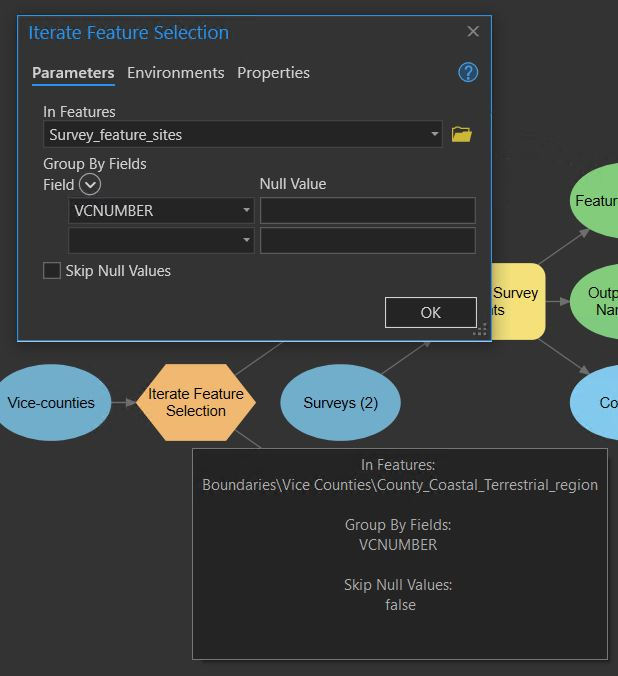
For example, in the first stage of this model (Image 1), I set the In Features to County_Coastal_Terrestrial_region. When I reopen the tool, it shows the In Features as a different layer - Survey_feature_sites. However, if I hover over the tool it shows the correct input feature (Image 2). This is occurring across all of the models I have created in the past 24 hours.
If I export the process to python, it appears to show the correct layers being used in the process.
This bug is causing a lot more work, having to go back and triple-check each model is running with the correct parameters and features as the model keeps displaying the wrong ones.
Image 1: The model
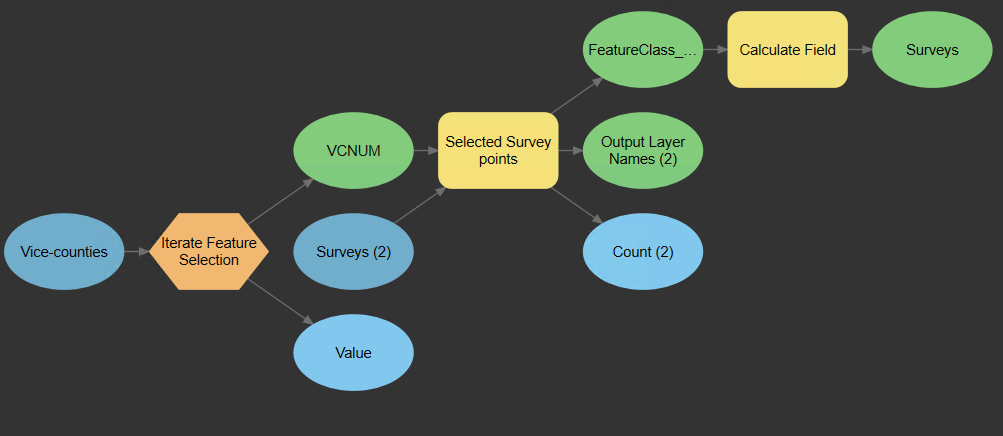
Image 2: Mismatch shown between In Features in the tool window (incorrect layer shown), and when hovering over the tool (correct layer shown).