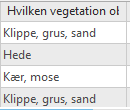
I have a survey with single choice values. When I view the input to the survey in Survey123, the information is displayed as the values, and also in ArcGIS Pro when clicking on a point or viewing an attribute table.
However, when I still in ArcGIS Pro do a Symbology on Unique Values, I will only see the values "choice0", "choice1" etc. and not the asked values.
Examples:
Clicking on a point:

Content of attribute table:
Classes in the Symbology on a layer:
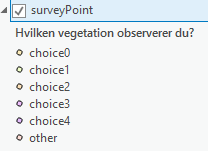
Is there anything, I can do to change this? Or would it be a feature request.
Obviously I will just type in corresponding values for now.
