Problem Statement:
In the Attribute Pane, when right-clicking on actual field values or cells within the bottom grid, the expected context menu option “Catalog Help…” is not visible. However, I am able to add this context button in the Top section of the Attribute Pane as well as in the Attribute Table.
Below is the screenshot:
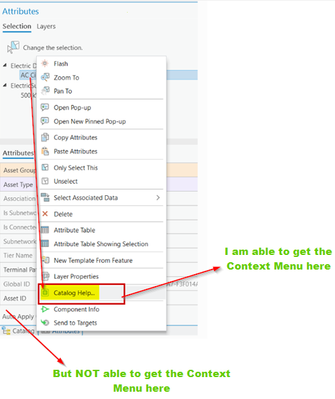
here is the configuration I tried in the config.daml file:
<!-- The button is added to the context menu of the attribute table. It's working.-->
<updateMenu refID="esri_editing_tableCellContextMenu">
	<!-- Inserts the button with a separator at a specific place -->
	<insertButton refID="POC_Addins_CustomContext_Views_CatalogHelpBtn" />
</updateMenu>


<updateMenu refID="esri_editing_Attributes_RelatedNonFeatureRowContextMenu">
	<insertButton refID="POC_Addins_CustomContext_Views_CatalogHelpBtn" separator="true" placeWith="esri_editing_Attributes_StandaloneTablePropertiesContextMenuItem" />
</updateMenu>

<!-- 2. esri_editing_Attributes_NonFeatureRowContextMenu: is used for standalone table records that are open in the Attributes Pane but are not currently being viewed as a "related child" of a map feature.
     e.g. In ArcGIS Pro, when you open a standalone table (one without geometry) and select a row, that row appears in the Attributes Pane. This specific refID controls the right-click menu for that record's entry in the selection tree.-->
<updateMenu refID="esri_editing_Attributes_NonFeatureRowContextMenu">
	<insertButton refID="POC_Addins_CustomContext_Views_CatalogHelpBtn" separator="true" placeWith="esri_editing_Attributes_StandaloneTablePropertiesContextMenuItem" />
</updateMenu>

<updateMenu refID="esri_editing_Attributes_FeatureContextMenu">
	<insertButton refID="POC_Addins_CustomContext_Views_CatalogHelpBtn" separator="true" placeWith="esri_editing_Attributes_LayerPropertiesContextMenuItem" />
</updateMenu>

<!-- esri_editing_Attributes_FeatureRowContextMenu: Right-clicking a Map Feature (Point, Line, Poly) in the top selection tree. -->
<updateMenu refID="esri_editing_Attributes_FeatureRowContextMenu">
	<insertButton refID="POC_Addins_CustomContext_Views_CatalogHelpBtn" separator="true" />
</updateMenu>


<!-- esri_editing_AttributesPaneAttributesContextMenu: Right-clicking the actual field values/cells in the bottom grid. -->
<updateMenu refID="esri_editing_AttributesPaneAttributesContextMenu">
	<insertButton refID="POC_Addins_CustomContext_Views_CatalogHelpBtn" separator="true" />
</updateMenu>

<updateMenu refID="esri_editing_AttributesPane_GridContextMenu">
	<insertButton refID="POC_Addins_CustomContext_Views_CatalogHelpBtn" separator="true" />
</updateMenu>