This is a similar issue another user posted (with nearly the same title), however this is occurring in Pro v2.5.1, and my experience with the "Save" button is slightly different.
Original post about a similar issue: Unable to Save Contingent Values in ArcGIS Pro 2.3.0
To address some issues that came up in that thread: I have an Advanced License, there are no subtypes involved here (should there be?), and I am not currently editing anything (same experience in a fully loaded map vs. a new, unsaved project).
My issue is that I am able to add new contingent value "pairs" using the drop downs in the Contingent Values window, and can then hit the save button, however upon "saving," they are just removed and I am left with a blank list again. I am not getting any error messages or warnings, and the colored indicator square in the table is green.
The general setup:
I have two fields in the field group (both TEXT type) from the same feature class. Each of the two fields has a unique domain, both of which use Coded Values. Both of the fields do not allow NULL values. While creating new features, I can successfully set the values for both fields, from their respective domains, and then proceed to create the feature.
I have tried setting up the geodatabase, feature class, fields, domains, and the grouped fields for the contingent values using arcpy, and also doing the whole thing manually in the GUI, both to no avail. Everything else up to this step appears to work just fine.
I have not tried adding the specific contingent value pairs using arcpy, but my feeling is that I'm doing something incorrectly before the adding values part, so I'd like to figure that out first. Not entirely sure I understand the setup for the CSVs to be used in the arcpy/geoprocessing tool either. As a side note, if anyone has a link to examples of what these look like, that would be helpful. I can't quite decipher how these are set up from the help docs.
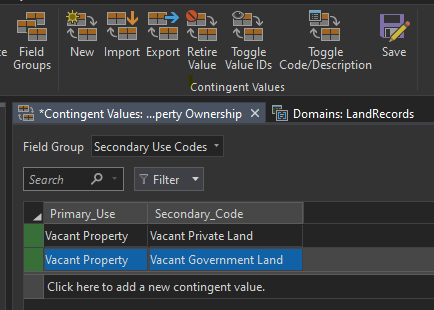
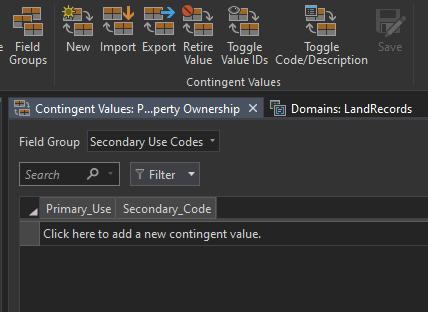
First image shows the CVs added, second image shows them disappear immediately after save. This is coming straight out of "Focus on Geodatabases in ArcGIS Pro" (2019) if the field group, fields, or individual CVs look familiar.
Thanks in advance if anyone has ideas.
UPDATE:
Adding via arcpy does seem to work. Interestingly, once one has been added, doing it manually via the GUI seems to allow saving as well. This probably solves my issue, but I'd be curious if others have the same problem.


