Hey Everybody - I'm a newbie with Survey123. I have an issue maybe someone with more knowledge can help me. I'm trying to develop a timber cruising workflow. My question is how do I replicate the workflow in this video?: https://www.youtube.com/watch?v=pbPNu3-aWlI
Using Survey123 Connect, I successfully published a survey with a geopoint question which allows me to randomly walk around in the stand and collect the plot center and associated forest inventory data. It uses a repeat to store the tree measurement data. That got me started...
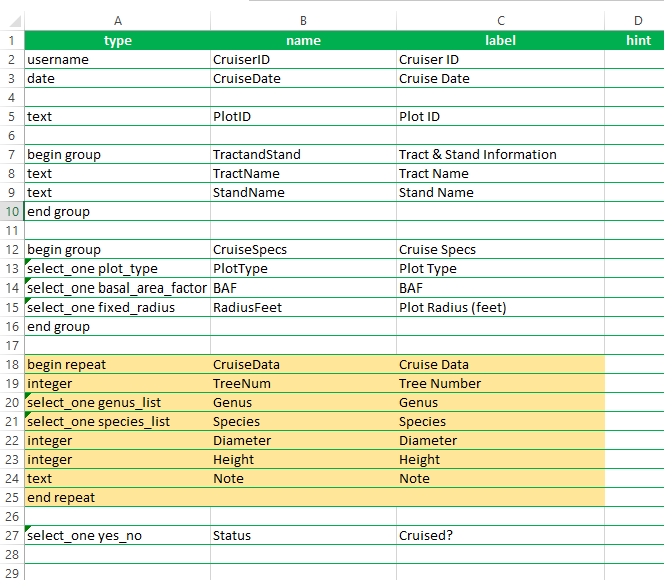
But what I'd like to do is publish a similar survey only this time from a existing feature layer containing a grid of plot center points. The issues hindering my previous attempts have to do with the existing related table when I published the feature layer from ArcGIS Pro and Survey123 wanting to create another related table from the repeat question in the survey form. The repeat question in yellow below is needed in the survey just like the video.
My feature layer (CruisePoints) has a GlobalID. The related table (CruiseData) has a GUID field. I created a one-many relationship between the two before I published to ArcGIS Online. I know the repeat section in the survey is trying to make another related table called CruiseData which is probably the issue I cant seem to correct.
I've just ran out of ideas on how to get this to work.
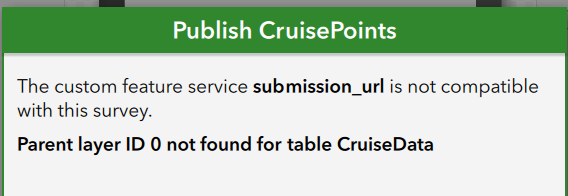
So my latest error is this:
Here is a screenshot of my survey excel sheet:
Any helps is much appreciated!
Hank



